2-47
Installing and Setting up the Machine > Embedded Web Server RX
Creating a New Custom Box
You can register a custom box from Embedded Web Server RX.
1
Display the screen.
1 Launch your Web browser.
2 In the address or location bar, enter the machine's IP address or the host name.
Press [Device Information] in the home screen and then [Identification/Network] to check the
machine's IP address or the host name.
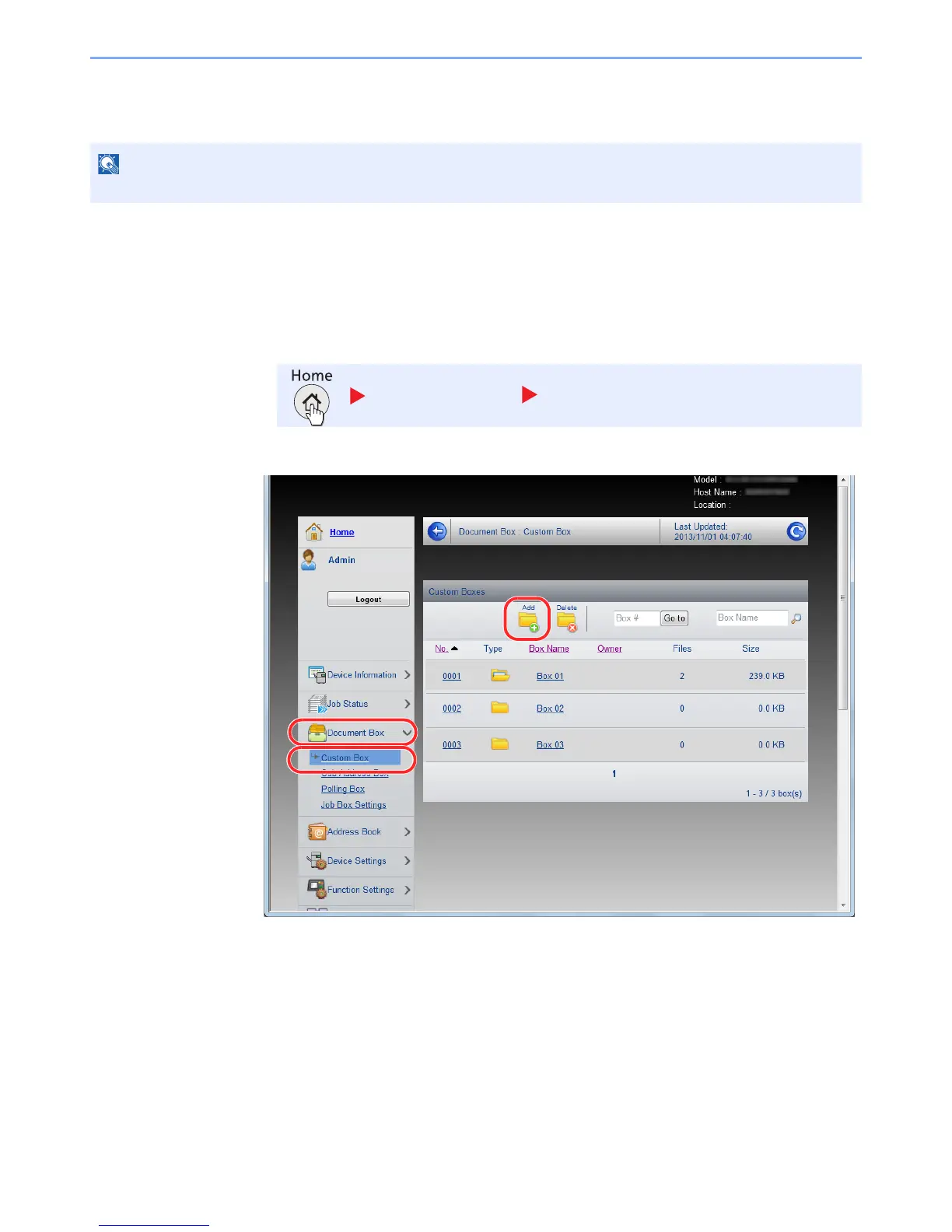
3 From the [Document Box] menu, click [Custom Box].
4 Click [Add].
2
Configure the Custom Box.
1 Enter the box details.
Enter the information for the custom box you want to register. For details on the fields to populate,
refer to Embedded Web Server RX User Guide.
2 Click [Submit].
To use Custom Box, an optional SSD must be installed in the machine.
Device Information Identification/Network



 To Next Page
 Loading...






