40
FM/AM TUNING
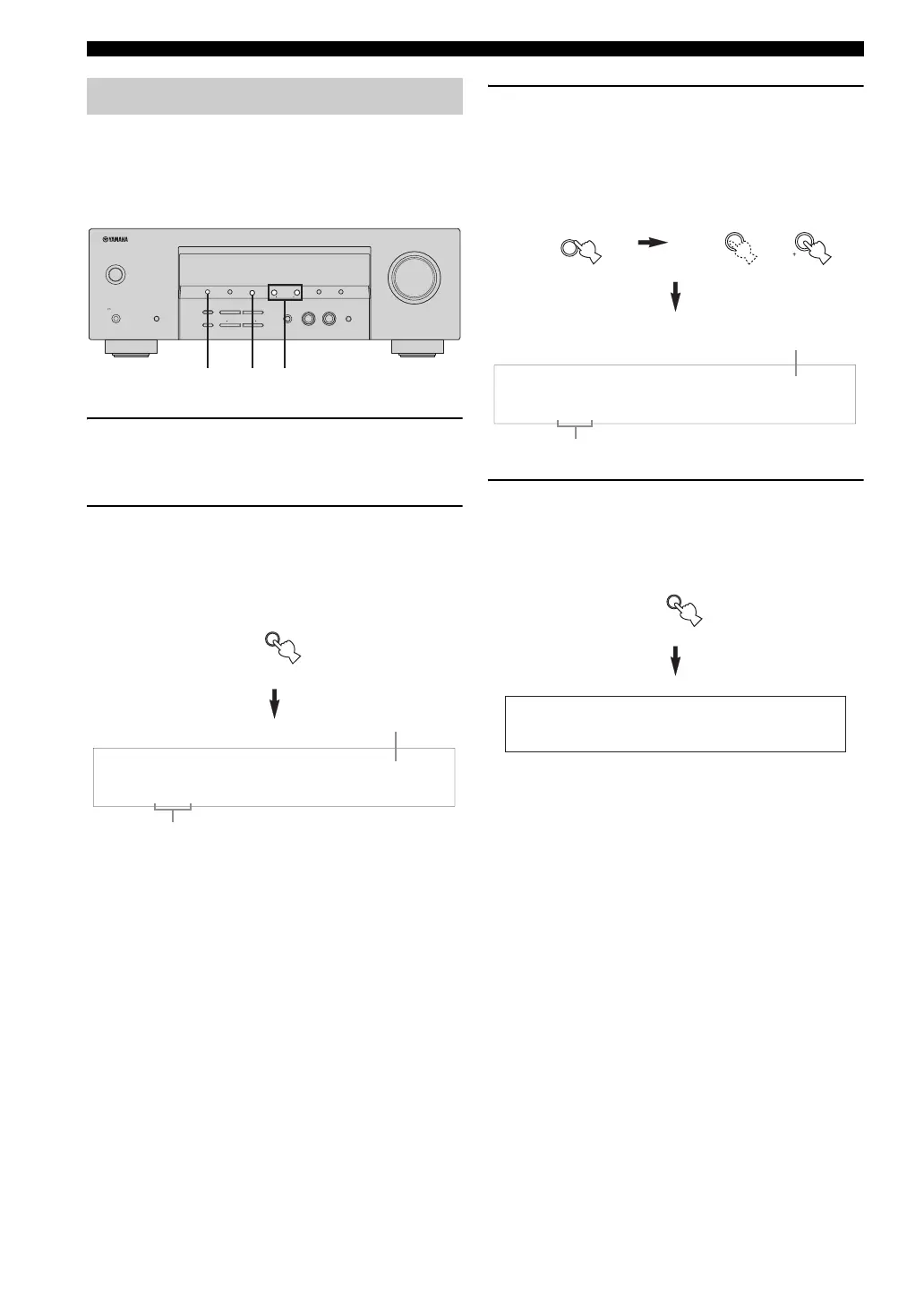
You can exchange the assignments of two preset stations
with each other. The example below describes the
procedure to exchange preset station “E1” with “A5”.
1 Select preset station “E1” using A/B/C/D/E
and PRESET/TUNING/CH l / h.
See “Selecting preset stations” on page 39.
2 Press and hold PRESET/TUNING for more
than 3 seconds.
“E1” and the MEMORY indicator flash in the front
panel display.
3 Select preset station “A5” using A/B/C/D/E
and PRESET/TUNING/CH l / h.
“A5” and the MEMORY indicator flash in the front
panel display.
See “Selecting preset stations” on page 39.
4 Press PRESET/TUNING again.
“EDIT E1–A5” appears in the front panel display and
the assignments of the two preset stations are
exchanged.
Exchanging preset stations
PRESET/TUNING/CH
VOLUME
STANDBY
/ON
PHONES
SILENT CINEMA
SPEAKERS
A/B/OFF
FM/AMPRESET/TUNING
A/B/C/D/E
lh
NEXT
AUTO/MAN'LMAN'L/AUTO FM
MEMORY
TUNING MODE
EFFECT
STRAIGHT
TONE CONTROL
BASS/TREBLE
l
PROGRAM
h
EDIT
INPUT MODE
l
INPUT
h
MULTI CH INPUT
SET MENU
SEARCH MODE
XM
CATEGORY
DISPLAY
2,4 3 3
(U.S.A. model)
PRESET/TUNING
EDIT
SEARCH MODE
MEMORY
:
E1
FM
87.5
MHz
Flashes
Flashes
MEMORY
:
A5
FM
90.6
MHz
A/B/C/D/E
NEXT
CATEGORY
PRESET/TUNING/CH
lh
SET MENU
Flashes
Flashes
EDIT E1-A5
PRESET/TUNING
EDIT
SEARCH MODE


 To Next Page
 Loading...