dvanced Guide
> Printing Using the Operation Panel of the Machine > Printing from a Memory Card > Printing by Using
the Photo Index Sheet
Printing by Using the Photo Index Sheet
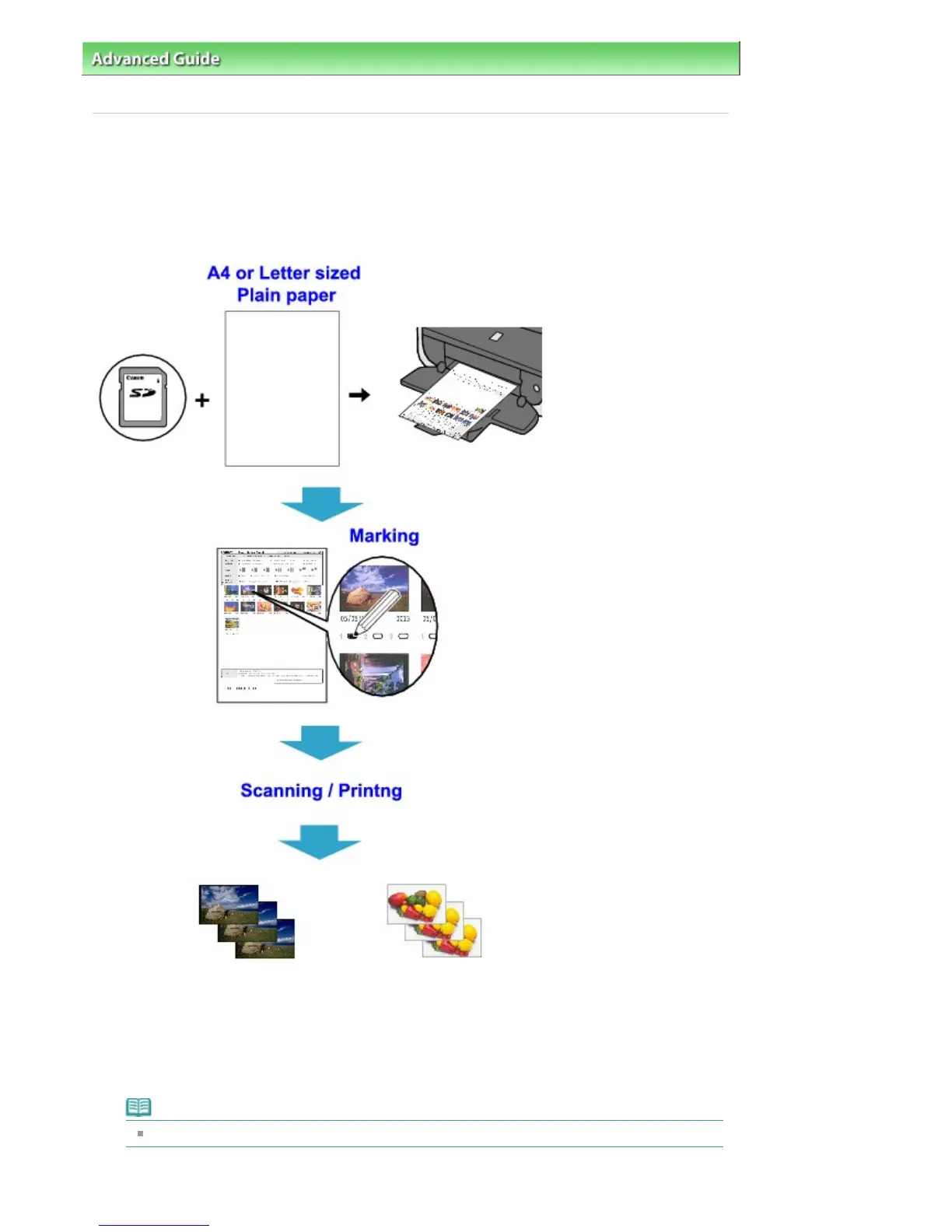
Photo Index Sheet is an A4 or Letter-size plain paper on which thumbnail images of photos saved on a
memory card are printed. Print out a Photo Index Sheet, mark the images that you want to print, scan the
sheet in, and the machine then prints the selected images. You can also specify other settings, such as
paper size and type, by using this sheet; you do not have to make settings by using the Operation Panel
on the machine.
1.
Make sure that the machine is turned on.
2.
Load A4 or Letter-sized plain paper.
3.
Insert a memory card into the Card Slot following the instruction on the LCD.
Note
For information on how to insert a memory card, refer to
Printing from a Memory Card
.
4.
Press the
Menu
button.
Page 290 of 681 pagesPrinting by Using the Photo Index Sheet


 To Next Page
 Loading...