119
Direct Printing
E
Direct Printing
Printing Still Images
You can print still images by connecting the camcorder to a printer with direct print
function. You can also use the print order settings for direct printing ( 129).
Following printers can be connected to your camcorder:
*Includes the CP-330/CP-220/CP-300/CP-200.
If your CP-300 is not PictBridge compliant (does not carry the PictBridge logo),
upgrade the printer firmware following the instructions on below website to enable
use with this camcorder.
http://www.canon.co.jp/Imaging/cp300/cp300_firmware-e.html
If you cannot access the website, please contact:
For Europe: A local Canon distributor listed in the Canon European Warranty
System List included in the CP-300 kit.
For other regions: Canon Customer Support Help Desk listed in the Canon
Customer Support Leaflet included in the CP-300 kit.
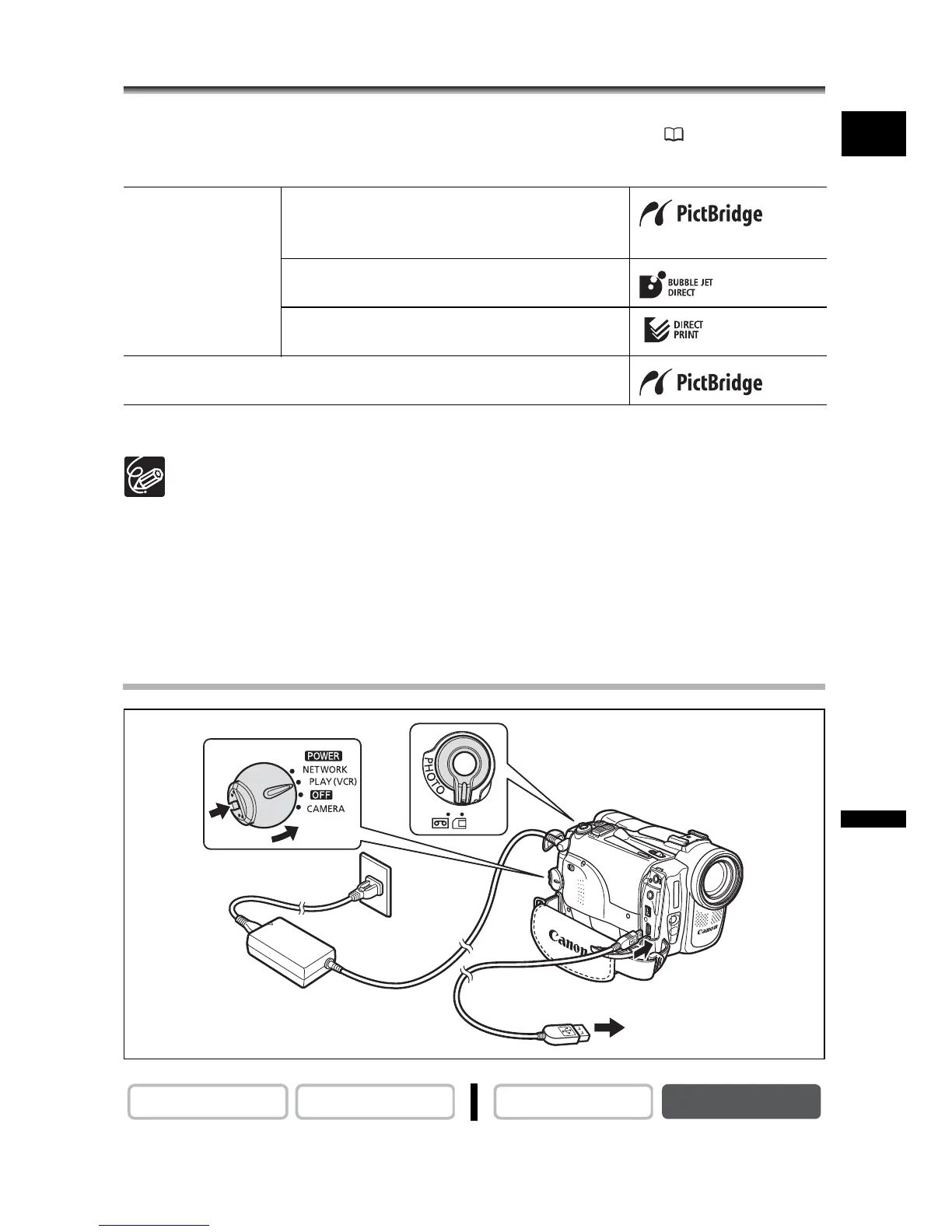
Connecting the Printer to the Camcorder
1. Turn off the camcorder and insert a memory card that contains still
images.
Canon Printers PictBridge compliant SELPHY CP series
printer*/Bubble Jet Printers (PIXMA
series/SELPHY DS series)
Bubble Jet Direct compatible Bubble Jet
Printer
CP-10/CP-100 CP-Printer
PictBridge compliant non-Canon Printer
CAMERA
PLAY (VCR) CARD CAMERA
CARD PLAY
Printer with
direct print function


 To Next Page
 Loading...







