1
Preparations
Installing the Battery and Memory Card
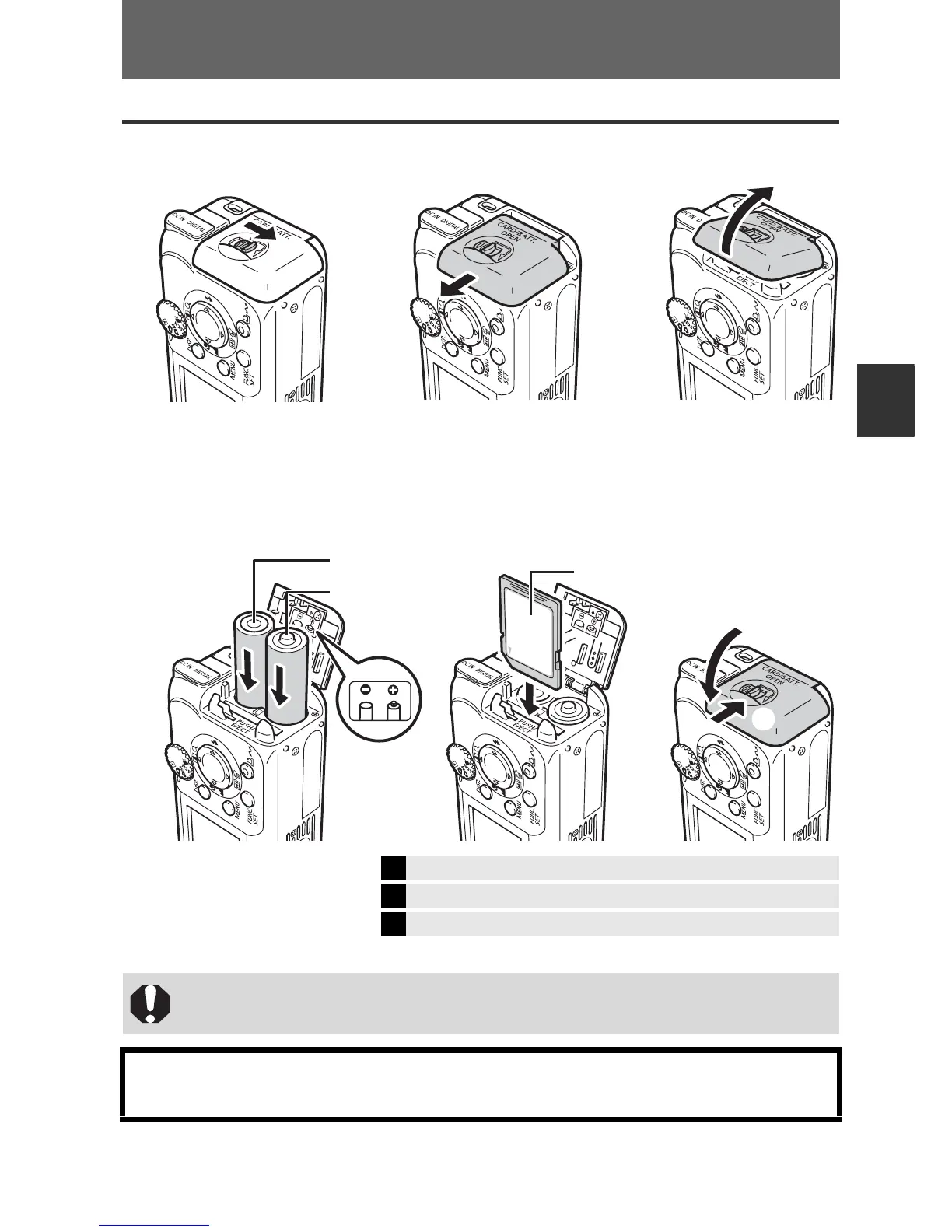
1 Open memory card slot/battery cover.
2 Insert the batteries, and insert the memory card until it clicks
into place, then close the cover.
* SD stands for Secure Digital, a copyright protection system.
Î
See the Advanced Guide: Battery Handling (p. 85)
Î
See the Advanced Guide: Handling the Memory Card (p. 87)
Î
See the Advanced Guide: Formatting Memory Cards (p. 29)
Ensure that the memory card is correctly oriented before inserting it in
the camera. It may damage the camera if inserted incorrectly.
You can use SD* memory cards and MultiMediaCards with this camera.
These cards are collectively called memory cards in this guide.
b
a
c
a
b
(–) Negative end
(+) Positive end
Front
Preparations


 To Next Page
 Loading...












