Front View
15
Printer Parts and Their Functions
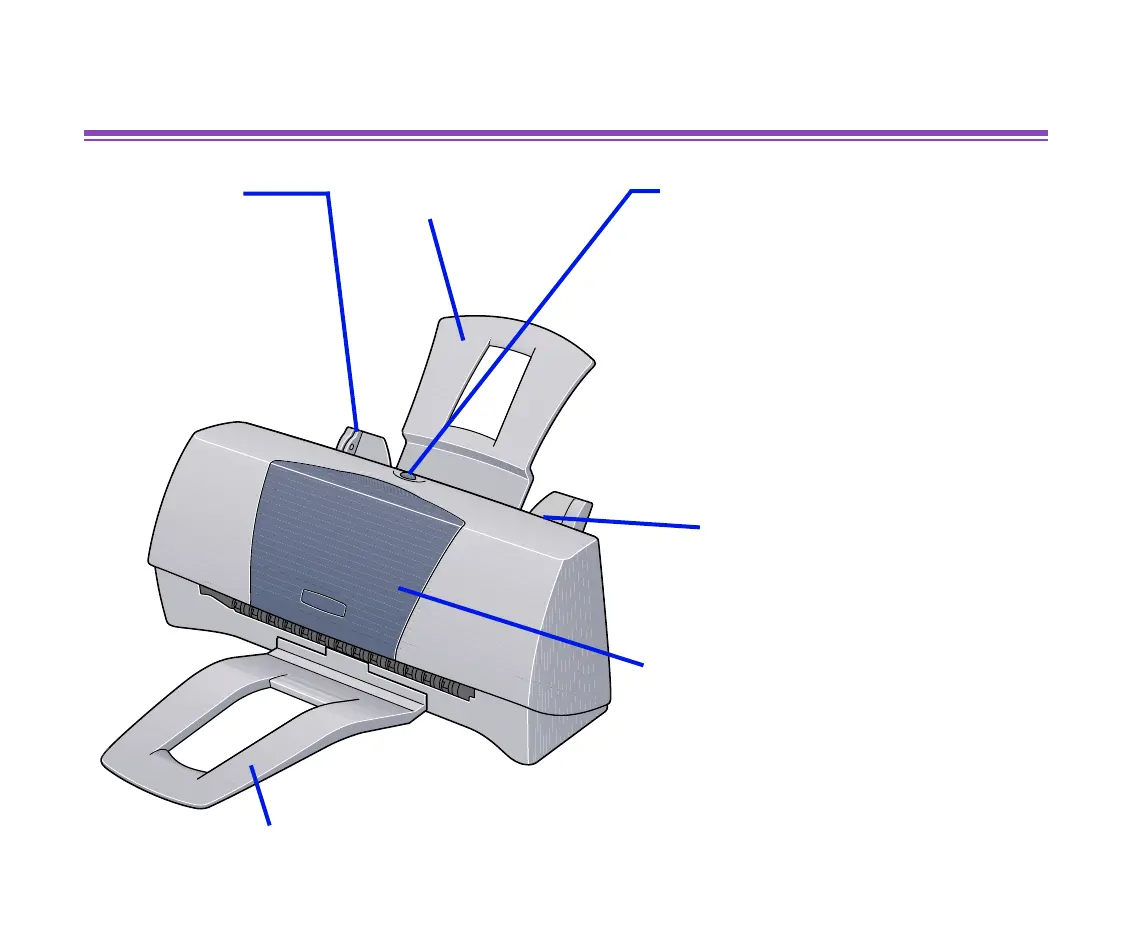
Front View
Paper Guide
When loading paper,
ensure the left edge
just touches this guide.
To move the paper
guide, pinch the knob
and slide in the
appropriate direction.
Paper Rest
Sheet Feeder
Load paper here.
Paper feeds automatically, one
sheet at a time.
Front Cover
Open to replace the ink cartridges
or remove jammed paper.
Paper Output Tray
RESUME/CANCEL Button
Press to resume printing once an
error has been resolved. The printer
will then initialise ready for printing.
Also, to cancel printing in progress,
press this button.
Do not open the front cover unnecessarily.
Print head cleaning will start automatically
when the cover is closed and this process
consumes ink.
This printer does not have a Power switch.
Warming up starts as soon as it is plugged
in. Unless unplugged, the printer will
remain ready to print with a very low level
of power consumption.


 To Next Page
 Loading...