49
Advanced Settings
Procedure
Enter the REC Mode * [MENU] * “REC” Tab * Focus
• Auto Focus is the only focus mode available while face detection is enabled. To
select another focus mode, first turn off face detection (page 53).
*1 The focus range is the distance from the lens surface.
*2 Range is affected by optical zoom.
REC Mode Settings (REC)
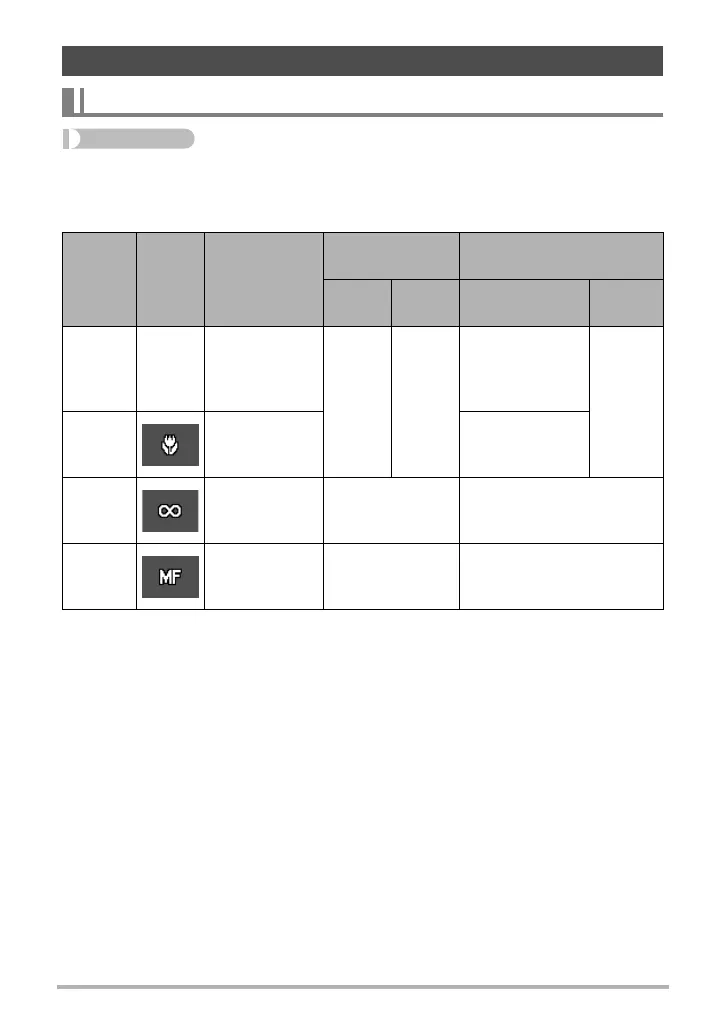
Selecting a Focus Mode (Focus)
Settings
REC
Screen
Icon
Display
Type of Shot
Focus Mode
Approximate Focus
Range
*
1
Snap-
shot
Movies Snapshot Movies
Q Auto
Focus
None
General
recording
Auto-
matic
Fixed
focal
point
10 cm to 9
(infinity)
(3.9" to 9)
(Wide Angle)
*
2
Fixed
distance
*
2
´
Macro
Close ups
10 cm to 50 cm
(3.9" to 19.7")
(Wide Angle)
*
2
)
Infinity
Scenery and
other distant
subjects
Fixed Infinity
W
Manual
Focus
When you
want to focus
manually
Manual
10 cm to 9 (infinity)
(3.9" t
o 9) (Wide Angle)*
2


 To Next Page
 Loading...