User reference guide
22
BRC0731A4
3P422724-1
Menu Manipulation
Airow Direction
Change the Airow direction
1
SettingReturn
Airflow Direction
Energy Saving Options
Schedule
Maintenance Information
Configuration
Current Settings
1/2Main Menu
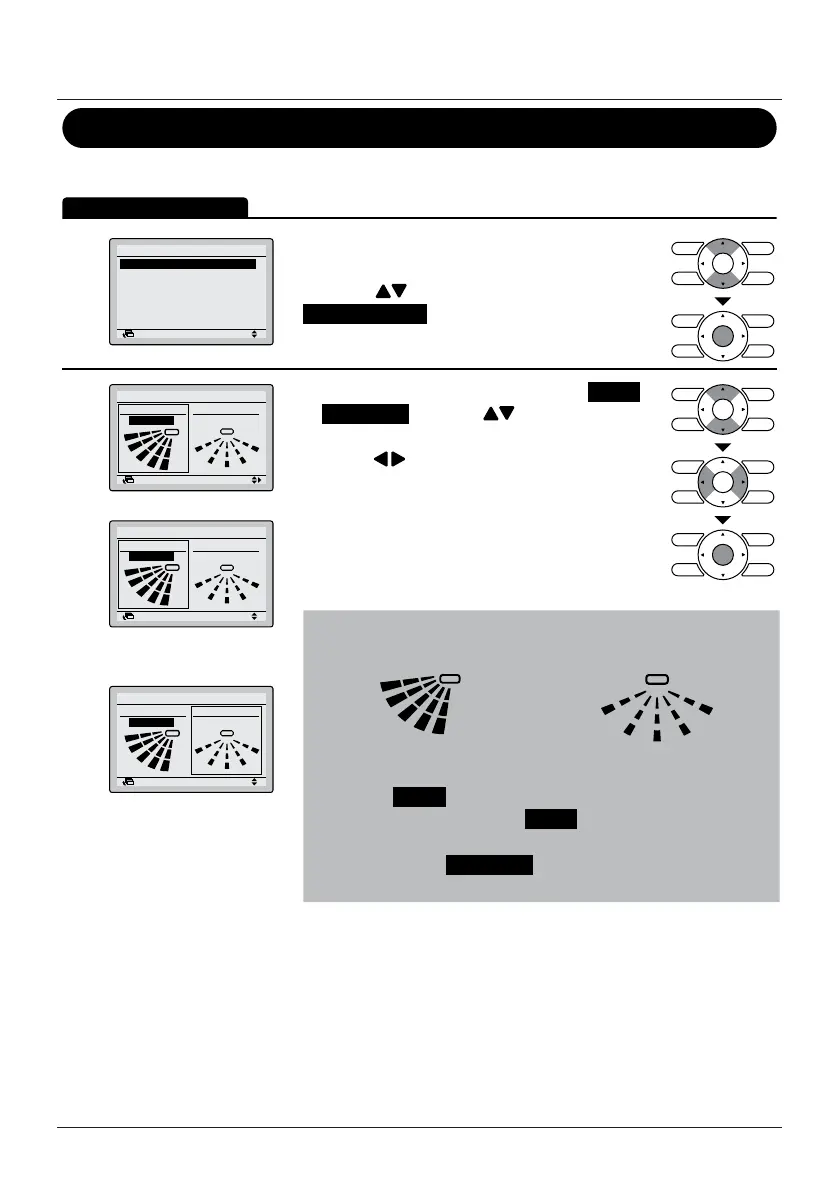
• Display the Main Menu (See "Manipulating the
Main Menu" on page 21)
• Press the
(Up/Down) buttons to select
Airow Direction and press the Menu/Enter
button.
2
Airflow Direction
Direction1
Swing
SettingReturn
Direction2
Swing
Swing
SettingReturn
Direction
Airflow Direction
Direction2
Swing
Airow direction
setting (up/down)
Swing
Direction
Airflow Direction
SettingReturn
Direction2
Swing
Airow direction
setting (left/right)
Remark: Only visible if
available.
• Select the desired airow direction from Swing
or Swing stop using the (Up/Down) buttons.
• Select Up/down direction or Left/right direction
using the
(Left/Right) buttons.
• Press the Menu/Enter button to conrm the
settings and to return to the Basic Screen.
Note
• The airow directions appear on the screen as follows:
Up/down direction Left/right direction
• Selecting Swing will cause the airow direction blades to
swing back and forth. When Swing is selected, all airow
directions will be visible at the same time.
• When you select Swing stop , the airow direction blades stay
in the position that you press the Menu/Enter button.


 To Next Page
 Loading...








