User reference guide
34
BRC0731A4
3P422724-1
Menu Manipulation
Conguration
Display
Display Mode
1
Display
Contrast Adjustment
Configuration
SettingReturn
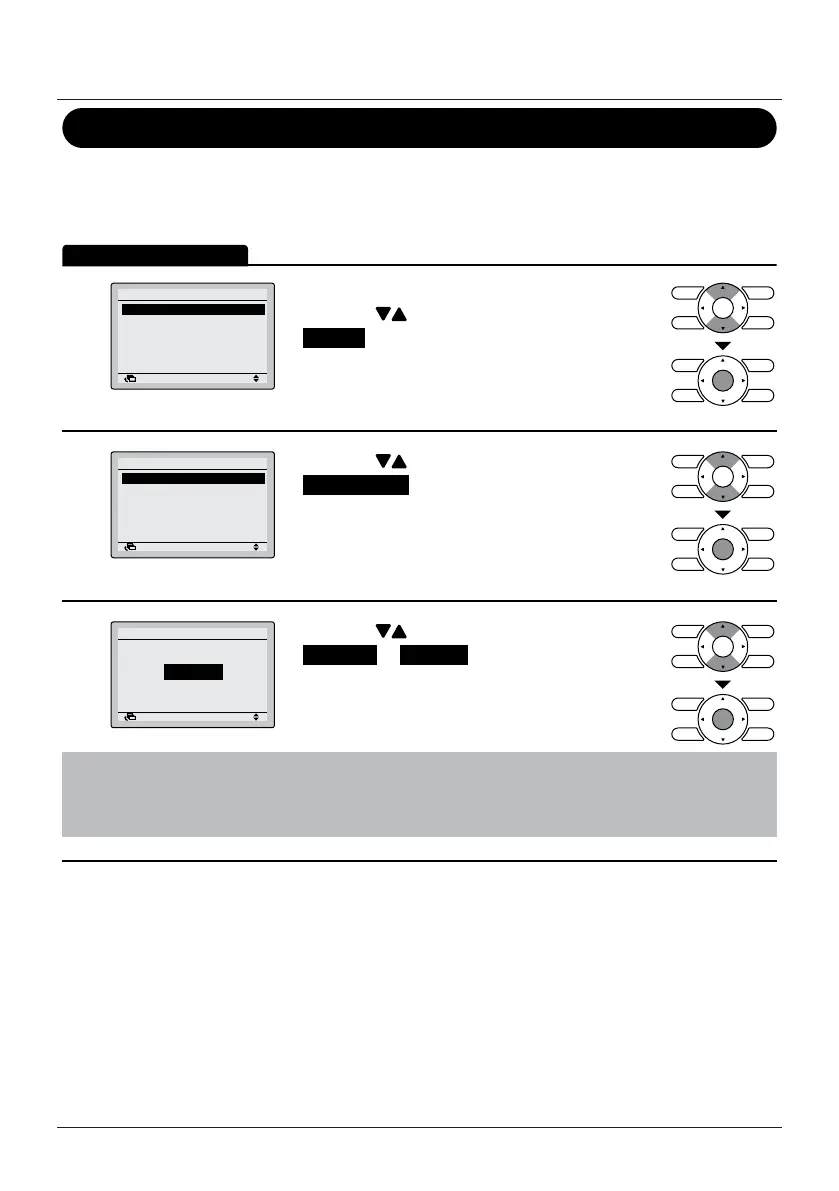
• Display the Conguration menu.
• Press the
(Up/Down) buttons to select
Display and press the Menu/Enter button.
2
Display Mode Standard
Display Item None
Display
SettingReturn
• Press the (Up/Down) buttons to select
Display Mode and press the Menu/Enter button.
3
Standard
Display
Display Mode
SettingReturn
• Press the (Up/Down) buttons to select
Standard or Detailed .
• Press the Menu/Enter button to conrm the
settings and to return to the Basic Screen.
Note
To select which item is displayed in the detailed display selection area, refer to "Detailed Item"
on page 35.


 To Next Page
 Loading...








