User reference guideBRC0731A4
3P422724-1
37
Menu Manipulation
Clock & Calendar
Date & Time
1
SettingReturn
Clock & Calendar
Language
2/2Main Menu
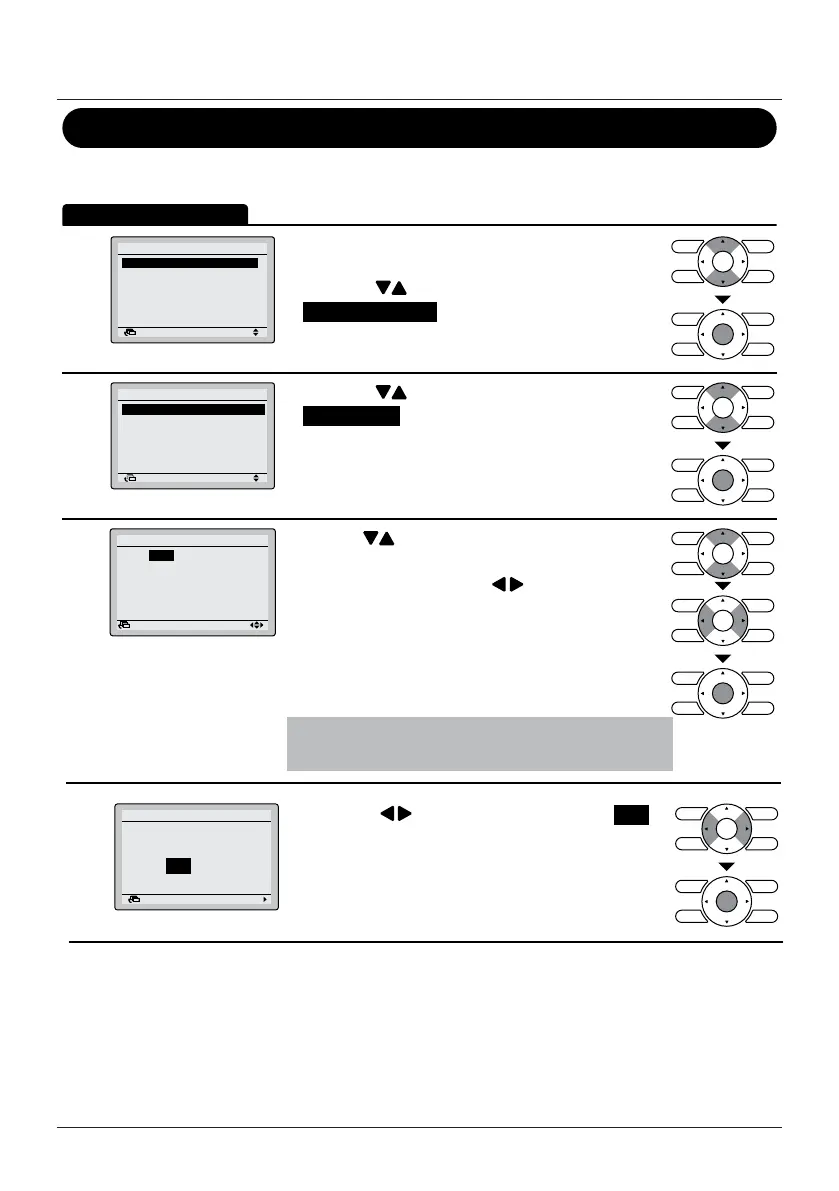
• Display the Main Menu. (See "Manipulating the
Main Menu" on page 21).
• Press the
(Up/Down) buttons to select
Clock & Calendar and press the Menu/Enter
button.
2
Date & Time
12H/24H Clock
Clock & Calendar
SettingReturn
• Press the (Up/Down) buttons to select
Date & Time and press the Menu/Enter button.
3
0:00
Wednesday
1Day
1Month
2014Year
Setting
Date & Time
Return
• Use the (Up/Down) buttons to change the
date and time.
• Move the cursor using the
(Left/Right)
buttons.
• Press the Menu/Enter button when all changes are
made. The conrmation screen will appear.
Note
The day of the week is set automatically.
4
NoYes
Date & Time
Save the settings?
SettingReturn
• Press the (Left/Right) button to select Yes .
• Press the Menu/Enter button to conrm the
settings and to return to the Basic Screen.



 To Next Page
 Loading...








