ASDA-B2 Chapter 5 Trial Operation and Tuning
Revision May, 2018 5-13
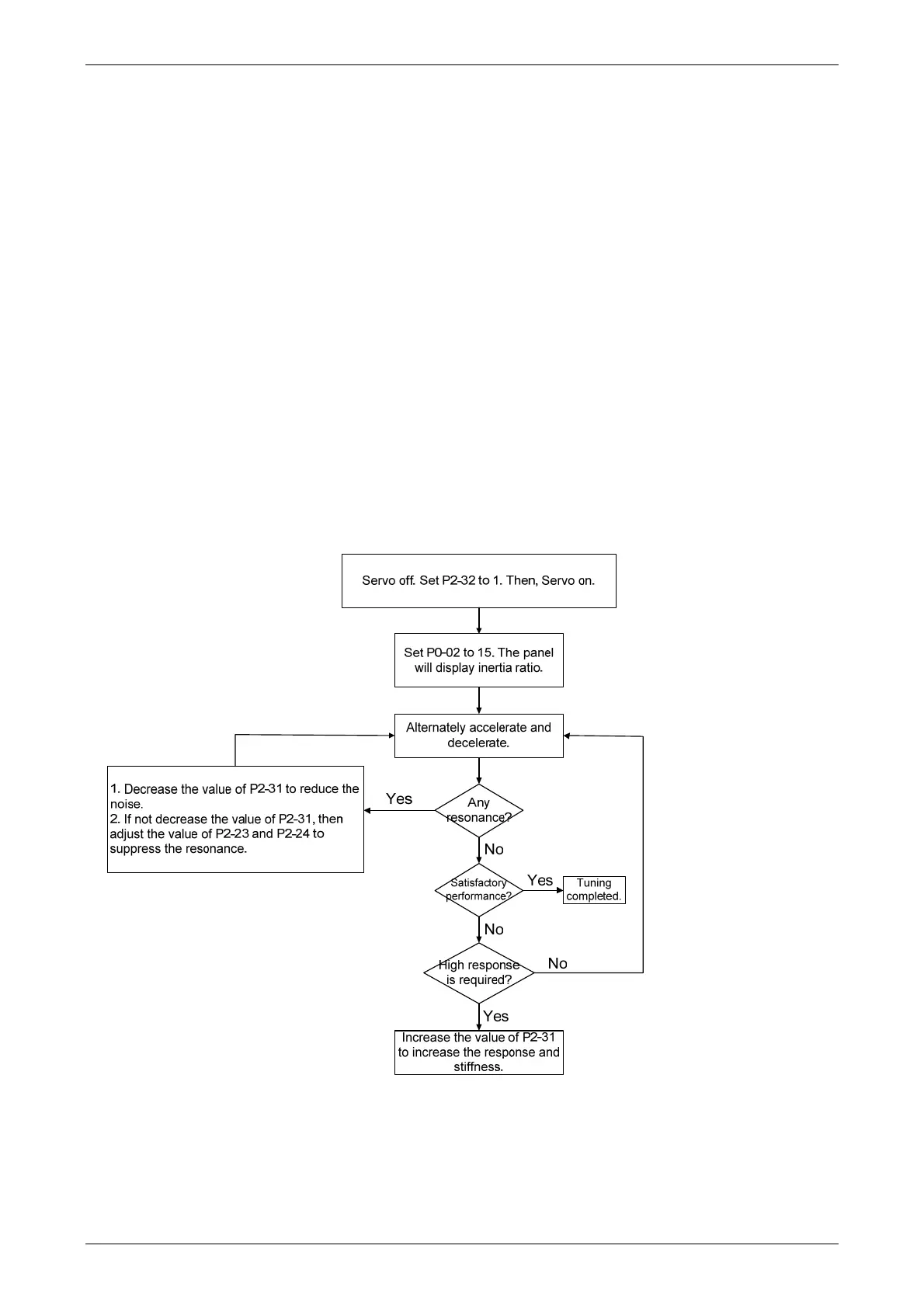
5.5.3 Flowchart of Auto Tuning
Set P2-32 to 1 (auto mode, continuous tuning)
Continue to estimate the system inertia. Automatically save the value in P1-37 every
30 minutes and refer the stiffness and bandwidth setting of P2-31.
P2-31 Stiffness setting in auto tuning mode (The default value is 80)
In auto and semi-auto mode, the bandwidth setting of speed circuit is:
1 ~ 50 Hz: low-stiffness, low-response
51 ~ 250 Hz: medium-stiffness, medium-response
251 ~ 850 Hz: high-stiffness, high-response
Stiffness setting in auto tuning mode: the bigger the value is, the stronger the stiffness will
be.
Adjust the value of P2-31: Increase the value of P2-31 to increase stiffness or decrease to
reduce the noise. Continue to tune until the performance is satisfied. Then, tuning is
completed.


 To Next Page
 Loading...