MARINE MODE PAGES
Five pages are available in Marine Mode—Map, Compass,
Highway, Active Route, and Position Data. An optional Sonar
Page is available when a GSD 20 or GSD 21 sounder module is
connected.
Map Page
When you turn on the GPSMAP 278, the Map Page appears after the
unit acquires a satellite signal. The position arrow ( ) shows your
current location on the map.
The Map Page shows map information (digital cartography) that
includes navaids, lakes, rivers, coastlines, cities, and highways. Use
the zoom keys (IN and OUT) to adjust the Map Page scale.
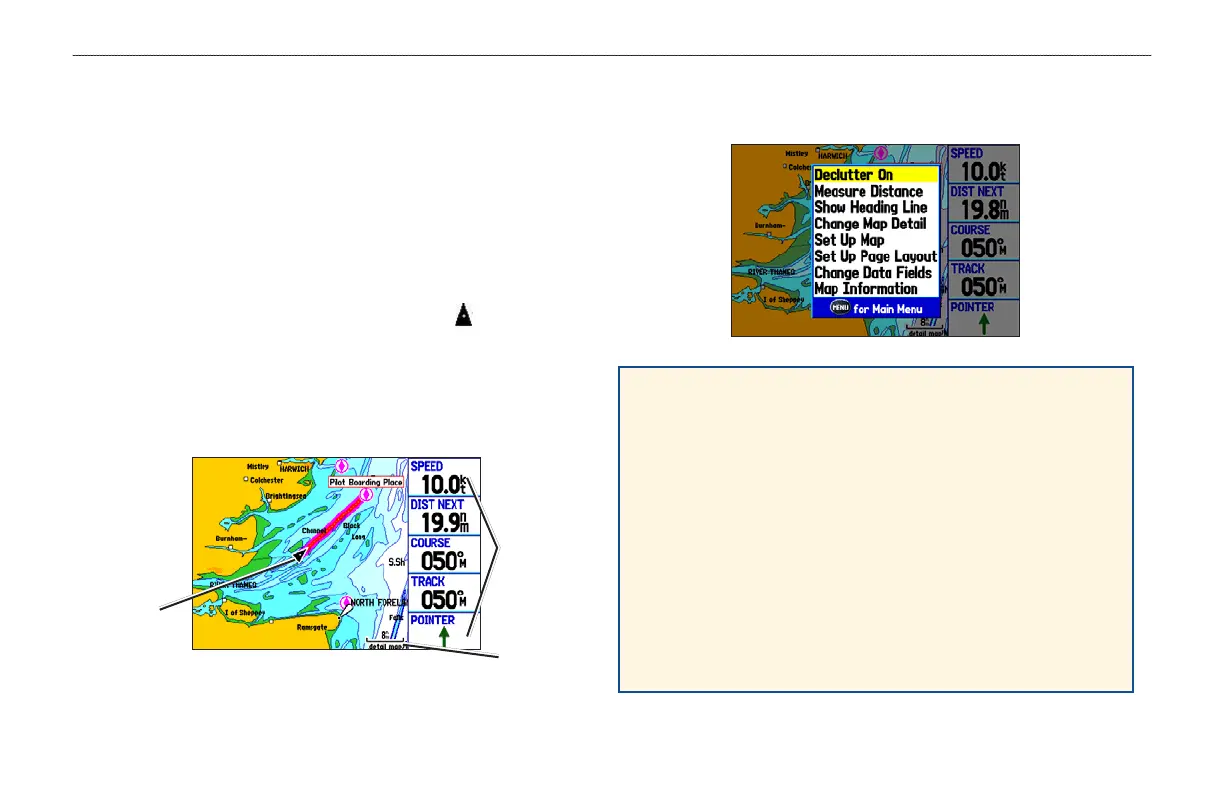
Map Page
Data fields
Map scale
Current
location
Map Page Options Menu
Press MENU to open the options menu.
Declutter On (Off)—hide unwanted map items such as
highways to declutter the display (page 47).
Measure Distance—measure distance between two map items
(page 48).
Show (Hide) Heading Line—turn the heading line on or off.
Set Up Map—set up how the Map Page appears (page 44).
Set Up Page Layout—select the page layout (page 43).
Change Data Fields—change onscreen data fields (page 43).
Map Information—review maps loaded on your GPSMAP 278
(page 44).
42 GPSMAP 278 Owner’s Manual
MARINE MODE PAGES > MAP PAGE


 To Next Page
 Loading...