7 Publishing
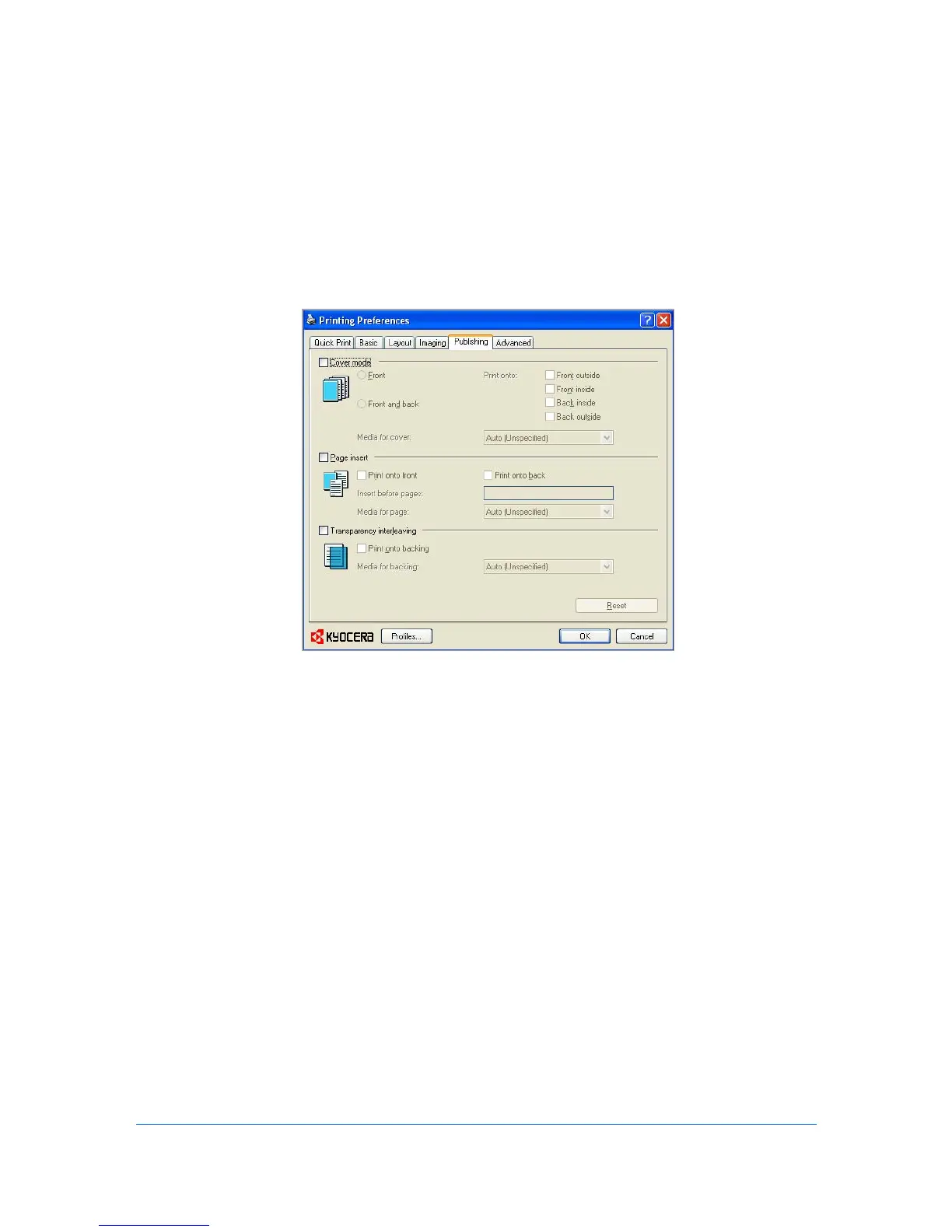
In the Publishing tab, you can create covers, inserts, and add transparencies
for a print job.
Cover Mode
Cover mode is a feature for adding cover pages for the front and back of your
document. You can print on cover pages of a different weight or color than the
main document. The source of the cover paper is specified by adjusting the
Media for cover settings in the Publishing tab.
Print on both sides must be selected in the Basic tab or in the Quick Print tab
in order to print using the Front inside or Back outside options.
Although Cover mode and Page insert may be used simultaneously, they
cannot be used with Transparency interleaving.
Printing Covers
1
In the Publishing tab, select Cover mode.
2
Select Front, Front and back, or the Print onto options to specify what type of
covers to print.
3
Select the Media for cover to specify what type of paper or other media to use
for the covers.
KX DRIVER
7-1


 To Next Page
 Loading...