EasyManua.ls Logo

Kyocera FS-9120DN - Image Formation Problems

Kyocera FS-9120DN
193 pages
Print Icon
To Next Page IconTo Next Page
To Previous Page IconTo Previous Page
Loading...
FS-9120DN/9520DN
1-5-28
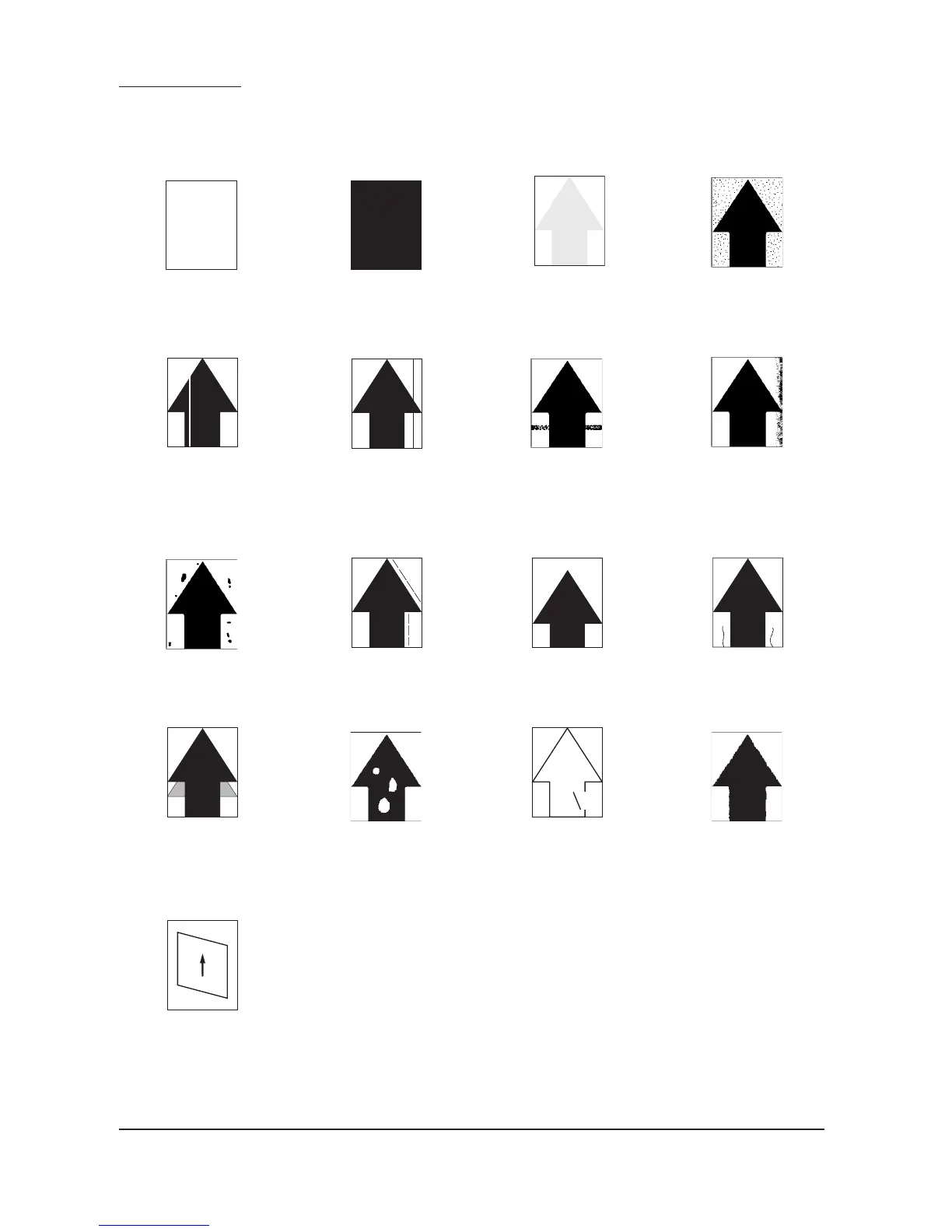
1-5-3 Image formation problems
(1) No image appears
(entirely white).
See page 1-5-29
(2) No image appears
(entirely black).
See page 1-5-29
(3) Image is too light.
See page 1-5-30
(4) Background is visible.
See page 1-5-30
(5) A white line appears
longitudinally.
See page 1-5-30
(6) A black line appears
longitudinally.
See page 1-5-31
(7) A black line appears
laterally.
See page 1-5-31
(8) One side of the print
image is darker than
the other.
See page 1-5-31
(9) Black dots appear on
the image.
See page 1-5-32
(10)Image is blurred.
See page 1-5-32
(11)The leading edge of the
image is misaligned.
See page 1-5-32
(12)Paper creases.
See page 1-5-33
(13)Offset occurs.
See page 1-5-33
(14)Image is partly missing.
See page 1-5-33
(15)Fusing is poor.
See page 1-5-34
(16)Image is out of focus.
See page 1-5-34
(17)Image is not square.
See page 1-5-34

Other manuals for Kyocera FS-9120DN

Related product manuals