AppendixA.CRUinstructions
ThischapterprovidesCRUinstructionsforyourcomputer.
•“Replacingthebattery”onpage23
•“Replacingtheharddiskdrive”onpage24
•“Replacingamemorymodule”onpage25
•“Removingtheopticaldrive”onpage27
Replacingthebattery
Note:Onlyusethebatteryspeciedinthepartslistforyourcomputer.Anyother
batterycouldigniteorexplode.
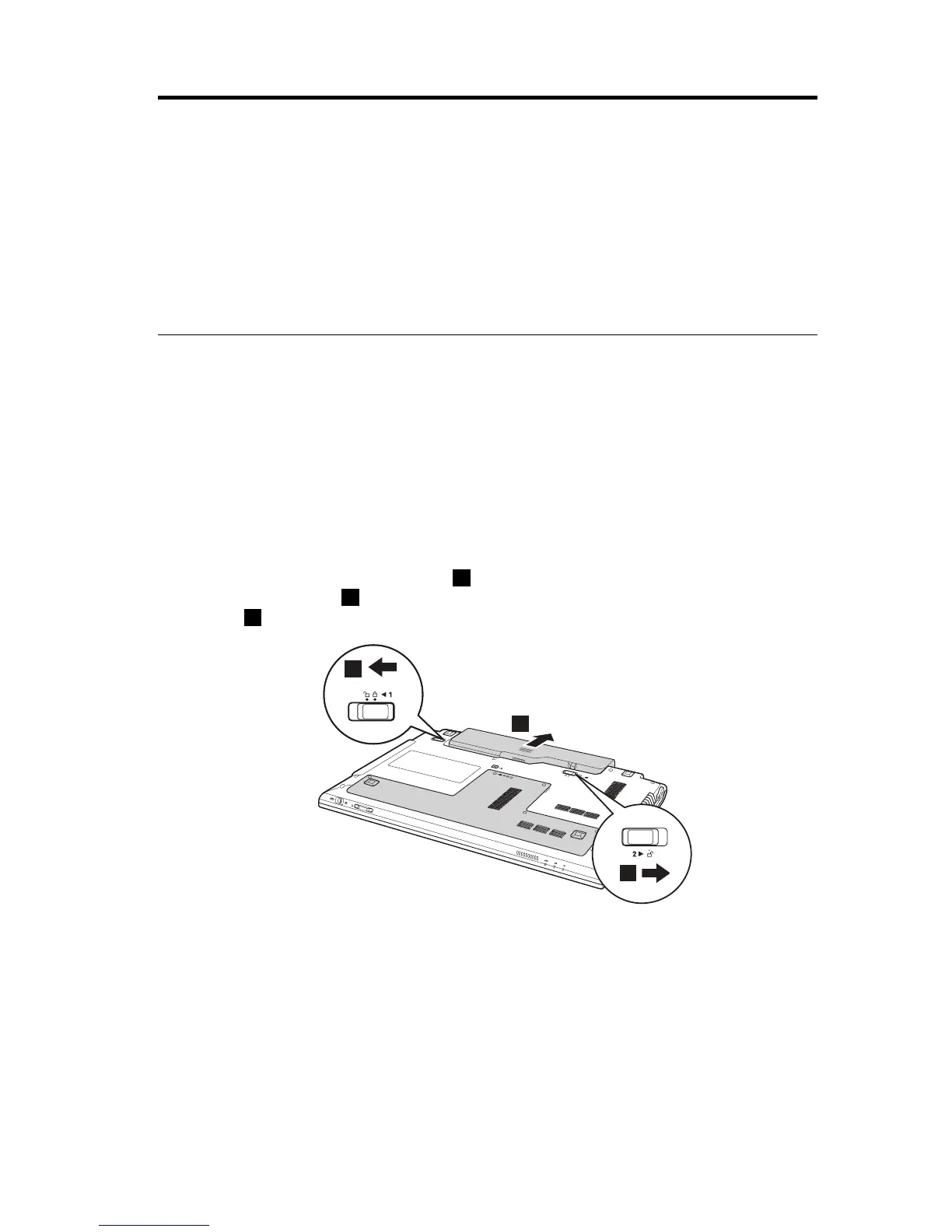
Toreplacethebattery,dothefollowing:
1.Turnoffthecomputer,orenterhibernationmode.Disconnecttheacpower
adapterandallcablesfromthecomputer.
2.Closethecomputerdisplay,andturnthecomputerover.
3.Unlockthebatteryreleaselever1.Holdingthebatteryreleaseleverinthe
unlockedposition2,removethebatterypackinthedirectionshownby
arrow3.
4.Installafullychargedbattery.
5.Slidethemanualbatterylatchtothelockedposition.
6.Turnthecomputeroveragain.Connecttheacpoweradapterandthecables
tothecomputeragain.
©CopyrightLenovo201123


 To Next Page
 Loading...






