Basic Operation Lexicon
2-2
FRONT-PANEL OVERVIEW
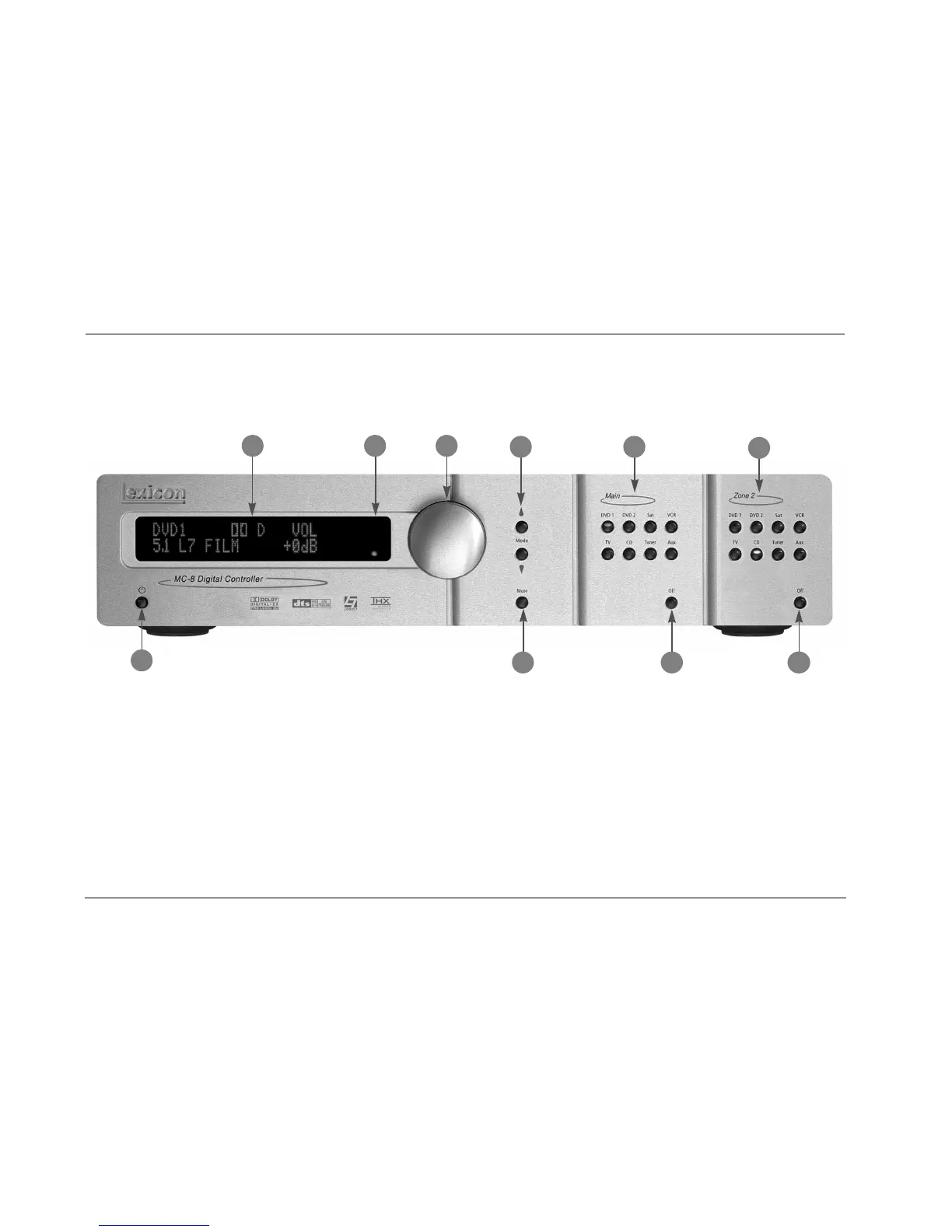
The MC-8 is shown below. The MC-8 Balanced is shown on page 2-4. The front panels are identical, except the MC-8 Balanced has a larger
chassis. The numbers in the front-panel illustrations correspond with the numbered items in the text.
1 STANDBY BUTTON
Use the Standby button to activate or deactivate standby mode.
The Standby button performs no function when the MC-8 rear-
panel power switch is powered off. When standby mode is deacti-
vated, all MC-8 zones that were active during the last session are
reactivated. The red standby button LED lights whenever standby
mode is activated.
2 FRONT-PANEL DISPLAY
Use the front-panel display to view the current input, listening
mode, input source and volume level. The 2 x 20 character display
also functions as a display for messages and menus.
Note:
Power is still supplied to the MC-8 when standby mode is activated.
1
2
3
10
4
6
7
5
9
8


 To Next Page
 Loading...