8
Introduction
Basic Operations
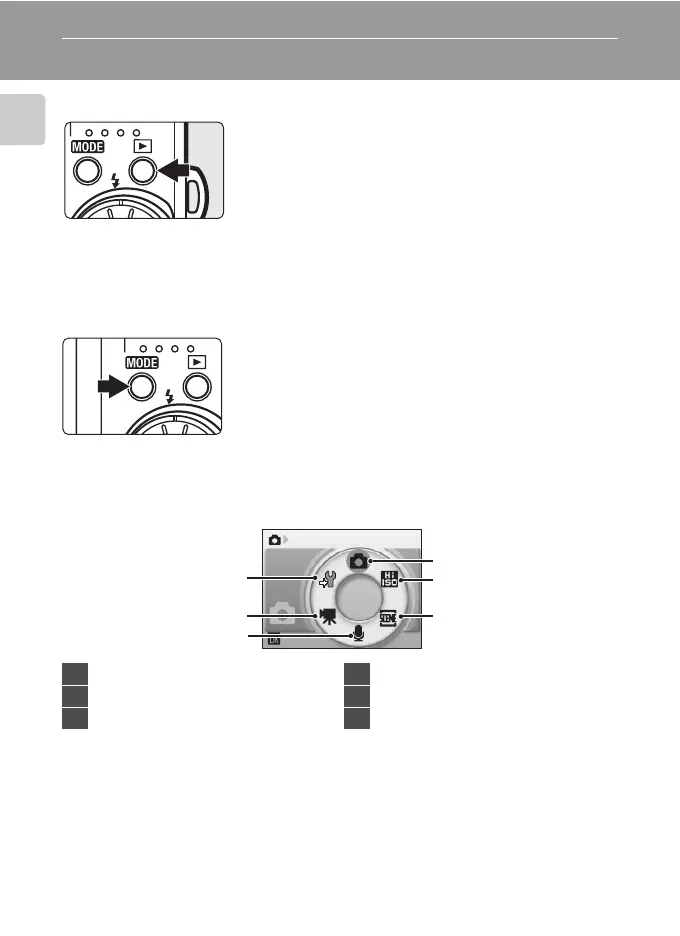
The c (shooting/playback) Button
The e (mode) Button
Press e during shooting to display the shooting-
mode selection menu, or during playback to display the
playback-mode selection menu. Use the rotary multi
selector (A 9) to choose the desired mode.
• Press c to switch between the mode-selection
menus for shooting mode and playback mode.
Shooting-mode Selection Menu
Press c once in shooting mode to enter playback
mode; press again to switch back to shooting mode.
If the camera is turned off, hold down c to turn the
camera on in playback mode.
Shooting
1
2
3
4
5
6
1 Auto mode.......................................................22
2 High-sensitivity shooting mode ......... 35
3 Scene mode.....................................................36
4 Voice recording mode..............................64
5 Movie mode....................................................60
6 Setup mode..................................................... 97


 To Next Page
 Loading...










