9
Basic Operations
Introduction
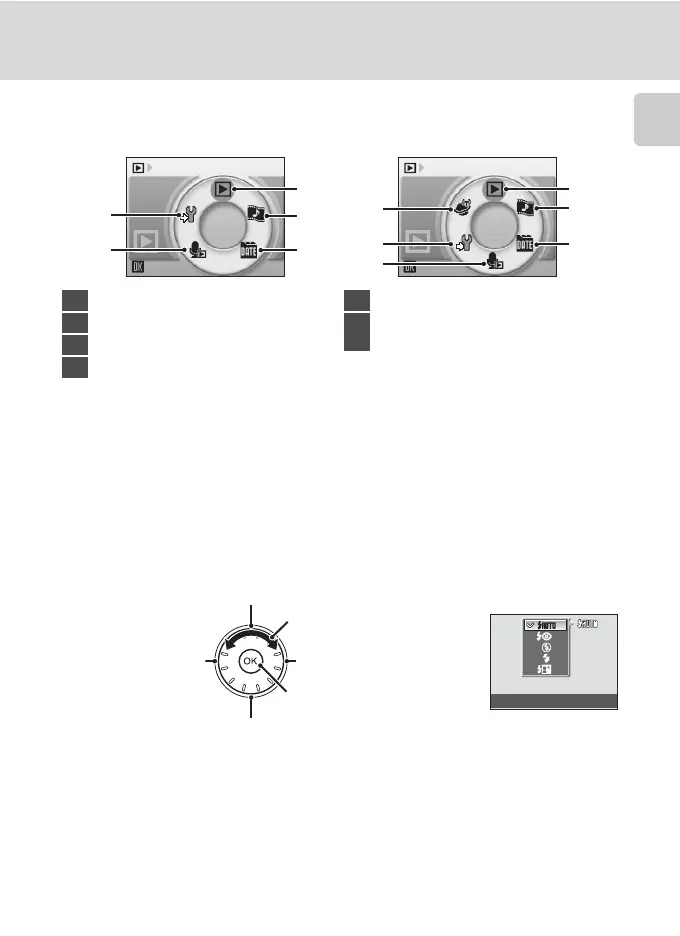
Playback-mode Selection Menu
The Rotary Multi Selector
This section describes standard uses of the rotary multi selector to select modes,
select menu options, and to apply selection.
For Shooting
* Items can also be selected by pressing the rotary multi selector up or down.
Play
1
2
3
4
5
6
Play
1
2
3
4
5
COOLPIX S52 COOLPIX S52c
1 Playback mode ..............................................28
2 Pictmotion mode.........................................54
3 List by date mode........................................51
4 Audio playback mode...............................66
5 Setup mode..................................................... 97
6
Picture Bank mode (COOLPIX S52c only)
.... 44
of the
Wireless LAN Connection Guide
Flash mode
Display m (flash mode) (A 30) menu
Display n (self-timer)
(A 32) menu
Display p (macro mode) (A 33) menu
Display o (exposure
compensation) (A 34) guide
Apply selection
Select options*


 To Next Page
 Loading...










