Preparation
- 14 -
Inserting and Removing the Card
(optional)
/ the Battery
• Check that this unit is turned off.
• We recommend using a Panasonic card.
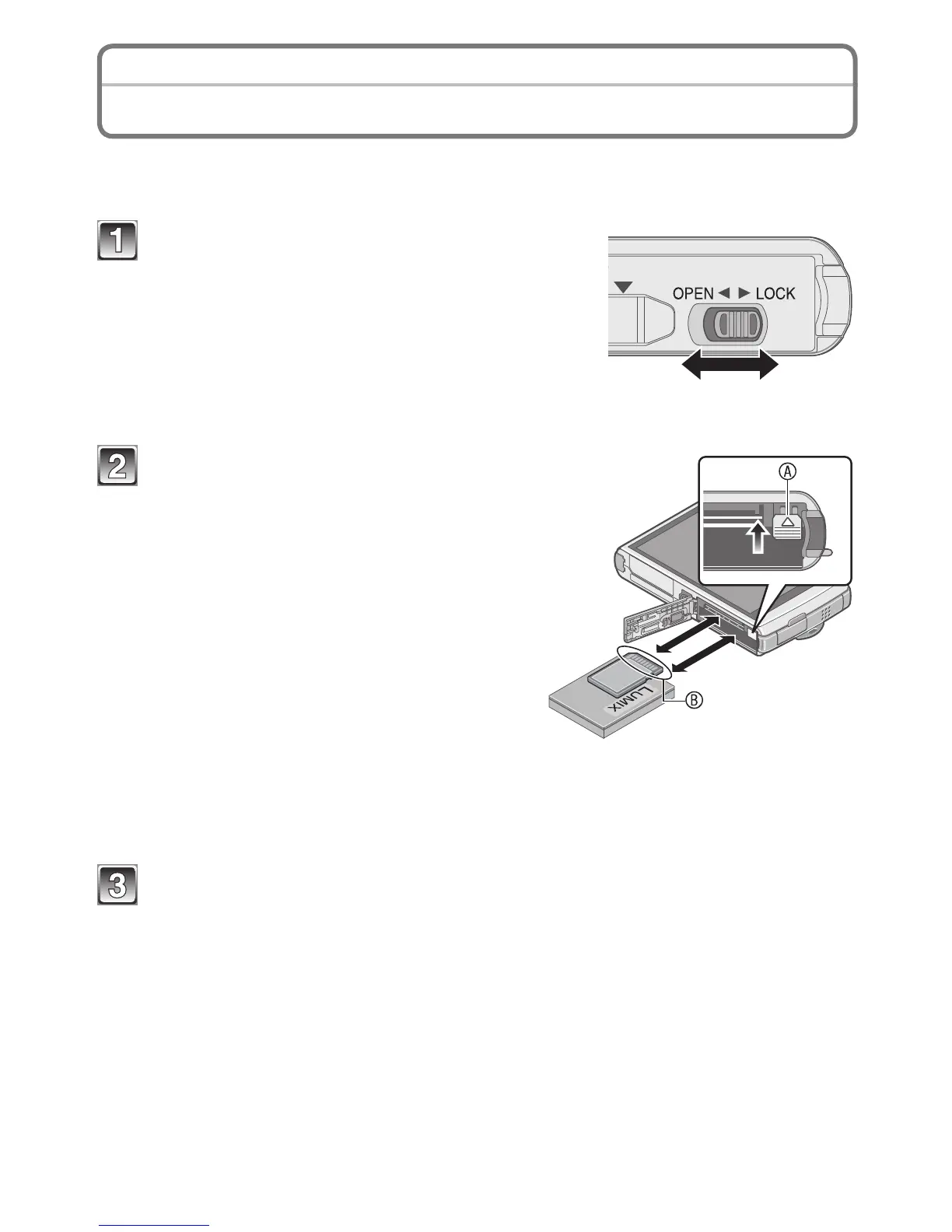
Slide the release lever in the direction of
the [OPEN] and open the card / battery
door.
• Always use genuine Panasonic batteries.
• If you use other batteries, we cannot
guarantee the quality of this product.
Completely insert battery and card.
Battery: Check the direction is correct
and insert it securely to the end
until the clicking sound is heard.
Then, conrm the battery is
locked by the lever A.
Card: Check the direction is correct
and insert it fully until it clicks.
B: Do not touch the terminals!
Face this side to the LCD side.
To remove
Battery: Pull the lever A in the direction
of the mark ([).
Card: Push the center of the card.
Close the card / battery door and slide the release lever in the
direction of the [LOCK].



 To Next Page
 Loading...