22
English
Introduction
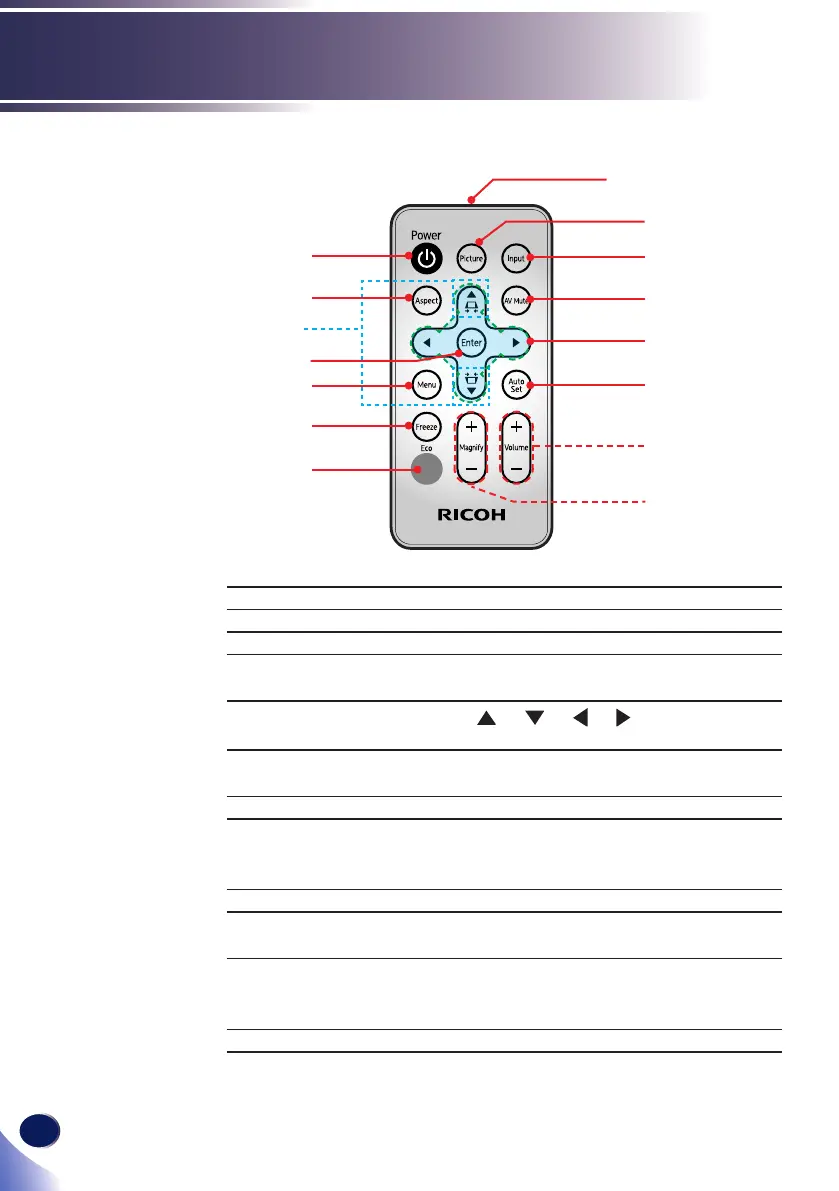
Remote Control
1 Transmitter Send signals to the projector.
2 Picture Select the preset picture mode.
3 Input Select the input source.
4 AV Mute Momentarily turn off/on the audio
and video.
5 Four Directional
Select Keys
Use or or or to select items
or make adjustments to your selection.
6 Auto Set Automatically synchronize the
projector to the input source.
7 Volume +/- Increase/decrease speaker volume.
8 Magnify +/- Enlarge part of the screen image.
Reduce the enlarged part of the
image. (Digital Zoom)
9 Eco Show “Lamp Power Mode” menu.
10 Freeze Pause the screen image. Press again to
resume the screen image.
11 Menu Press “Menu” to launch the on screen
display (OSD), or go back to the
previous menu. (See page 33)
12 Enter Select or conrm settings.
13
3
1
9
2
4
5
6
7
8
10
11
12
14
15


 To Next Page
 Loading...