62
Flesh Tone
Adjust the flesh tone color by increasing or decreasing red levels.
RGB Only Mode
Fine-tune the saturation and tint of the red, green, and blue color channels.
Off / Red / Green / Blue
Color Space Settings
Configure color space settings to refine the spectrum of colors on your screen.
Color Space
Choose a color space.
Auto / Native / Custom
To adjust Color, Red, Green, Blue and Reset, set Color Space to Custom.
Input Signal Plus
Expands the input signal range for HDMI connections.
HDMI1 (Off ( ) / On ( ))
HDMI2 (Off ( ) / On ( ))
When Input Signal Plus is set to On, up to the 4096 x 2160p @ 60 Hz resolution is supported.
When Input Signal Plus is set to Off, up to the 1920 x 1080 @ 60 Hz resolution is supported.
Supported Resolutions for UHD Input Signals
Check the supported resolution for UHD input signals.
Resolution: 3840 x 2160p, 4096 x 2160p
Even if the UHD signal is input, display outputs as a 1920 x 1080 @ 60 Hz resolution on the actual screen.
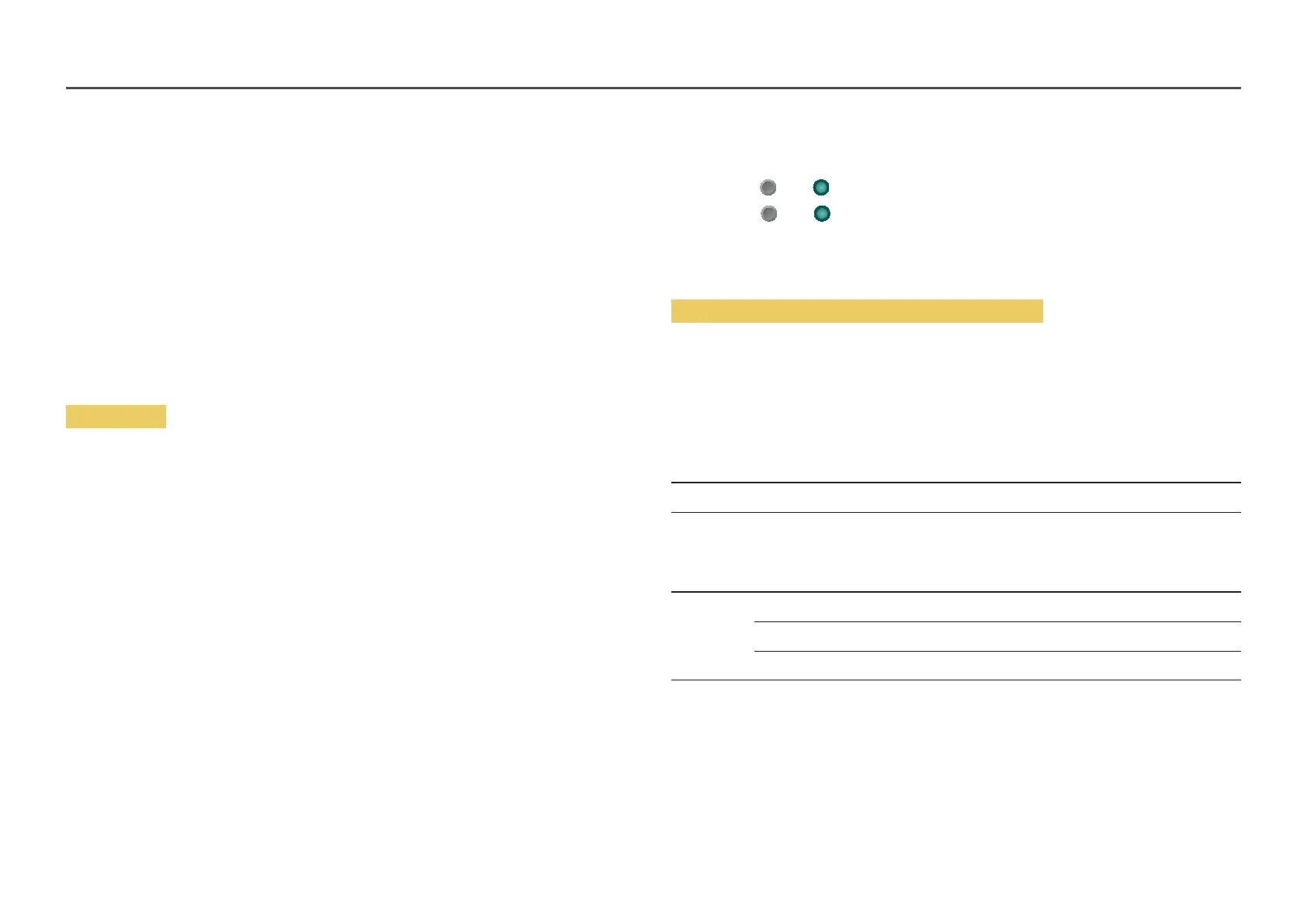
If Input Signal Plus is set to Off
Frame rate
(fps)
Color Depth /
Chroma Sampling
RGB 4:4:4 YCbCr 4:4:4 YCbCr 4:2:2 YCbCr 4:2:0
50 / 60 8 bit - - - O
If Input Signal Plus is set to On
Frame rate
(fps)
Color Depth /
Chroma Sampling
RGB 4:4:4 YCbCr 4:4:4 YCbCr 4:2:2 YCbCr 4:2:0
50 / 60 8 bit O O O O
10 bit - - O O
12 bit - - O O
Motion Lighting
Reduces power consumption by reducing screen brightness when the picture on the screen is in motion.
Off / On


 To Next Page
 Loading...