HCD-HDX285/HDX287WC/HDX585/HDX587WC/HDX589W/HDX685/HDX686W
15
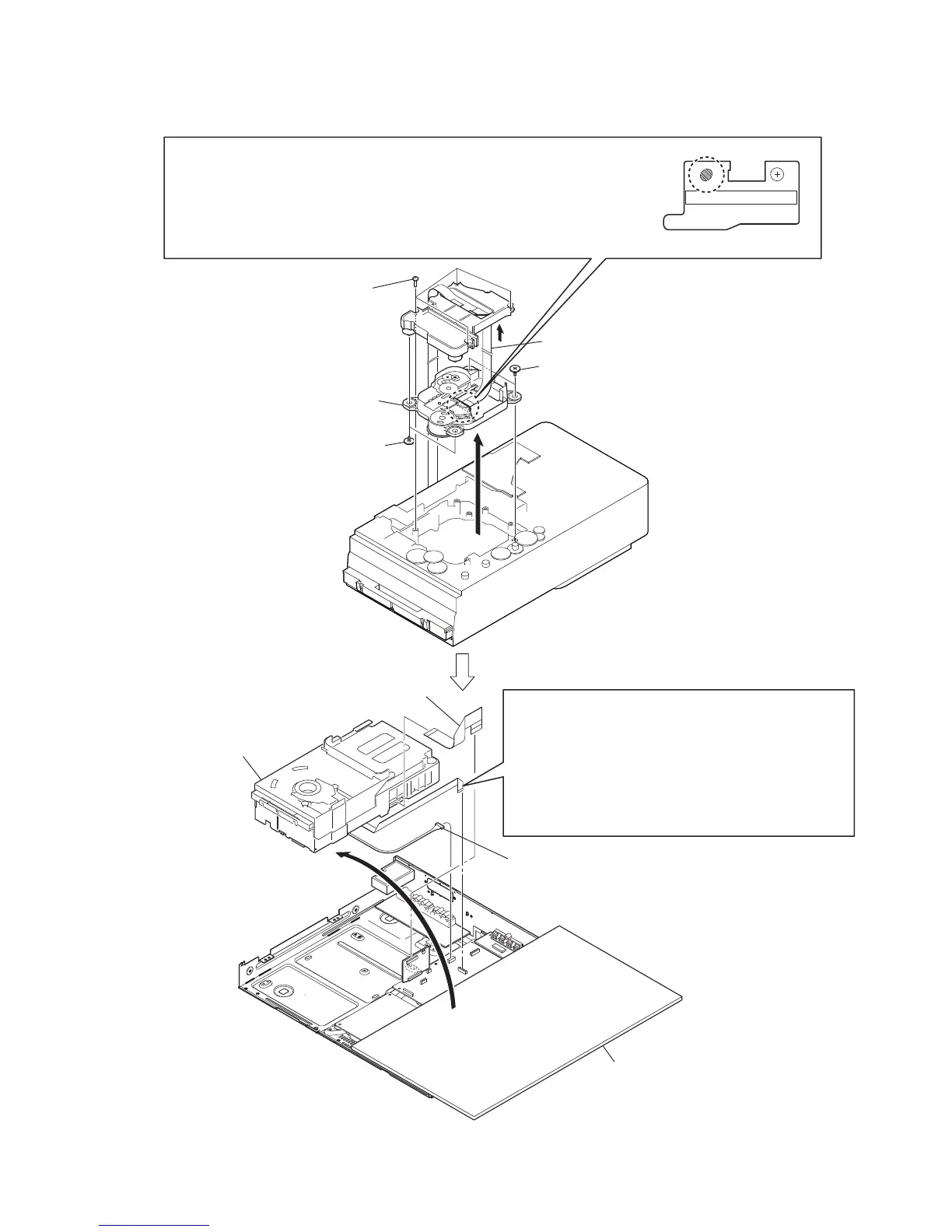
3-8. DVD MECHANISM DECK (CDM81C-DVBU101)
wire (flat type) (24 core)
sheet for insulation
optical pick-up block
PRECAUTION WHEN REMOVING GOOD OPTICAL PICK-UP
four screws
(BTP2.6
×
8)
two insulator screws
R
connector
(CN1201)
RB
DVD mechanism deck
(CDM81C-DVBU101)
wire (flat type) (21 core)
(SERIPARA board: CN651,
RELAY board: CN701)
two insulator screws
Be sure to bridge here, and then disconnect the wire (flat type) (24 core).
(optical pick-up block will be destroyed without bridging)
On the contrary at the installation, connect the
wire (flat type) (24 core) first, and then remove the bridge.
Note: For a soldering iron, use the one with a ground wire.
(Refer to DISASSEMBLY 3-12. OPTICAL PICK-UP BLOCK (KHM-310CAB or KHM-313CAB))
PRECAUTION WHEN REMOVING DVD MECHANISM DECK
(CDM81C-DVBU101)
Perform work with this wire (flat type) (24 core) connected,
or make a bidge as mentioned above and then disconnect
the wire (flat type) (24 core).
(optical pick-up block will be destroyed without bridging.)
On the contrary at the installation, connect the
wire (flat type) (24 core) first, and then remove the bridge.
Note: For a soldering iron, use the one with a ground wire.


 To Next Page
 Loading...