28
US
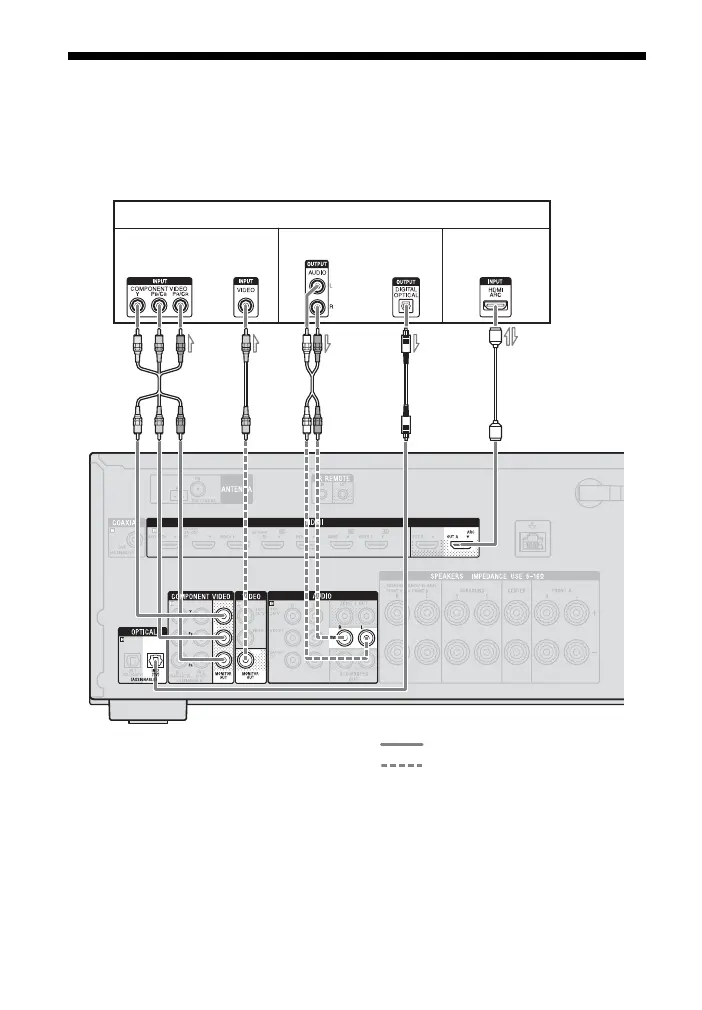
3: Connecting the TV
You can watch the selected input image when you connect the HDMI OUT or MONITOR
OUT jack to a TV. You can operate this receiver using a GUI (Graphical User Interface).
GUI is only for HDMI OUT A and HDMI OUT B.
Before connecting cords, be sure to disconnect the AC power cord (mains lead).
A Component video cord (not supplied)
B Video cord (not supplied)
C Audio cord (not supplied)
D Optical digital cord (not supplied)
E HDMI cable (not supplied)
Sony recommends that you use an
HDMI-authorized cable or Sony HDMI
cable.
TV
A
Audio/Video
signals
Audio signalsVideo signals
BC** D** E*
oror
Recommended connection
Alternative connection


 To Next Page
 Loading...












