85
US
“BRAVIA” Sync Features
Controlling the MHL
device
By connecting MHL device with a MHL
cable (not supplied), operation is simplified
as follows:
• One-Touch Play (page 85)
• Remote Easy Control (page 85)
• This function allows communication with Sony
“BRAVIA” Sync-compatible TV using an
HDMI cable (not supplied).
• This function may not work depending on the
connected MHL device.
• This function can only work when
– The receiver is turned on.
– The “Control for HDMI” is set to “On”.
– The MHL device is connected via a MHL
cable (not supplied) to the HDMI/MHL
(VIDEO 2 IN) jack (page 32).
The receiver switches to the appropriate
input when you connect, playback, etc.
from your MHL device.
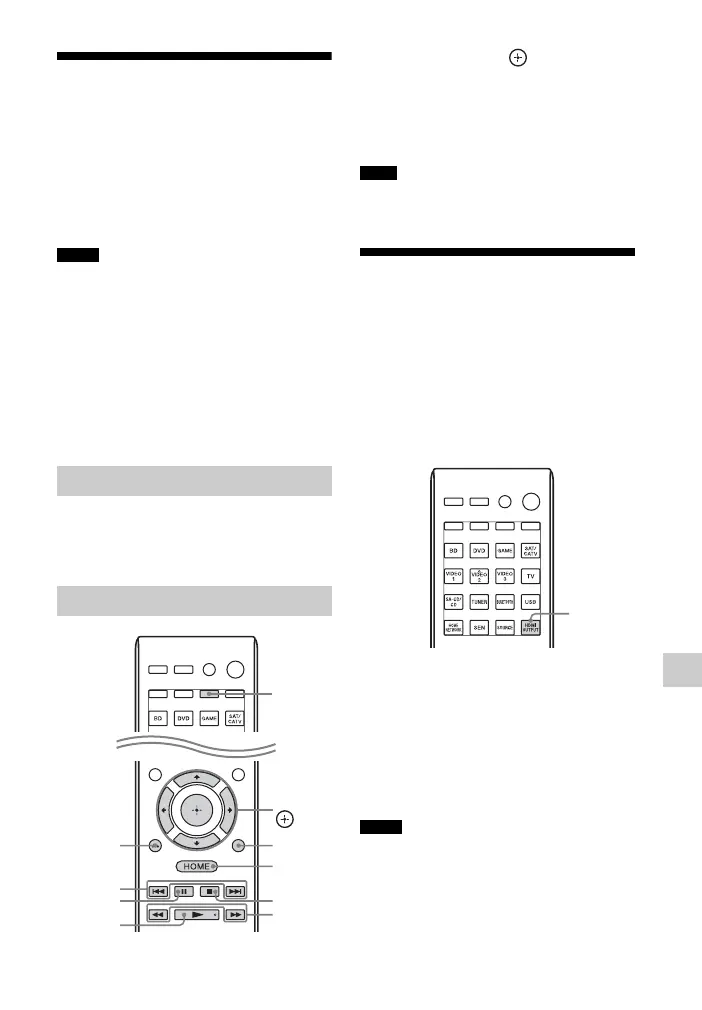
You can use V/v/B/b, , RETURN O,
OPTIONS, HOME*, N, X,
x, ./
>,
m/M buttons on the remote
control to control your MHL device.
* Hold down HOME to display the home menu of
the MHL device.
Be sure to press AMP before you use the buttons
to control your MHL device.
Switching the monitors
that output the HDMI
video signals
When you have two monitors connected to
the HDMI OUT A and HDMI OUT B
jacks, you can switch the output for these
two monitors using the HDMI OUTPUT
button on the remote control.
1 Turn on the receiver and the two
monitors.
2 Press HDMI OUTPUT.
Each time you press the button, the
output will be switched as follows:
HDMI A t HDMI B t HDMI
A+B t HDMI OFF t HDMI A…
• If the compatible video format differs between
the monitors connected to the HDMI OUT A
jack and the HDMI OUT B jack of the receiver,
“HDMI A + B” may not work.
• Depending on the playback equipment you
connect, “HDMI A + B” may not work.
Notes
One-Touch Play
Remote Easy Control
N
./>
m/M
x
X
HOME
V/v/B/b,
OPTIONS
RETURN
O
AMP
Note
Notes
HDMI
OUTPUT



 To Next Page
 Loading...











