Removing the Reserve Battery
1. Follow the instructions in "Preparing to Work Inside the Computer."
2. Remove the keyboard.
3. Remove the hinge cover.
4. Remove the display assembly.
5. Remove the palm rest.
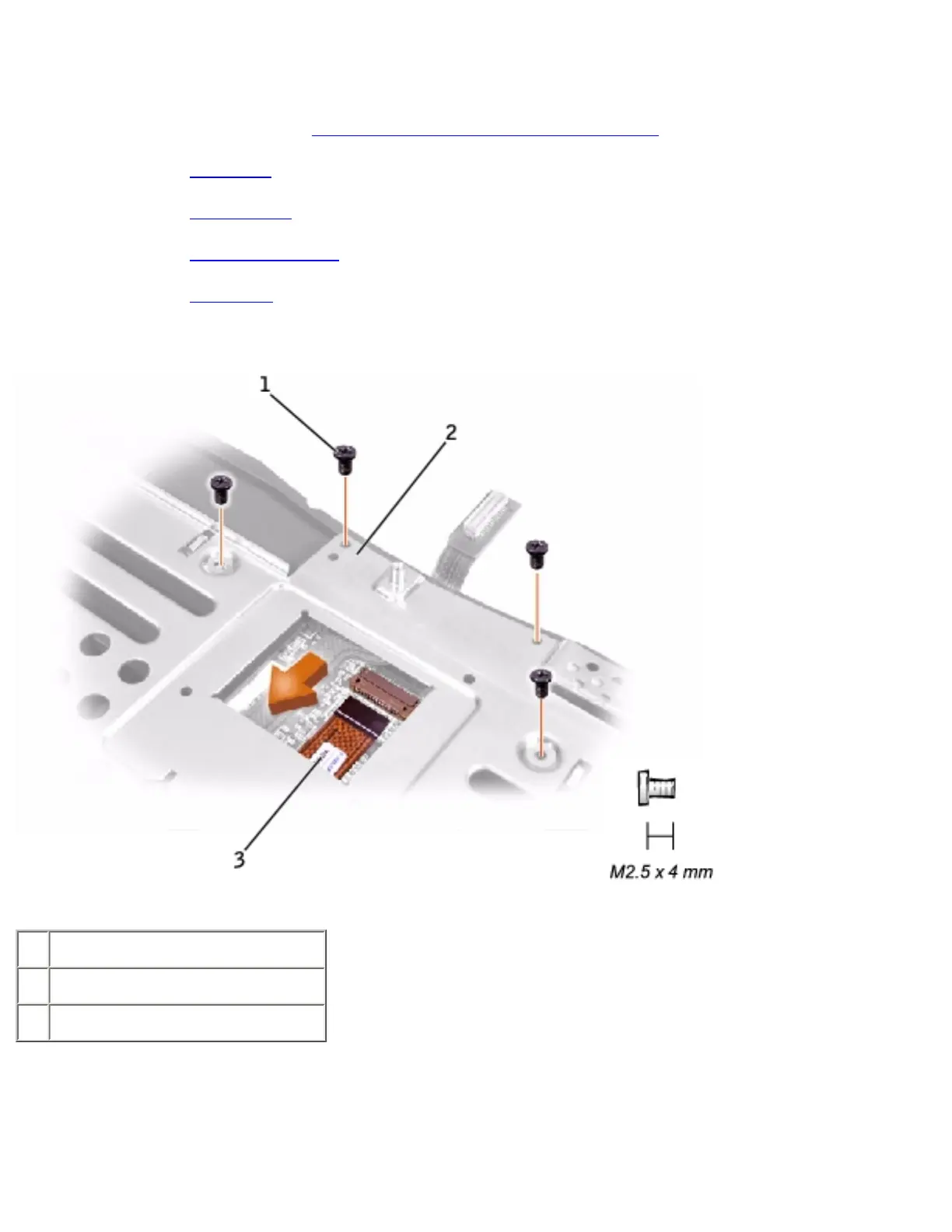
6. On the underside of the palm rest, disconnect the palm-rest flex cable from the ZIF connector.
1 M2.5 x 4-mm screws (4)
2 palm rest bracket
3 palm-rest flex cable
7. Remove the four M2.5 x 4-mm screws that secure the palm rest bracket.
8. While supporting the palm-rest flex cable, lift out the palm rest bracket and turn it over.
9. Disconnect the reserve battery cable.
file:///I|/SERVICE%20MANUALS/DELL%20MANUALS/LA.../Latitude/C840/C840_SERVICE_MANUAL/resbatt.htm (2 of 3)6/21/2004 1:36:20 AM


 To Next Page
 Loading...