Garmin © 2007 1 Honda Portable Navigation System
Quick sTarT
Quick Start
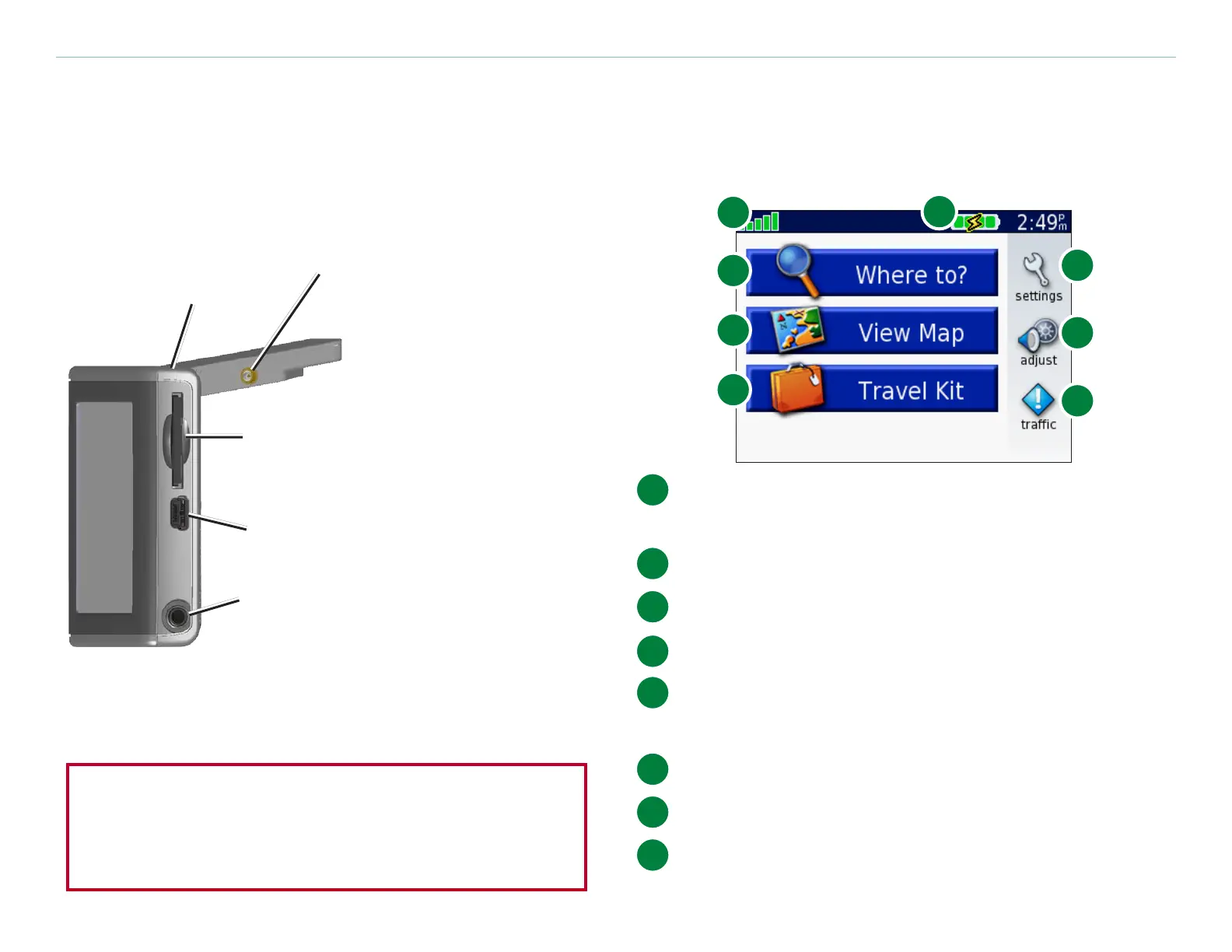
Your Honda Portable
Navigation System
Honda Portable Navigation System
with Antenna Raised (Open)
MCX connector
(for an optional
external
antenna)
Power
button
Mini-USB
port
SD card
slot
Headphone
plug
WARNING: See the Important Safety and Product
Information guide in the product box for product
warnings and other important information.
Menu Page
C
F
D
G
E
H
A
B
A
Satellite signal strength indicator. Touch to
view satellite signal information.
B
Battery indicator.
C
Touch to adjust the settings.
D
Touch to adjust the volume and brightness.
E
Touch to view trafc incidents, if an optional
FM trafc receiver is connected.
F
Touch to use the Travel Kit.
G
Touch to view the map.
H
Touch to nd a destination.



 To Next Page
 Loading...









