– 143 –
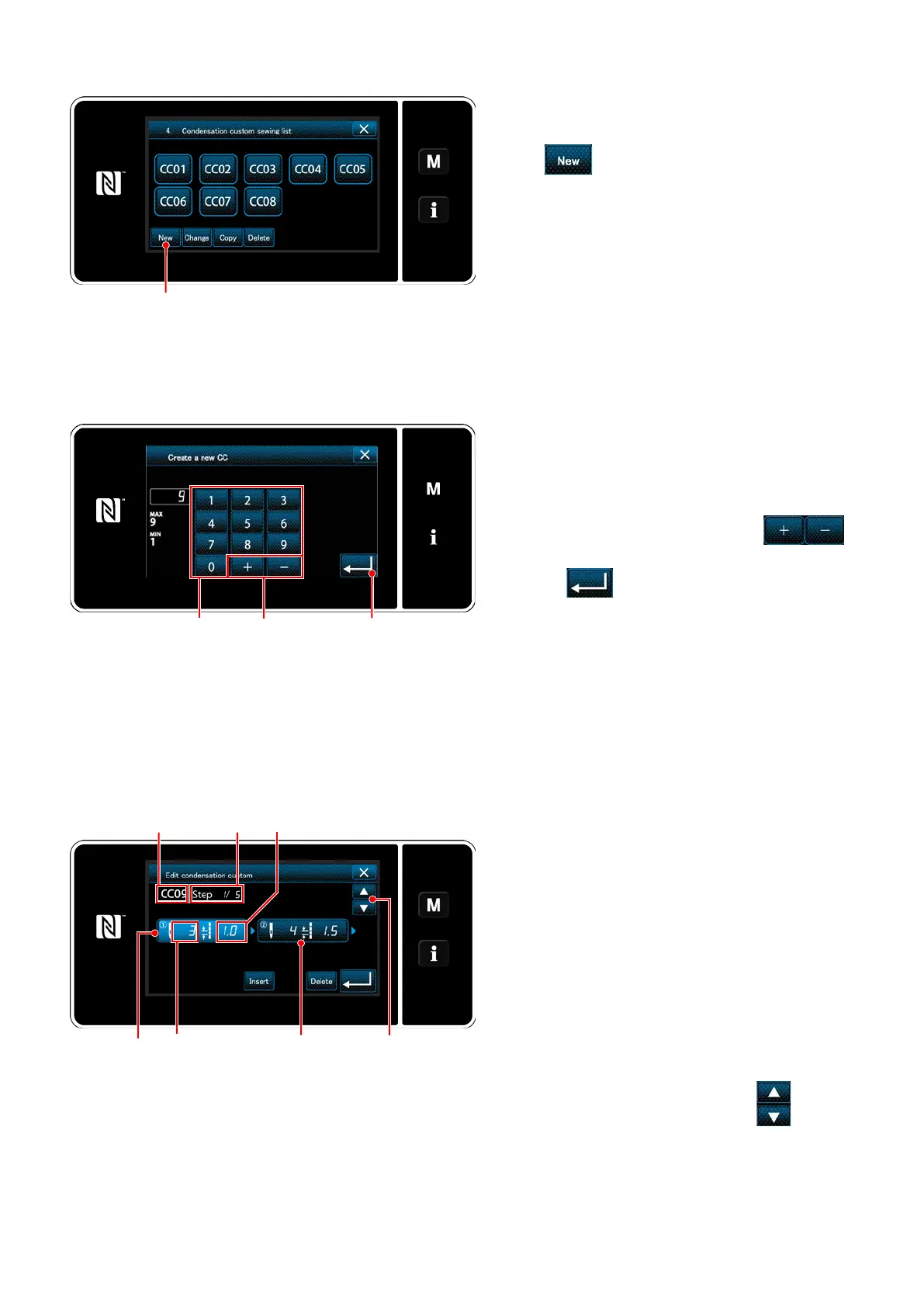
<New condensation custom pattern creation pattern
number input screen>
Inputting the condensation custom number
1) Enter the pattern number with numeric keypad
.
An unassigned registration number that is
closest to the entered value in the plus/minus
direction is displayed by pressing
.
2) Press
.
The "condensation custom edit screen" is
displayed.
In the case the entered number has already
been registered, the prompt message for
overwrite conrmation is displayed.
Selecting the new condensation custom creating function
Registered condensation custom patterns are
displayed on the screen.
Press
.
The "new condensation custom pattern creation
pattern number input screen" is displayed.
<Condensation custom pattern list screen>
<Condensation custom edit screen>
Creating a condensation custom
1) Press
to put the step you have pressed in
the selected state.
2) The selected condensation custom number
is displayed in
and the step number which
is being edited, and the total number of steps
are displayed in
.
3) The "number of stitches" and "stitch length"
for the step are displayed in
. Press
to
put the displayed data in the selected state.
Previous step number screen or the next step
number screen is displayed with
.
4) "Condensation custom data input screen"
is displayed by pressing
while the step is
being selected.
Number of stitches
Stitch length


 To Next Page
 Loading...