– 58 –
Selecting the type of reverse feed stitching at the beginning of sewing
In the case of maintenance personnel mode
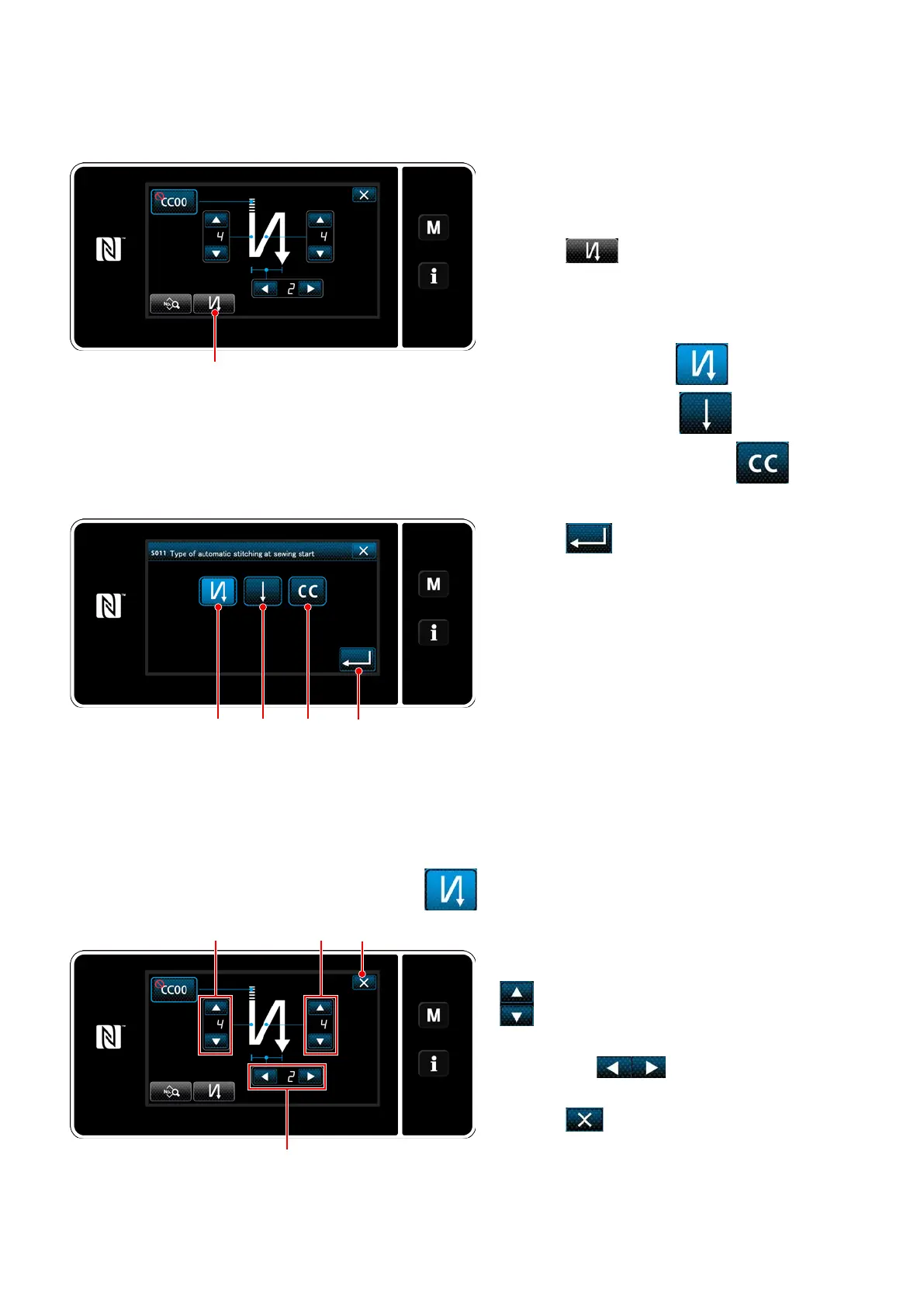
1) Display the sewing-start reverse-feed stitching
edit screen referring to the case of the opera-
tor mode.
2) Press
to display the reverse feed
stitching type input screen.
Select one of the reverse feed stitching pat-
terns to be used at the beginning of sewing:
・
Reverse feed stitch
・
Condensation stitch
・
Condensation custom stitch
<Sewing-start reverse-feed stitching screen
(maintenance personnel mode)>
3) Press
to conrm the aforementioned
operation and return the current screen to the
sewing-start reverse-feed stitching screen.
<Type of reverse-feed stitching input screen (maintenance
personnel mode)>
Setting the shape of reverse feed stitch at the beginning of sewing
In the case of selecting reverse feed stitch
Change the number of reverse feed stitches with
.
Change the number of repetitions of reverse feed
stitching with
.
The value you have entered is conrmed by
pressing
Then, the sewing screen is
displayed.


 To Next Page
 Loading...