28 First Steps
The battery can be charged using the supplied battery charger
or a charging AC adapter (a charging AC adapter is supplied with
the Z 7, and can be purchased separately for the Z 6).
The Battery Charger
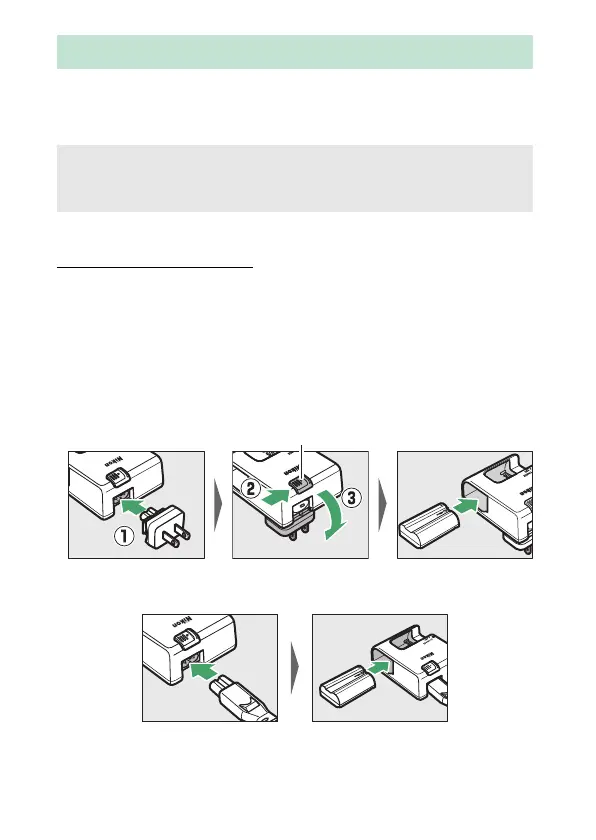
Insert the supplied EN-EL15b battery and plug the charger in.
Depending on the country or region, the charger comes with
either an AC wall adapter or a power cable.
• AC wall adapter: Insert the AC wall adapter into the charger AC
inlet (q). Slide the AC wall adapter latch as shown (w) and
rotate the adapter 90 ° to fix it in place (e). Insert the battery
and plug the charger in.
• Power cable: After connecting the power cable with the plug in
the orientation shown, insert the battery and plug the cable in.
Charge the Battery
D The Battery and Charger
Read and follow the warnings and cautions in “For Your Safety” (0 xvi)
and “Caring for the Camera and Battery: Cautions” (0 424).
AC wall adapter latch


 To Next Page
 Loading...











