79
Advanced Playback Operations
Searching for a photo – Photo search/
Photo scan (DCR-TRV19 only)
You can search for a still image you have recorded on a tape (PHOTO SEARCH).
You can also search for still images one after another and display each image for five
seconds automatically regardless of the cassette memory (PHOTO SCAN). Use the
Remote Commander for these operations.
Use this function to check or edit still images.
Searching for a photo by using cassette memory
Before operation
•You can use this function only when playing back a tape with cassette memory.
•Set CM SEARCH to ON in the menu settings. (The default setting is ON.)
The POWER switch should be set to .
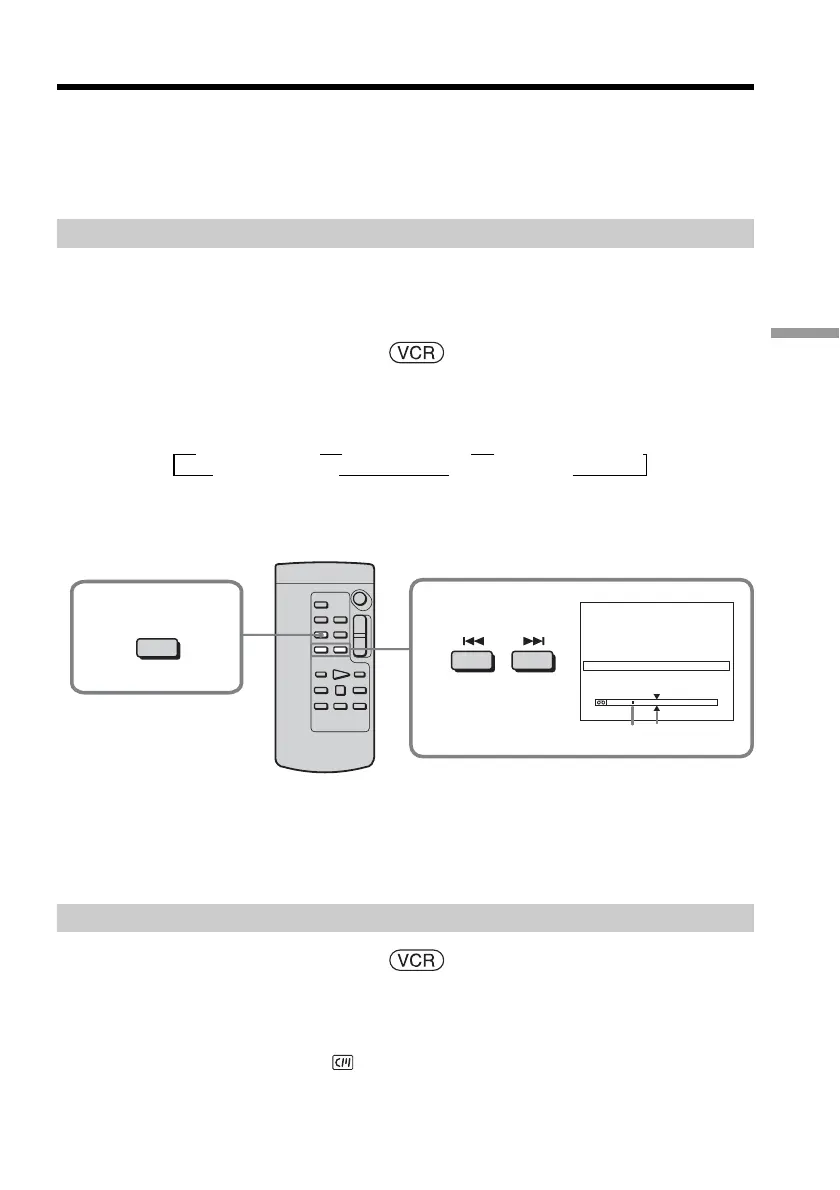
(1) Press SEARCH MODE on the Remote Commander repeatedly, until the
PHOTO SEARCH indicator appears.
The indicator changes as follows:
(2) Press . or > on the Remote Commander to select the date for playback.
Your camcorder automatically starts playback of the photo having the date
that you selected.
[a] Actual point you are trying to search for
[b] Present point on the tape
To stop searching
Press x on the Remote Commander.
Searching for a photo without using cassette memory
The POWER switch should be set to .
Operate by touching the panel.
(1) Press FN to display PAGE1.
(2) Press MENU to display the menu.
(3) Select CM SEARCH in
, then press EXEC (p. 181).
tTITLE SEARCH t DATE SEARCH t PHOTO SEARCH
(no indicator) T PHOTO SCAN T
1
SEARCH
MODE
2
PHOTO SEARCH
1 SEP / 5 / 03
2 SEP / 6 / 03
3 DEC / 24 / 03
4 JAN / 1 / 04
5 FEB / 11 / 04
6 APR / 29 / 04
5 : 30PM
8 : 50AM
10 : 30AM
10 : 26PM
4 : 11PM
1 : 45PM
[b][a]



 To Next Page
 Loading...