33
Recording/Playback
You can adjust and fix the white balance
according to the lighting conditions of
recording environment.
You can store white balance values in
memory A ( A) and memory B ( B),
respectively. Unless a white balance is
readjusted, values will remain even after the
power has been turned off.
When you select PRESET, [OUTDOOR],
[INDOOR] or [MANU WB TEMP] is
selected, according to which one you
previously set with [WB PRESET] in the
(CAMERA SET) menu.
z Tips
• You can assign [WB PRESET] to an ASSIGN
button (p. 48).
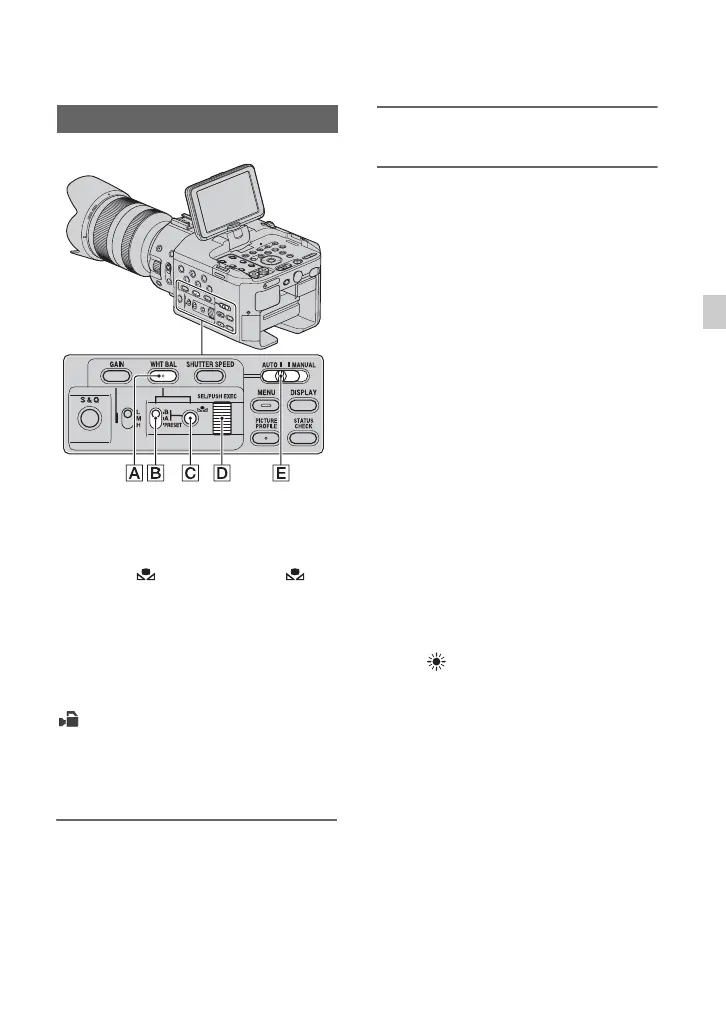
1 Set the AUTO/MANUAL switch E
to MANUAL.
2 Press the WHT BAL button A.
3 Set the white balance memory
switch B to any one of
PRESET/A/B.
Select A or B for recording with the
white balance setting stored in memory
A or B.
x To use the white balance you
adjusted in advance
1 Preset the white balance offset value as
described in “To save the adjusted
white balance value in memory A or B”
(p. 34).
2 Set the white balance memory switch
B to A or B.
z Tips
• This adjustment is recommended when you
use a commercially available ND filter.
x To use the preset white balance
offset value
Outdoor recording
1 Select [CAMERA SET] menu t
[
WB PRESET] t
[ (OUTDOOR)] (p. 71).
2 Set the white balance memory switch
B to
PRESET.
Indoor recording
1 Select [CAMERA SET] menu t
[
WB PRESET] t [n (INDOOR)].
2 Set the white balance memory switch
B to
PRESET.
x To set the color temperature
1 Select [CAMERA SET] menu t
[WB TEMP SET] t a desired color
temperature (p. 71).
2 Select [
CAMERA SET] menu t
[
WB PRESET] t [MANU WB
TEMP] (p. 71).
Adjusting the white balance
Continued ,


 To Next Page
 Loading...