85
Connecting with another device
Creating a high definition image quality (HD)
disc with a DVD writer
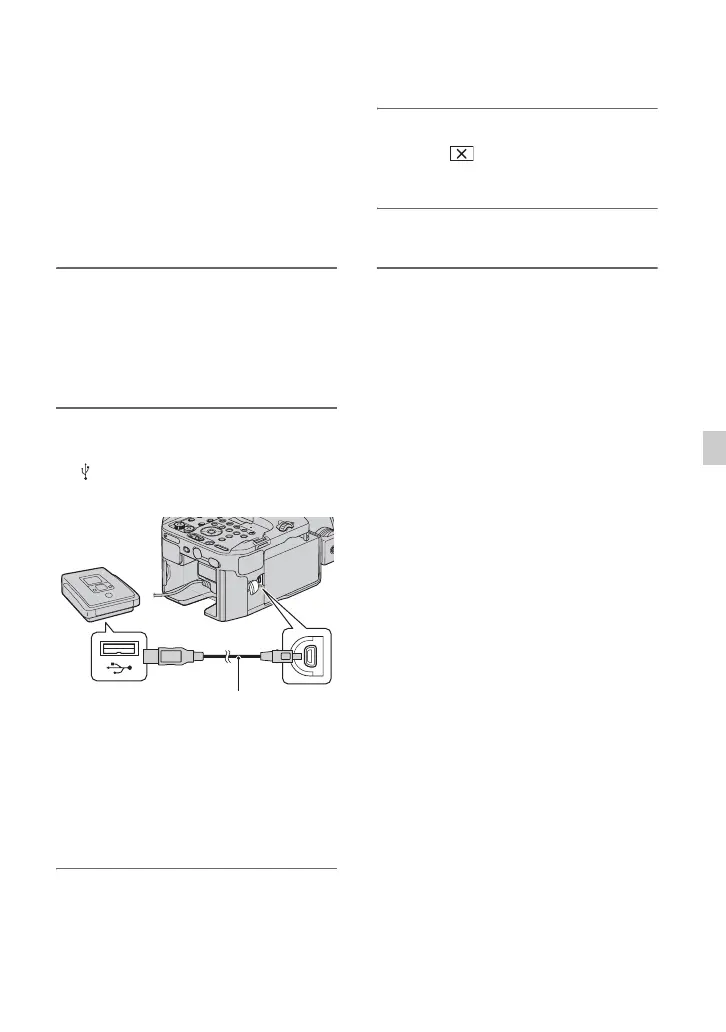
Use the USB cable to connect your
camcorder to a DVD writer. Refer also to
the instruction manuals supplied with the
device to be connected.
b Notes
• Sony DVD writer may not be available in some
countries/regions.
1 Connect the AC Adaptor/Charger
and the power cord (mains lead)
to the DC IN jack of your
camcorder and the wall outlet
(wall socket) (p. 17).
2 Turn on your camcorder, and
connect a DVD writer, etc. to the
(USB) jack of your camcorder
with the USB cable (supplied).
The [USB CONNECT] screen appears
on the camcorder screen.
• If the [USB CONNECT] screen does not
appear, press the MENU button, and select
[OTHERS] t [USB CONNECT].
3 Record movies on the connected
device.
For details, refer to the instruction
manuals supplied with the device to be
connected.
4 After the operation is completed,
touch t [YES] on the
camcorder screen.
5 Disconnect the USB cable.
USB cable
(supplied)



 To Next Page
 Loading...