35
Recording/Playback
4 When [Completed.] appears,
press the MENU button to
complete the adjustment.
If [Could not adjust.] appears
Try the adjustment again.
Audio setup
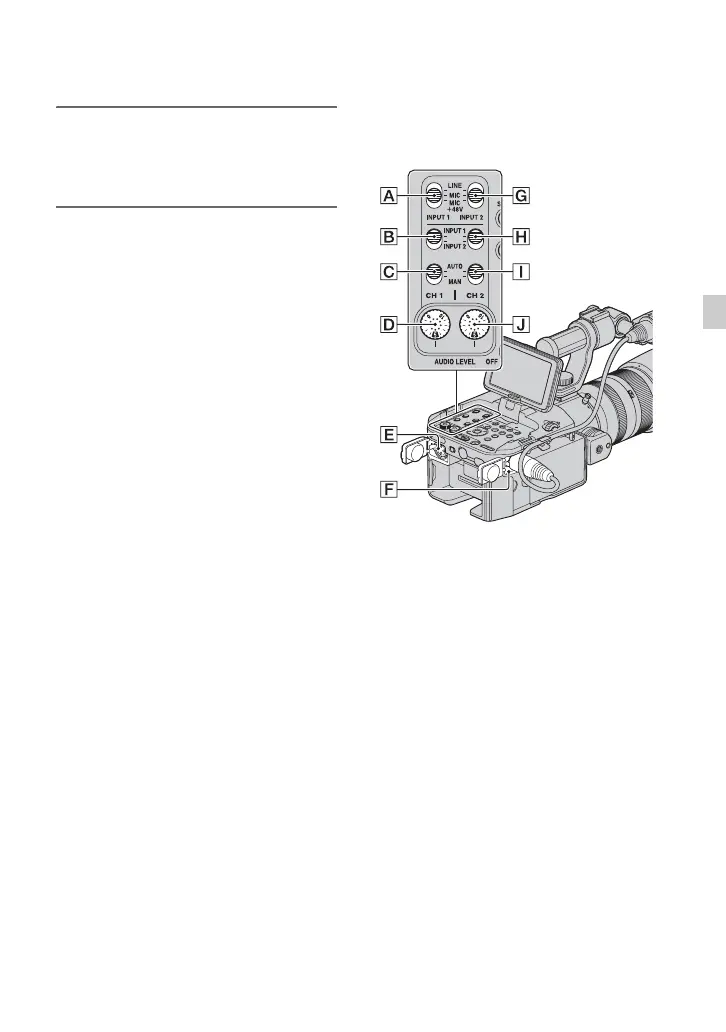
The following jacks and switches allow you
to set the sound to be recorded. See page 11
on connecting the microphones.
External audio jacks and switches
INPUT 1 jack F
INPUT 2 jack E
INPUT 1 switch A
INPUT 2 switch G
Audio source switches
CH1 (INPUT 1/INPUT 2) switch B
CH2 (INPUT 1/INPUT 2) switch H
Audio level controls
CH1 (AUTO/MAN) switch C
CH2 (AUTO/MAN) switch I
AUDIO LEVEL (CH1) dial D
AUDIO LEVEL (CH2) dial J
Continued ,


 To Next Page
 Loading...