103
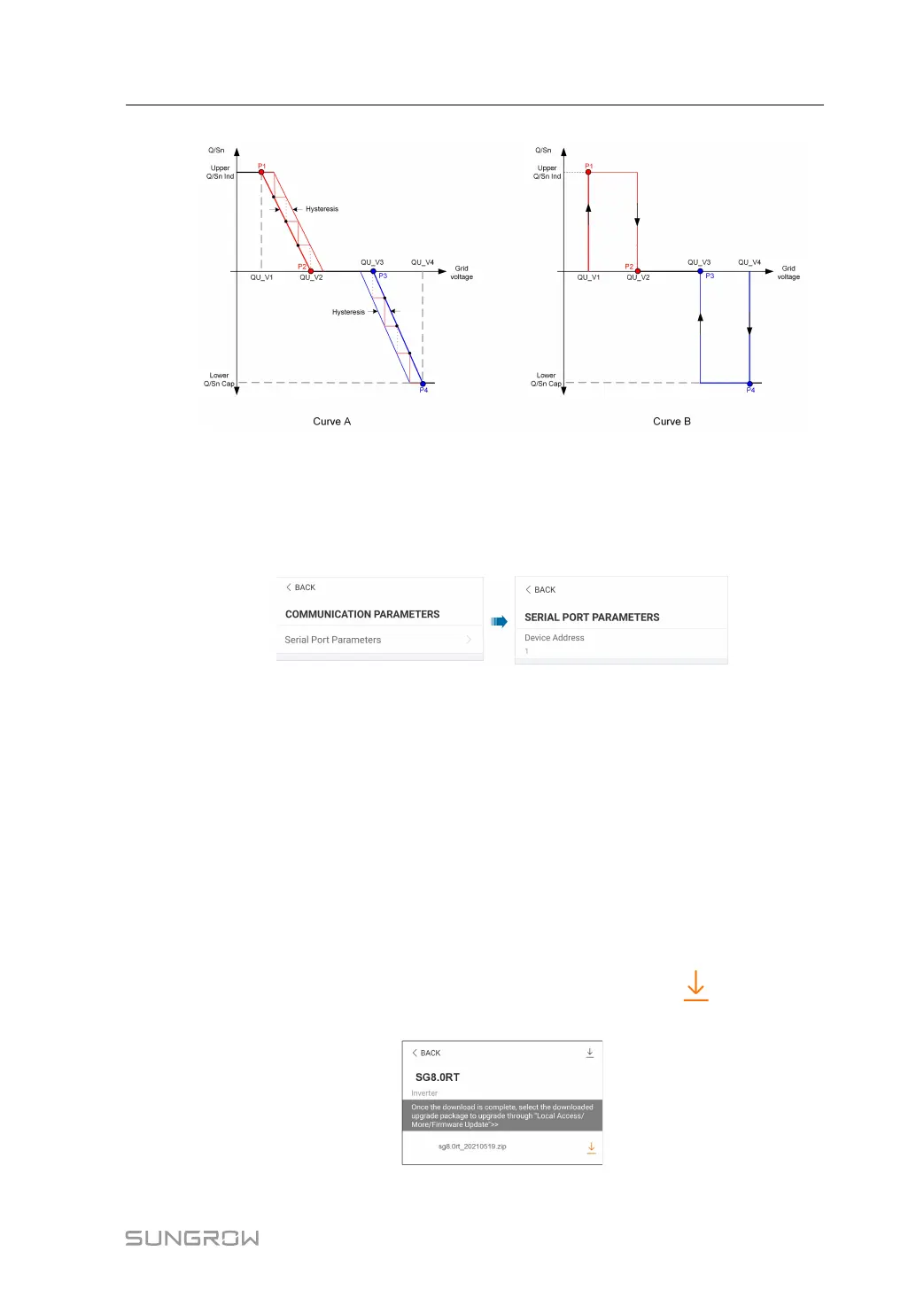
figure 7-21 Reactive Power Regulation Curve in Q(U) Curve
7.10.4 Communication Parameters
Tap Settings→Communication Parameters to enter the corresponding screen, as shown
in the following figure. The device address ranges from 1 to 246.
figure 7-22 Communication Parameters
7.10.5 Firmware Update
To avoid download failure due to poor on-site network signal, it is recommended to download
the firmware package to the mobile device in advance.
step 1 Enable the "Mobile data" of the mobile device.
step 2 Open the App, enter the account and password on the login screen. Tap Login to enter the
home screen.
step 3 Tap More→Firmware Download to enter corresponding screen on which you can view the
device list.
step 4 Select the device model before downloading the firmware. Tap the device name in the de-
vice list to enter the firmware upgrade package detail interface, and tap
behind the firm-
ware upgrade package to download it.
User Manual 7 iSolarCloud App


 To Next Page
 Loading...