4 Rear 102 mm (4 in.)
5 Top 254 mm (10 in.)
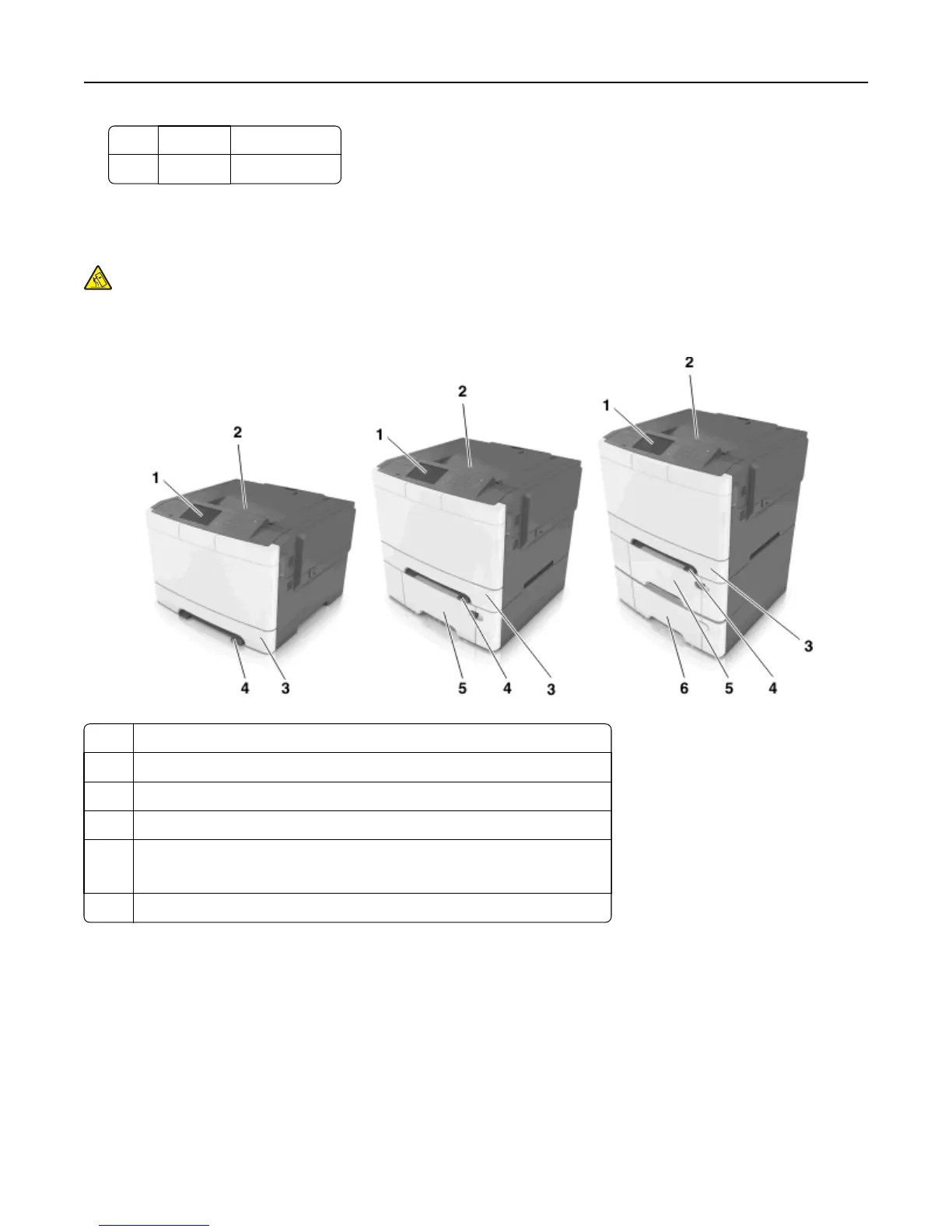
Printer configurations
CAUTION—TIPPING HAZARD: Floor-mounted configurations require additional furniture for stability. You must
use either a printer stand or printer base if you are using multiple input options. If you purchased a printer with
a similar configuration, then you may need additional furniture. For more information, contact the place where
you purchased the printer.
1 Printer control panel
2 Standard bin
3 250-sheet tray (Tray 1)
4 Manual feeder
5 Optional 650-sheet duo tray with integrated multipurpose feeder (Tray 2)
Note: This tray is standard on the CS410dtn and CS510dte models.
6 Optional 550-sheet tray (Tray 3)
Using the Embedded Web Server
Note: This feature is available only in network printers or printers connected to print servers.
If the printer is installed on a network, then you can use the Embedded Web Server to do the following:
• View the virtual display of the printer control panel.
• Check the status of the printer supplies.
• Configure supply notifications.
• Configure printer settings.
Learning about the printer 9


 To Next Page
 Loading...