40
menu
(
“
set”
)
mode
The Menu system allows certain aspects of your radio’s
conguration to be customized for your personal operat-
ing convenience. We do not recommend that any of the
default settings be changed, however, until you are thor-
oughly familiar with the operation of the
FTA-230
.
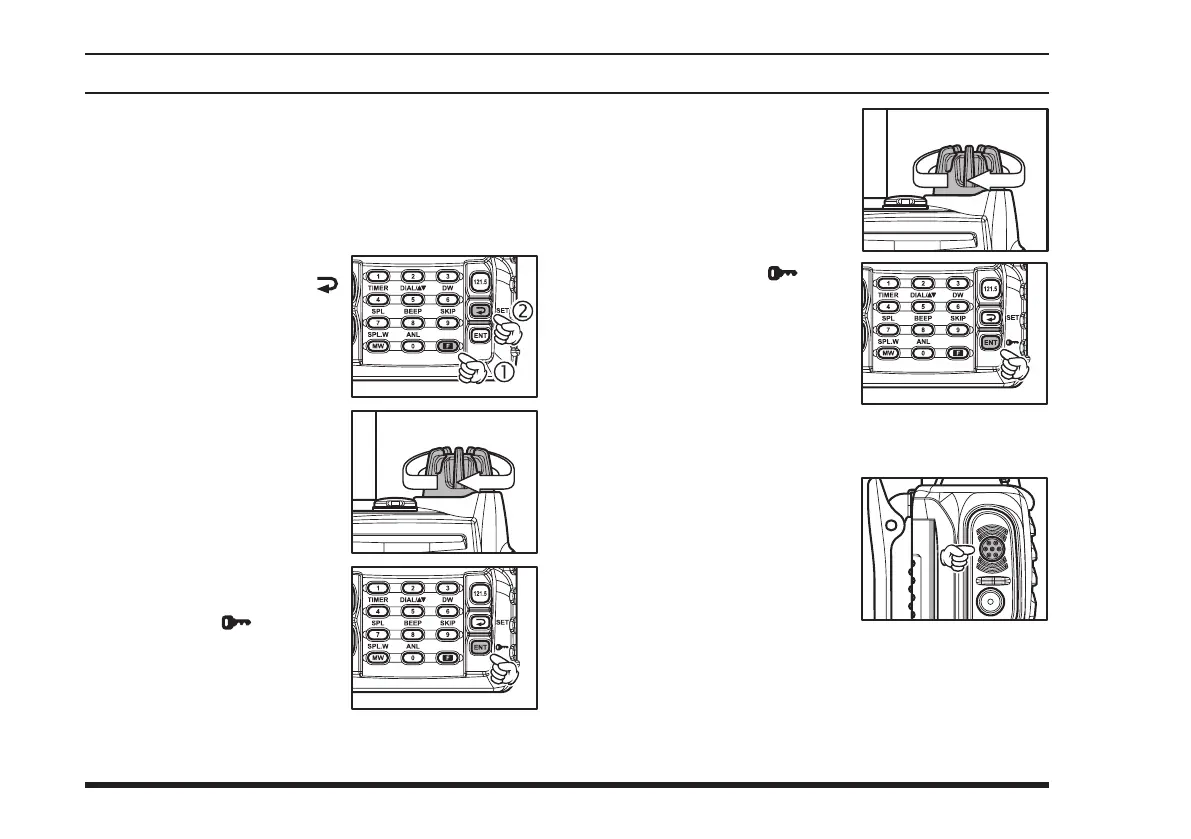
1. Press the
[
F
]
key momen-
tarily, then press the
[
(
SET
)]
key to activate the
Menu (“SET”) mode.
2. Rotate the
DIAL
selector
knob to select the Menu
Item (feature) you wish to
view and/or modify.
3. Once you have selected the
desired Menu Item, press
th e
[
ENT
( )]
key t o
enable adjustment of this
Menu Item. The current
setting value will be blink-
ing.
4. Rotate the
DIAL
selector
knob to change the setting
of the item (“on” to “oFF,”
etc.).
5. Press the
[
ENT
( )]
key
to save your new setting.
6. If you need to change more than one Menu item,
repeat steps 2 - 5.
7. Press the
PTT
switch to
exit th e Menu ( “SET”)
mode.



 To Next Page
 Loading...