PSR-S910/S710 Owner’s Manual 19
Starting Up
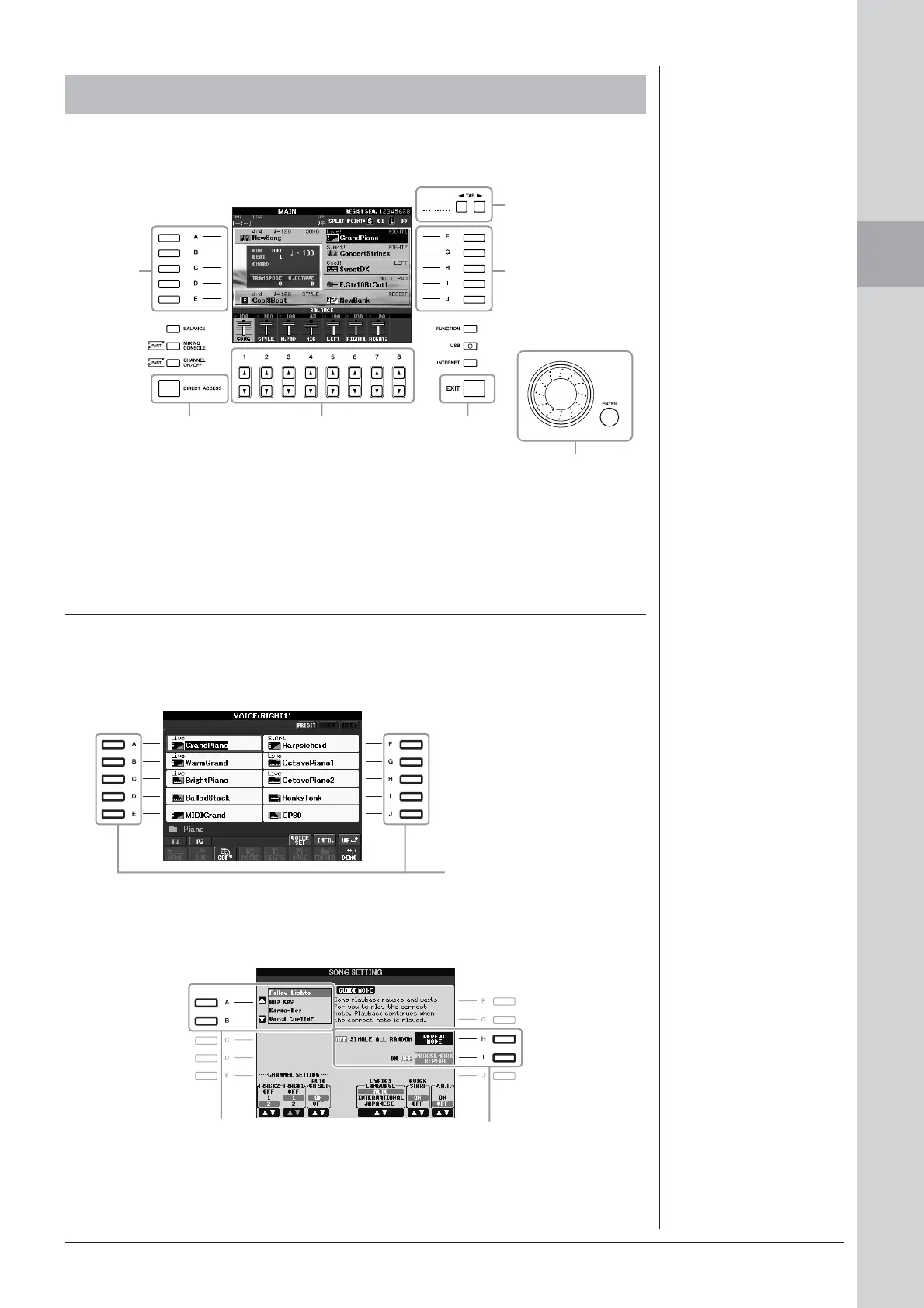
The LCD provides comprehensive at-a-glance information on all current settings.
The displayed menu can be selected or changed by the controls around the LCD.
The [A] – [J] buttons are used to select the corresponding menu.
• Example 1
• Example 2
Display-based Controls
[A] – [J] buttons
[A] – [E]
buttons
(see below)
[F] – [J]
buttons
(see below)
TAB [E][F]
buttons
(page 20)
[DIRECT
ACCESS]
button
(page 22)
[DATA ENTRY] dial
and
[ENTER] button
(page 21)
[1 ▲▼] – [8 ▲▼] buttons
(page 20)
[EXIT]
button
(page 22)
In the File Selection display
(page 25), the [A] – [J] buttons
can be used to select the corre-
sponding respective files.
The [A] and [B] buttons are used
to move the cursor up or down.
The [H] and [I] buttons are used to
select the corresponding parameter.


 To Next Page
 Loading...