30
E
Mastering
the Basics
Playing Back a Tape
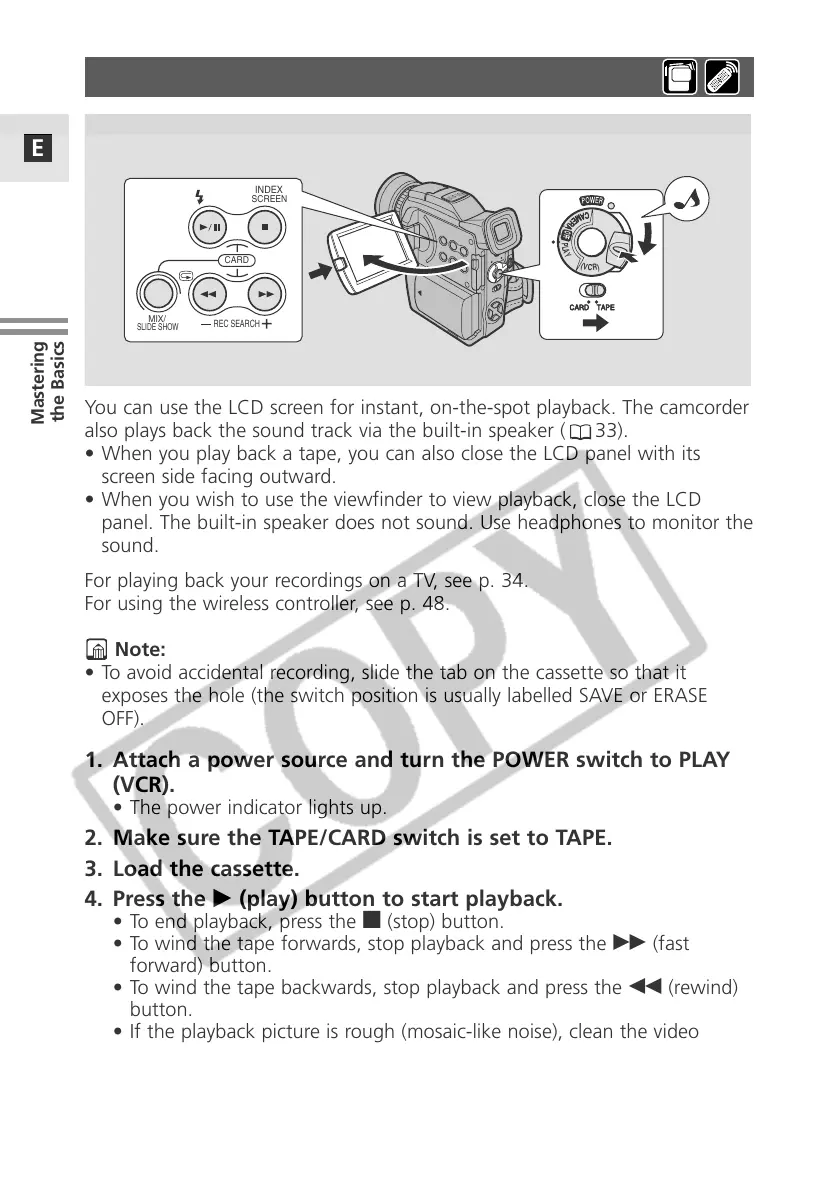
You can use the LCD screen for instant, on-the-spot playback. The camcorder
also plays back the sound track via the built-in speaker ( 33).
• When you play back a tape, you can also close the LCD panel with its
screen side facing outward.
• When you wish to use the viewfinder to view playback, close the LCD
panel. The built-in speaker does not sound. Use headphones to monitor the
sound.
For playing back your recordings on a TV, see p. 34.
For using the wireless controller, see p. 48.
Note:
• To avoid accidental recording, slide the tab on the cassette so that it
exposes the hole (the switch position is usually labelled SAVE or ERASE
OFF).
1. Attach a power source and turn the POWER switch to PLAY
(VCR).
• The power indicator lights up.
2. Make sure the TAPE/CARD switch is set to TAPE.
3. Load the cassette.
4. Press the e (play) button to start playback.
• To end playback, press the 3 (stop) button.
• To wind the tape forwards, stop playback and press the
1 (fast
forward) button.
• To wind the tape backwards, stop playback and press the
` (rewind)
button.
• If the playback picture is rough (mosaic-like noise), clean the video
heads using a Canon DVM-CL Digital Video Head Cleaning Cassette or
a commercially available digital video head cleaning cassette.
(
V
C
R
)
P
L
A
Y
C
A
M
E
R
A
O
F
F
CARD TAPE
INDEX
REC SEARCH
SCREEN
MIX/
CARD
SLIDE SHOW


 To Next Page
 Loading...