(
L
I
N
E
I
N
)
R
E
C
P
A
U
S
E
INDEX
REC SEARCH
SCREEN
MIX/
CARD
SLIDE SHOW
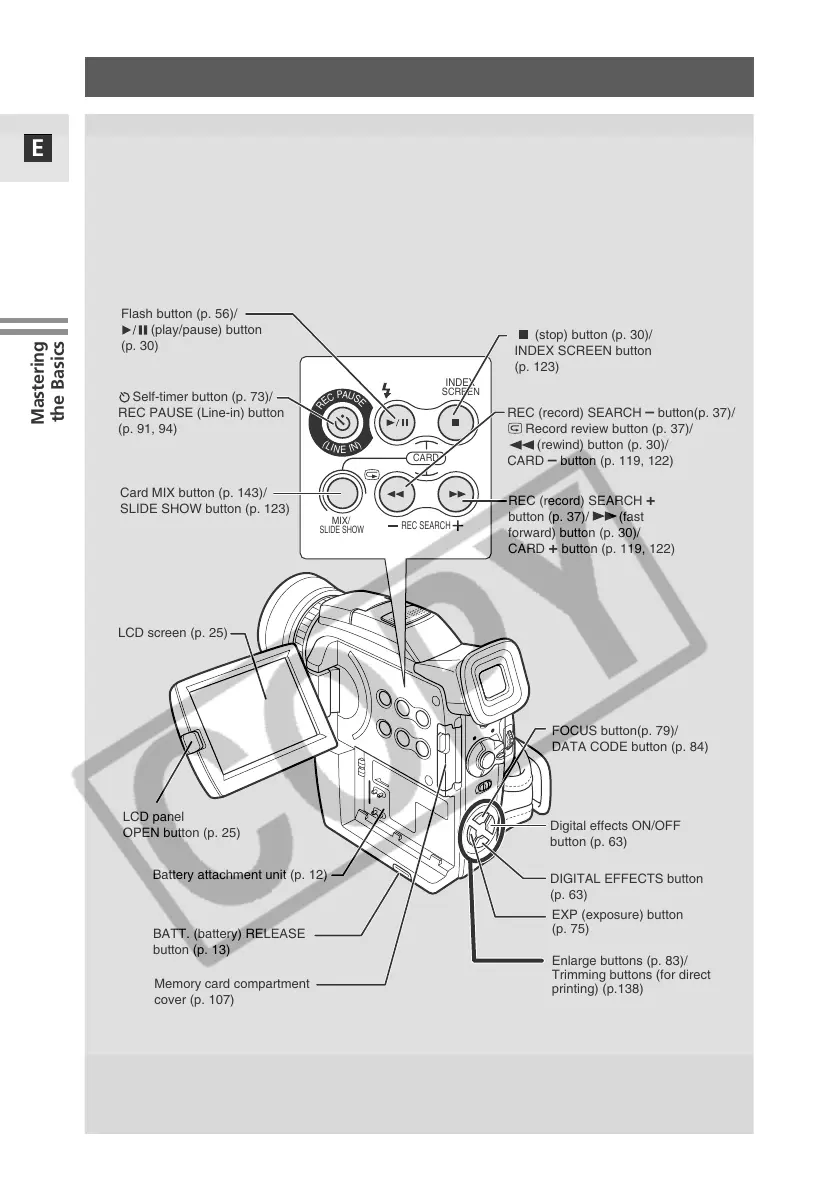
LCD screen (p. 25)
Flash button (p. 56)/
(play/pause) button
(p. 30)
(stop) button (p. 30)/
INDEX SCREEN button
(p. 123)
BATT. (battery) RELEASE
button (p. 13)
Memory card compartment
cover (p. 107)
Battery attachment unit (p. 12)
LCD panel
OPEN button (p. 25)
REC (record) SEARCH
+
button (p. 37)/ (fast
forward) button (p. 30)/
CARD
+ button (p. 119, 122)
REC (record) SEARCH –
button(p. 37)/
Record review button (p. 37)/
(rewind) button (p. 30)/
CARD
–
button (p. 119, 122)
DIGITAL EFFECTS button
(p. 63)
Digital effects ON/OFF
button (p. 63)
FOCUS button(p. 79)/
DATA CODE button (p. 84)
EXP (exposure) button
(p. 75)
Enlarge buttons (p. 83)/
Trimming buttons (for direct
printing) (p.138)
Card MIX button (p. 143)/
SLIDE SHOW button (p. 123)
Self-timer button (p. 73)/
REC PAUSE (Line-in) button
(p. 91, 94)


 To Next Page
 Loading...