5-11
Hardware Installation Guide for Cisco 4000 Series Integrated Services Routers
OL-32185-02
Chapter 5 Install and Upgrade Internal Modules and FRUs
Overview of the SSD Carrier Card NIM (NIM-SSD)
Locate Internal and External Slots for Modules on Cisco 4331 ISR
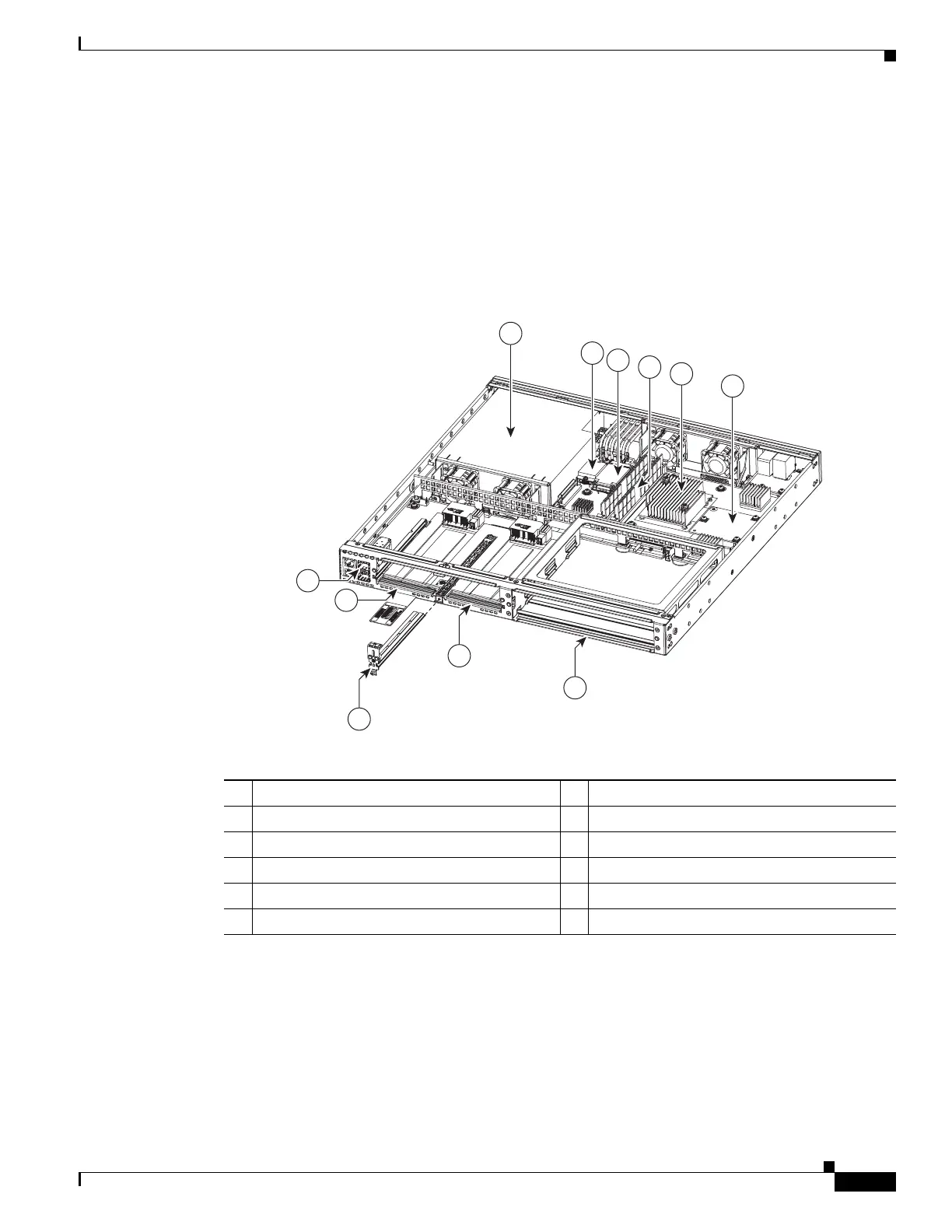
Figure 5-6 shows locations of internal modules on the Cisco 4331 ISR motherboard. Internal modules
include DIMMs, PVDM4, and PoE daughter card . Figure 5-28 shows the location of the available slots
that includes the Integrated Services Card (ISC) slot.
Figure 5-6 shows an internal view of Cisco 4331 ISR chassis indicating the location of internal modules.
Figure 5-6 Module Locations in Cisco 4331 ISR chassis
Overview of the SSD Carrier Card NIM (NIM-SSD)
This section describes the NIM-SSD and how to remove and replace NIM-SSDs. This section contains
the following sections:
• Overview
1 Power Supply 2 Flash memory card connector
3 SSD mSATA connector 4 DIMMs
5 CPU ISC /PVDM-4 slot 6 ISC /PVDM-4 slot
7 SM-X Slot
1
1. Gi0/0 may be configured to be either copper or fiber. Gi0/1 is copper/RJ45 and Gi0/2 is Fiber/SFP.
8 NIM Slot 2
9 NIM Removable Divider 10 NIM Slot 1
11
SFP/RJ45Ports
1
2
5
6
3
4
7
8
9
11
10
365445


 To Next Page
 Loading...