EasyManua.ls Logo

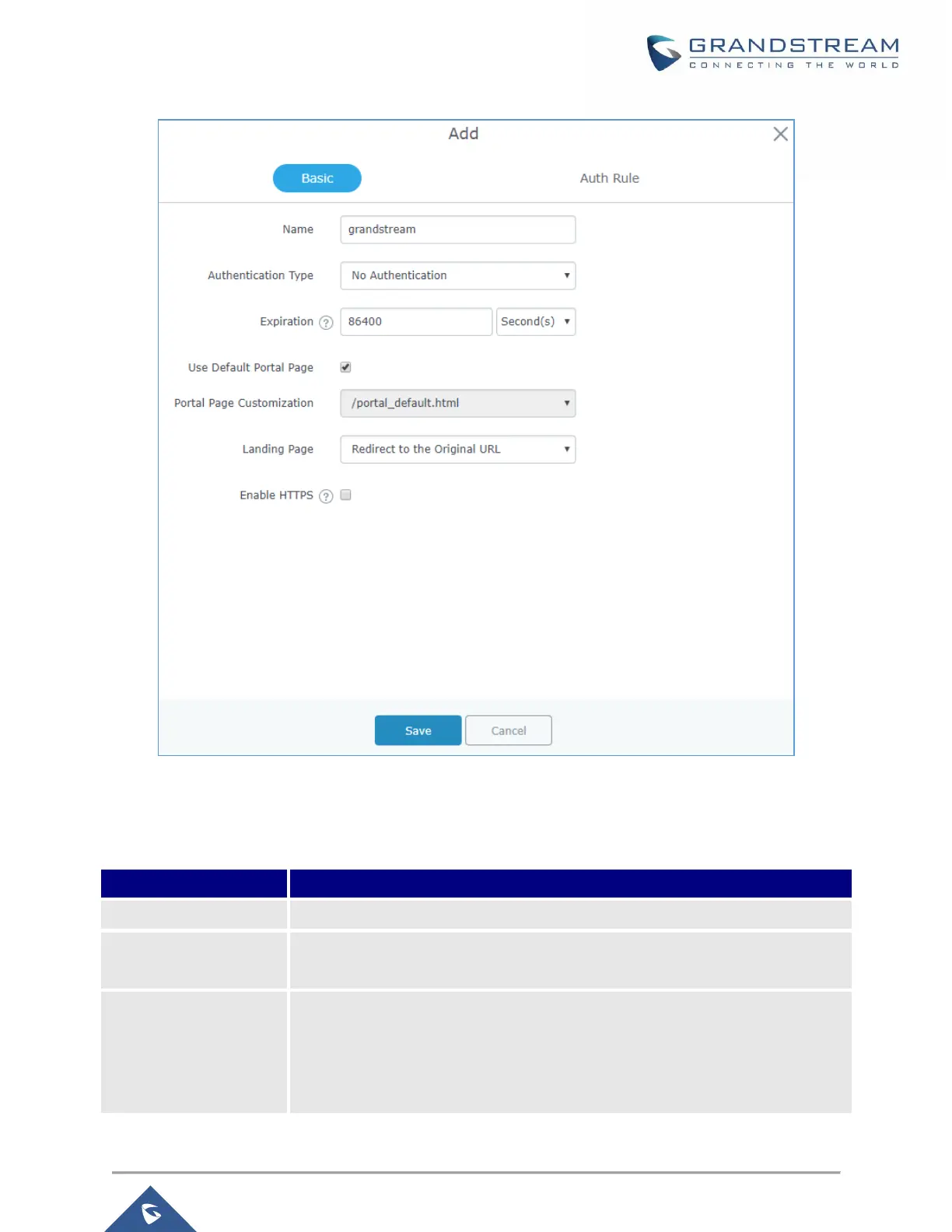
Grandstream Networks GWN7000 - Figure 72: Add a New Policy; Table 42: Policy Parameters

Grandstream Networks GWN7000
155 pages
Print Icon
To Next Page IconTo Next Page
To Previous Page IconTo Previous Page
Loading...
P a g e | 120
GWN7000 User Manual
Version 1.0.6.28
Figure 72: Add a New Policy
Below table lists the items policy add page configures.
Table 42: Policy Parameters
Field
Description
Name
Enter the name of the Captive Portal policy
Expiration
Configures the period of validity, after the valid period, the client will be re-
authenticated again.
Authentication Type
Three types of authentication are available:
No Authentication: when choosing this option, the landing page feature will
not provide any type of authentication, instead it will prompt users to accept
the license agreement to gain access to internet.

Table of Contents

Other manuals for Grandstream Networks GWN7000

Related product manuals