GWN7000 User Manual
Version 1.0.6.28
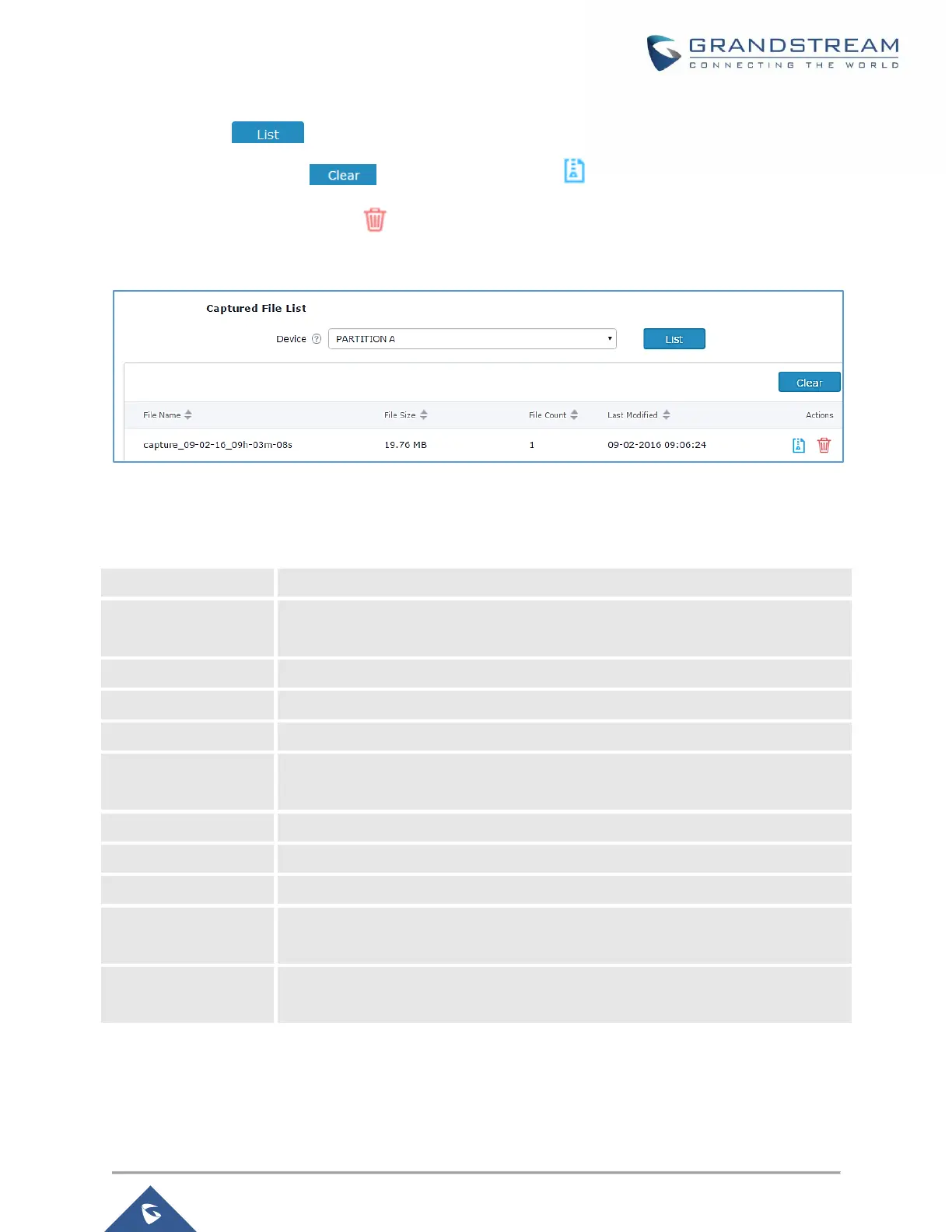
• Click on to show the captured files on a chosen device, and the capture files details
will appear, click on to delete all files, click on next to a capture file to download it
on a local folder, or click on to delete it.
Figure 87: Capture Files
The below table will show different fields used on capture page
Table 49: Debug-Capture
Enter the name of the capture file that will be generated.
Choose an Interface (WAN port1 or 2, or a network group) from where to begin the
capture.
Choose a device plugged to USB port to save the capture once started.
Set a File size that the capture will not exceed (Optional field).
Set a value for rotating captures (Optional Field).
Choose if you want to get all traffic or only outgoing or incoming to the choses
interface.
Set the Source Port to filter capture traffic coming from the defined source port.
Set the Destination Port to filter capture traffic coming from the defined port.
Set the Source IP to filter capture traffic coming from the defined source IP.
Set the Destination IP to filter capture traffic coming from the defined destination
IP.
Choose ALL or a specific protocol to capture (IP, ARP, RARP, TCP, UDP, ICMP,
IPv6)


 To Next Page
 Loading...