EasyManua.ls Logo

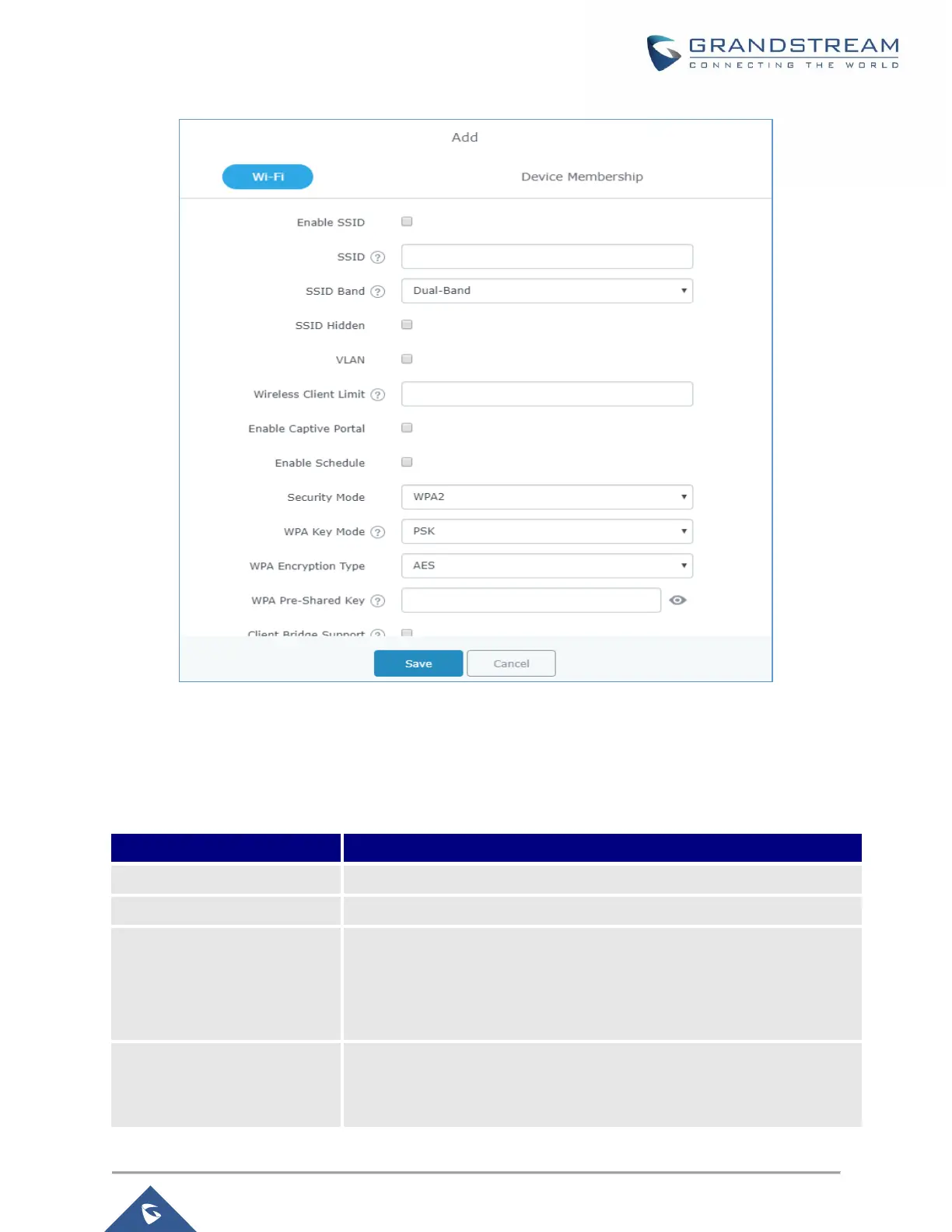
Grandstream Networks GWN7000 - Table 22: Wi-Fi; Figure 31: Add a New SSID

Grandstream Networks GWN7000
155 pages
Print Icon
To Next Page IconTo Next Page
To Previous Page IconTo Previous Page
Loading...
P a g e | 59
GWN7000 User Manual
Version 1.0.6.28
Figure 31: Add a new SSID
When editing or adding a new SSID, users will have two tabs to configure:
Wi-Fi: Please refer to the below table for Wi-Fi tab options
Table 22: Wi-Fi
Field
Description
Enable SSID
Check to enable Wi-Fi for the SSID.
SSID
Set or modify the SSID name.
SSID Band
Select the Wi-Fi band the GWN will use, three options are available:
Dual-Band
2.4GHz
5Ghz
SSID Hidden
Select to hide SSID. SSID will not be visible when scanning for Wi-Fi, to
connect a device to hidden SSID, users need to specify SSID name and
authentication password manually.

Table of Contents

Other manuals for Grandstream Networks GWN7000

Related product manuals