MSLXU
1-5 Dynamic Convergence adjustment
(Except ITC CPT type)
(1)
(2)
(3)
(4)
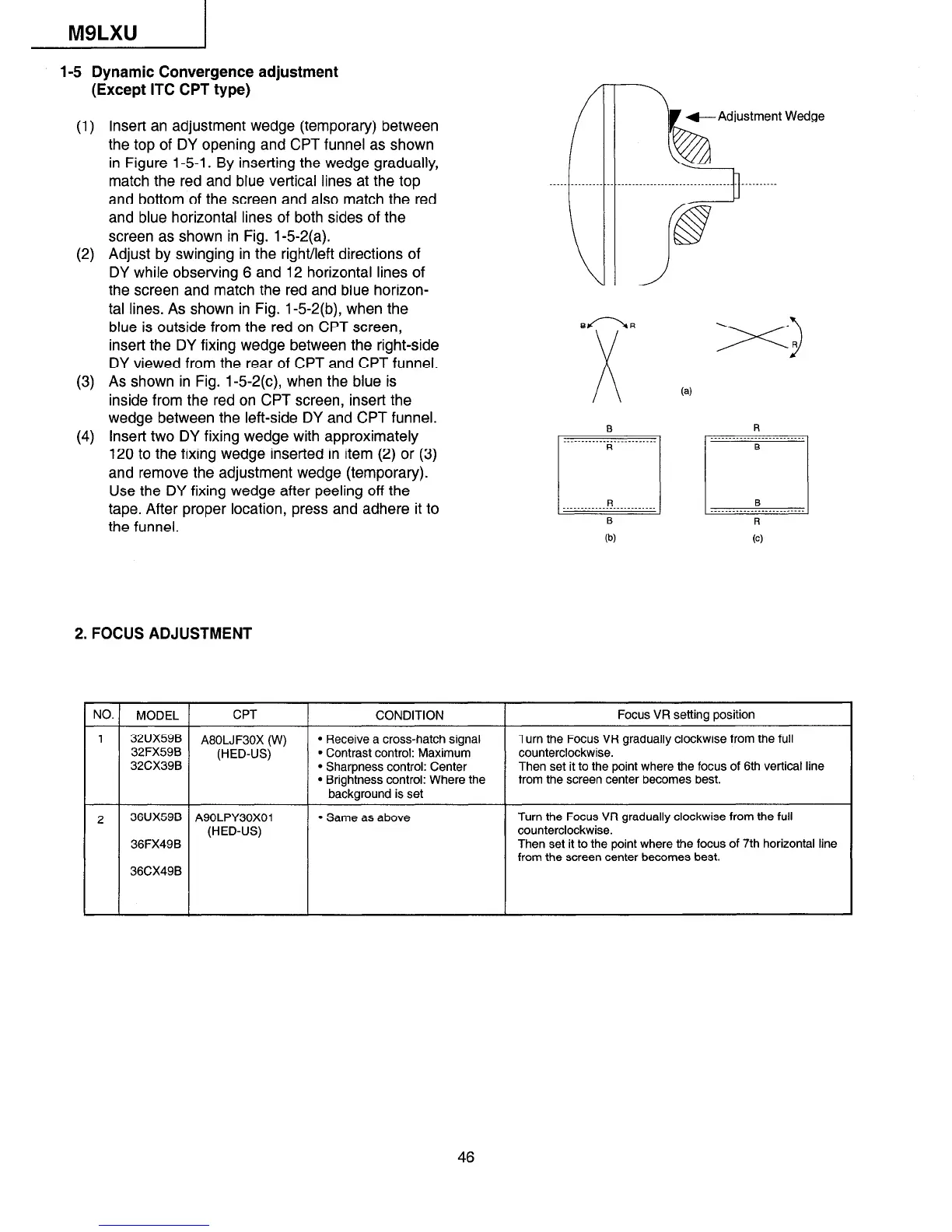
Insert an adjustment wedge (temporary) between
the top of DY opening and CPT funnel as shown
in Figure 1-5-l. By inserting the wedge gradually,
match the red and blue vertical lines at the top
and bottom of the screen and also match the red
and blue horizontal lines of both sides of the
screen as shown in Fig. 1-5-2(a).
Adjust by swinging in the right/left directions of
DY while observing 6 and 12 horizontal lines of
the screen and match the red and blue horizon-
tal lines. As shown in Fig. 1-5-2(b), when the
blue is outside from the red on CPT screen,
insert the DY fixing wedge between the right-side
DY viewed from the rear of CPT and CPT funnel.
As shown in Fig. 1-5-2(c), when the blue is
inside from the red on CPT screen, insert the
wedge between the left-side DY and CPT funnel.
insert two DY fixing wedge with approximately
120 to the fixing wedge inserted in item (2) or (3)
and remove the adjustment wedge (temporary).
Use the DY fixing wedge after peeling off the
tape. After proper location, press and adhere it to
the funnel.
2. FOCUS ADJUSTMENT
NO.
MODEL
CPT
CONDITION
Focus VR setting position
1
72;U;;; A80LJF30X (W)
l
Receive a cross-hatch signal Turn the Focus VR gradually clockwise from the full
(HED-US)
l
Contrast control: Maximum counterclockwise.
32CX39B
l
Sharpness control: Center
Then set it to the point where the focus of 6th vertical line
l
Brightness control: Where the from the screen center becomes best.
background is set
2
36UX59B A90LPY30XOl
l
Same as above
Turn the Focus VR gradually clockwise from the full
(HED-US)
counterclockwise.
36FX49B
Then set it to the point where the focus of 7th horizontal line
from the screen center becomes best.
36CX49B
46


 To Next Page
 Loading...