19
4
SELCALL/ALE OPERATION
4
The Selcall function allows you to make individual or
group calls. Each transceiver is assigned an individual
ID (identification) and can be called using this ID.
• Preparation for a Selective call
Send a Channel Test call on several Selcall channels,
and check the propagation on each one to select the
channel with the best signal quality. (p. 26)
• Sending a Selective call
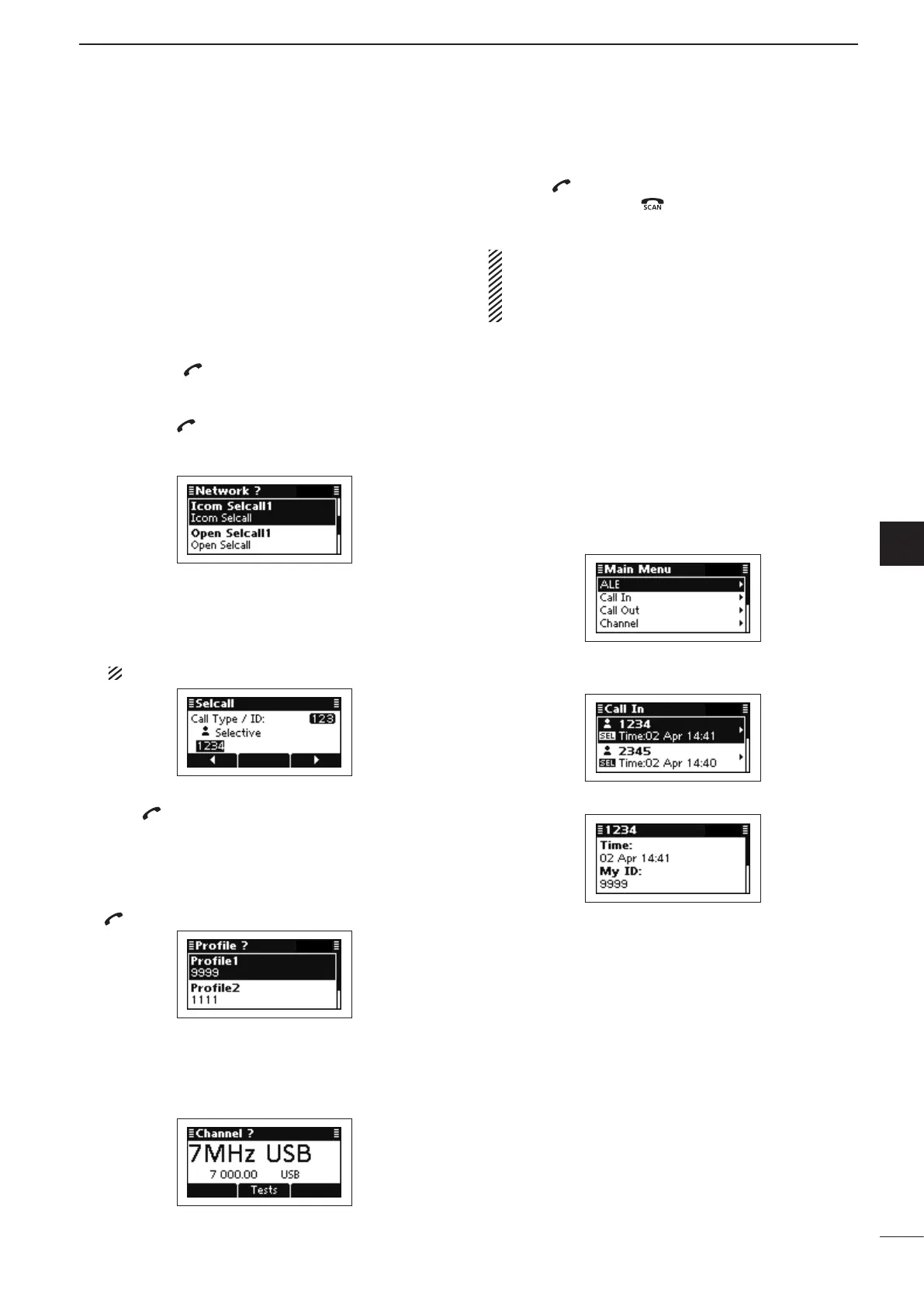
q Hold down [ ] for 1 second to enter the Network
selection screen.
w Push [r] or [s] to select the desired Network, and
then push [ ].
• The Networks that belong to the Icom Selcall or Open
Selcall systems must be selected.
e Push [r] or [s] to select the Call Type to “Selec-
tive.”
• “Selective,” “Phone,” “Message,” “Send Position,” “Get Posi-
tion,” “Get Status,” “Emergency,” “Channel Test” and “Stun”
are selectab
le.
The Stun call is selectable in the Open Selcall.
r Push the keypad keys to enter the Call ID, and then
push [ ].
• The previously entered Call ID is displayed.
• Push [t](§) or [u](§§§) to move the cursor.
• Push [8] to delete the digit to the left of the cursor.
• This Call ID is not saved in the Call ID list.
t Push [r] or [s] to select the Profile, then push
[ ].
y Push [r] or [s] to select the channel.
• Only the channels that belong to the Network selected in
step w, are displayed.
• If desired, push [Tests](§§) to transmit the Channel Test
call in this step.
u Push [ ] to transmit the Selective call.
• While calling, push [ ] or [PTT] to cancel the call.
• The call is saved in the Call Out memory.
You can also make a Selective call when the Ad-
dress screen is displayed. In this case, you can skip
several steps. See page 29 for the Simple Selcall
operation details.
• Receiving Selective calls
When your transceiver receives a Selective call with
your individual ID, it automatically responds by trans-
mitting. The received Selcall is saved in the Call In
memory.
q Push [8] to enter the Main Menu screen.
w Push [r] or [s] to select “Call In,” and then push
[4].
e Push [r] or [s] to select the desired Call, and then
push [4].
r Push [r] or [s] to select the information.
t Push [8] twice to return to the normal operating
screen.
D Selective call


 To Next Page
 Loading...