− 67 −
Start switch
FORWARD
BACK
or
③ CP-3 (continuous operation)
Performs the initial setting of the operation conditions, and moves to the continuous operation mode.
* When “CP-3” is selected, it is not possible to return to the other test modes. Turn OFF the power and
turn ON the power again in accordance with the starting way of the test mode.
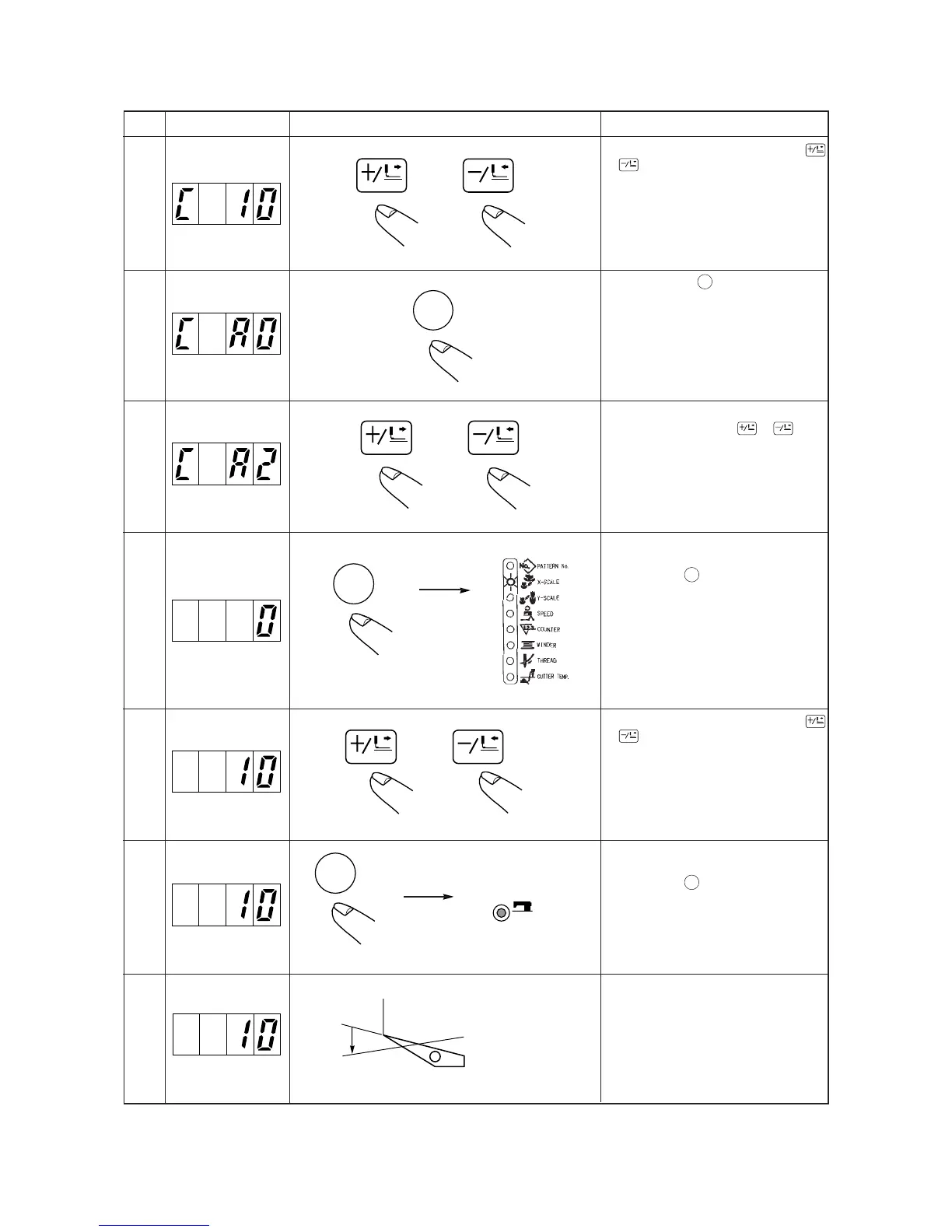
Step Indicating section Checking measure Explanation
1
2
3
4
5
6
7
A time of pause is set by pressing down
FORWARD
or
BACK
key
Setting range : 0 to 9,900 ms
(in a unit of 100 ms)
By pressing down
READY
key, the time of pause
is updated and the setting moves to the
automatic origin retrieual setting
Setting moves to automatic origin retrieval
setting by pressing down
FORWARD
or
BACK
key.
Setting range : A0 ... Ineffective
(initial setting)
A1 ... Every 100 times
A2 ... Every time
Automatic origin retrieval is updated and
setting moves to pattern No. setting by
pressing down
READY
key.
(When setting for the first time, “0” is
indicated. In other cases, pattern No. that
was previously set is indicated.)
Pattern No. will be set by pressing down
FORWARD
or
BACK
key.
Pattern No. is updated and the mode moves
to the continuous operation mode by
pressing down
READY
key.
Continuous operation can be stopped at the
time of pause by depressing the pedal
switch.
READY
SEWING
Sewing LED
Lights up
FORWARD
BACK
or
READY
READY
FORWARD
BACK
or


 To Next Page
 Loading...