Disassembly Instructions Repair Information
3 - 14 0070-10-0705 Passport V™ Service Manual
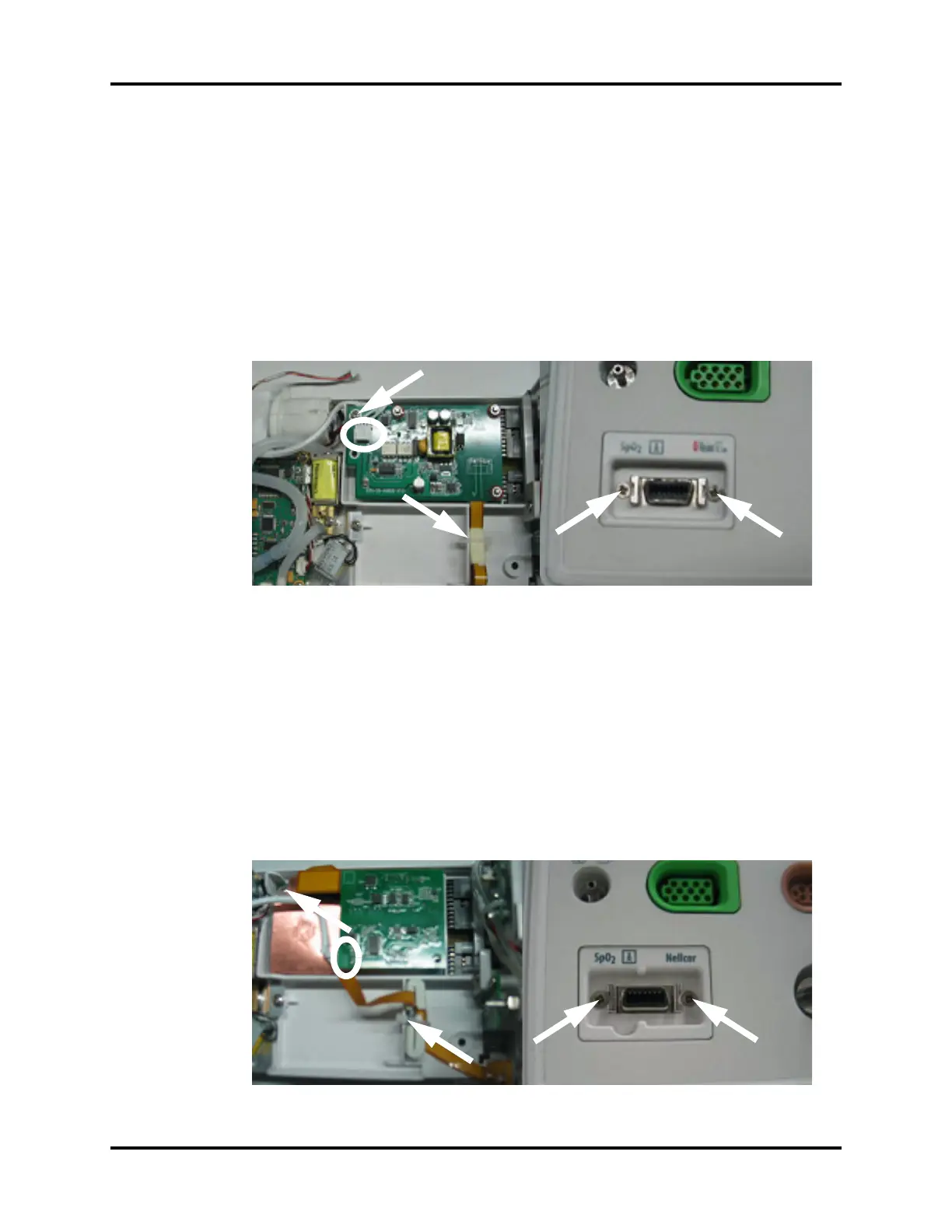
3.5.13 Removal of the Masimo SpO
2
Module
1. Remove the multi-parameter board assembly as stated in “Removal of the Multi-
parameter Board Assembly” on page 3-10.
2. Disconnect the SpO
2
communication cable from the multi-parameter board.
3. Cut the tie of flexible cable.
4. Unfasten the screw that secures the Masimo SpO
2
module to the multi-parameter board
installation frame.
5. Unfasten the two screws that secure the Masimo SpO
2
connector.
6. Remove the Masimo SpO
2
module.
FIGURE 3-22 Remove the Masimo SpO
2
module
3.5.14 Removal of the Nellcor SpO
2
Module
1. Remove the multi-parameter board assembly as stated in “Removal of the Multi-
parameter Board Assembly” on page 3-10.
2. Disconnect the SpO
2
communication cable from the multi-parameter board.
3. Cut the tie of flexible cable.
4. Unfasten the screw that secures the Nellcor SpO
2
module to the multi-parameter board
installation frame.
5. Unfasten the two screws that secure the Nellcor SpO
2
connector.
6. Remove the Nellcor SpO
2
module.
FIGURE 3-23 Remove the Nellcor SpO
2
module


 To Next Page
 Loading...