2.1.7 Releasing Network Direct Station Selection (NDSS) Monitor
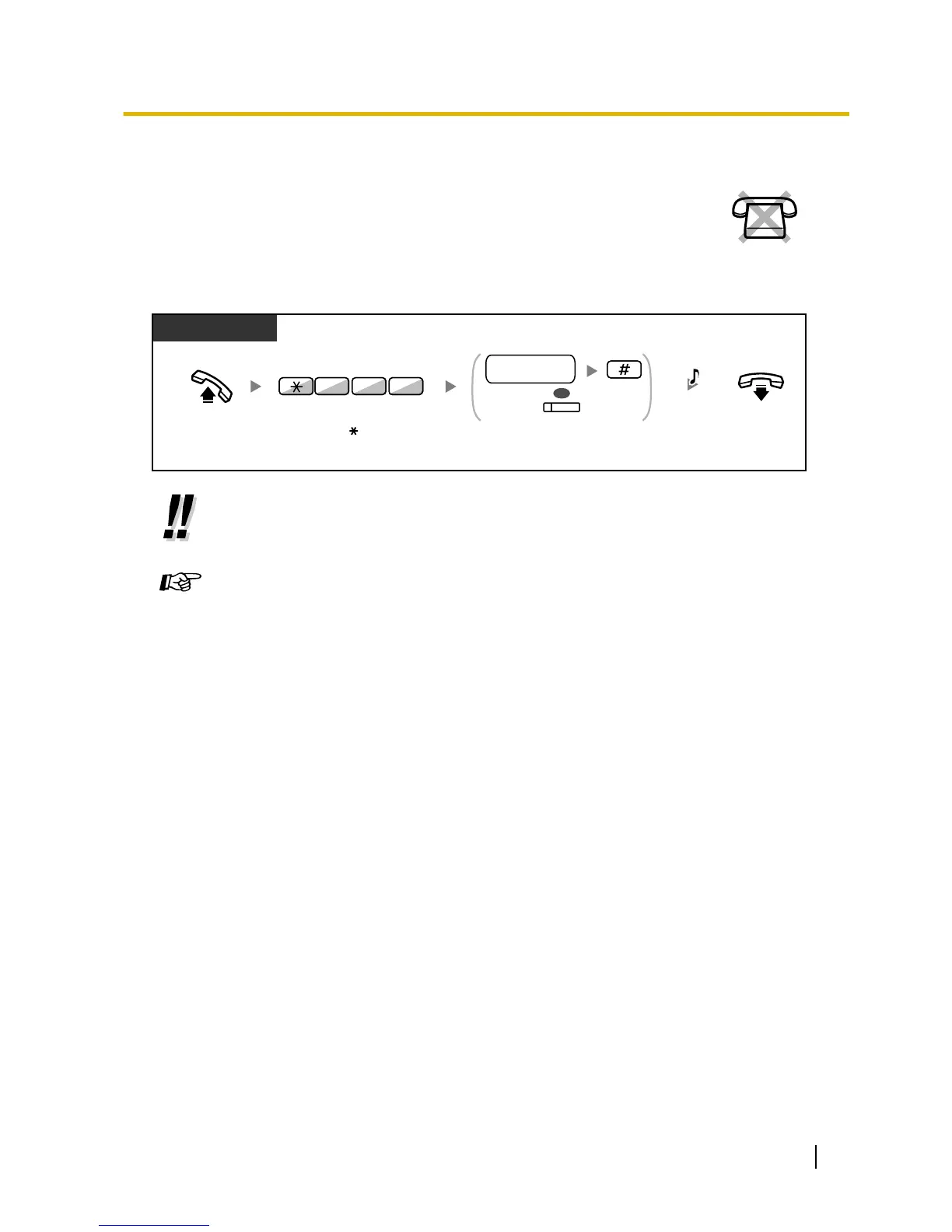
NDSS buttons can be customised on any extension connected to your PBX. An NDSS
button
allows an extension user to monitor another extension connected to another PBX
in a private network. The NDSS button light shows the current status of the monitored
extension in the same way as a DSS button. When it becomes unnecessary to monitor
an extension connected to another PBX, the manager can stop the PBX from monitoring
it. Any NDSS buttons set to monitor that extension will also stop monitoring.
PT and SLT
PT/PS
Off-hook.
(NDSS)
Dial another PBX extension
number and then enter #, or
press NDSS.
another PBX
extension no.
OR
C.Tone
On-hook.
Enter 784.
784
• To restart monitoring of an extension after performing this operation, go off
-hook, press the
corresponding NDSS button, and go on-hook.
Customising Your Phone
• 3.1.3 Customising the Buttons
Create or edit a Network Direct Station Selection
(NDSS) button.
User Manual 207
2.1.7 Releasing Network Direct Station Selection (NDSS) Monitor



 To Next Page
 Loading...