Service Modes, Error Codes, and Fault Finding
EN 23TPN16.3E LA 5.
2016-Oct-28
back to
div. table
How to Exit the Factory mode
Use one of the following methods:
• Select EXIT_FACTORY from the menu and press the “OK”
button.
Note: When the TV is switched “off” by a power interrupt, or
normal switch to “stand-by” while in the factory mode, the TV
will show up in “normal operation mode” as soon as the power
is supplied again. The error buffer will not be cleared.
5.1.4 Customer Service Mode (CSM)
Purpose
The Customer Service Mode shows error codes and
information on the TVs operation settings.The call centre can
instruct the customer (by telephone) to enter CSM in order to
identify the status of the set.This helps the call centre to
diagnose problems and failures in the TV set before making a
service call.
The CSM is a read-only mode; therefore, modifications are not
possible in this mode.
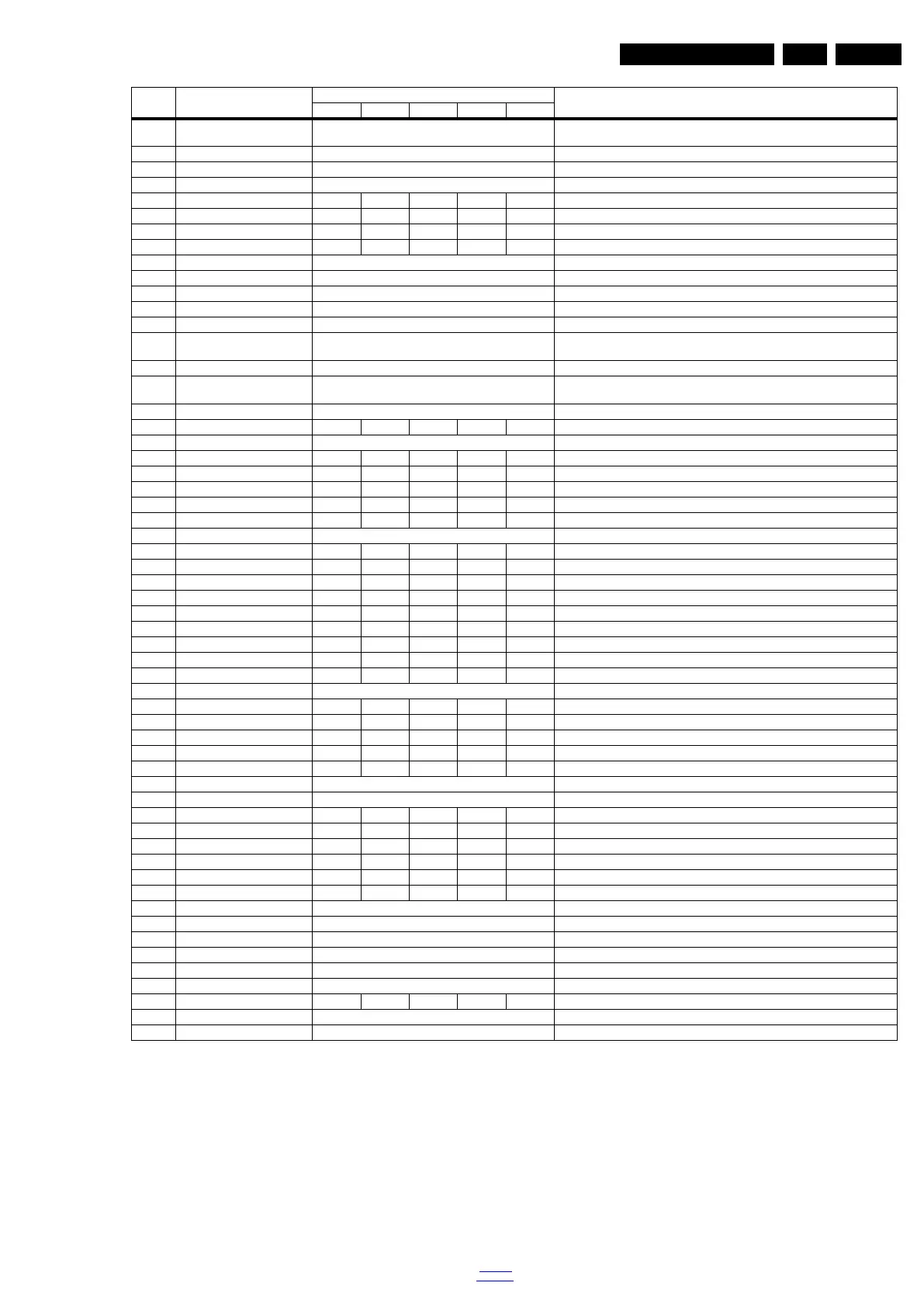
15 VIRGING_MODE off Use this to return the set to virgin mode. Depends whether the set has been used
already.
16 E_Fuse on E-fuse mode
17 ORT_MODE off ORT mode
18 AGEING MODE off Use this for aging a new LCD panel
19 AUD_LIMITE_MODE 1 1 1 1 1 Three modes,0: off, 1: adaptive mode, 2: fixed mode
20 AUD_THRESHOLD_BYTE1 100 100 100 100 100 Limit threshold
21 AUD_THRESHOLD_BYTE2 200 200 200 200 200 Limit threshold
22 AUD_THRESHOLD_BYTE3 100 100 100 100 100 Limit threshold
23 AUD_GAIN_LINEIN 0 Line-in audio gain
24 AUD_GAIN_HDMI 0 HDMI audio gain
25 AUD_GAIN_ATV 0 Analogue TV audio gain
26 AUD_GAIN_DTV 0 Digital TV audio gain
27 AUD_GAIN_USB 0 USB audio gain
28 TUNER_ID 0 Displays and changes the Tuner ID with the left and right cursor. Not to be changed
when the tuner is replaced with the correct service part.
29 CIPLUS QUERY Press OK Shows the Validity of the CI+ key and the supplier information
30 CIPLUS UPDATE Press OK Used to enter a new CI+ code into the NVM. This can only be used when no CI+
code exists in the NVM
31 CI Key Type Selection ProductKey CI Key Type Selection
32 AQ_TABLE_INDEX 6 7 2 4 10 Audio Quality index
33 EDID UPDATE Press OK Used to enter a new EDID codes into the NVM
34LVDS SSC Ratio 4%5%5%5%3%LVDS SSC ratio
35 LVDS SSC Freq 30KHz 30KHz 30KHz 30KHz 30KHz LVDS SSC frequency
36 DDR MU0 SSC Ratio 0.3% 0.3% 0.3% 0.3% 0.3% DDR MU0 SSC ratio
37 DDR MU0 SSC Freq 30KHz 30KHz 30KHz 30KHz 30KHz DDR MU0 SSC frequency
38 DDR MU1 SSC Ratio 0.2% 0.2% 0.2% 0.2% 0.2% DDR MU1 SSC ratio
39 DDR MU1 SSC Freq off SSC DDR MU1 SSC frequency
40 Panel H.Flip on on off off on Flip panel
41 Panel V.Flip on on off off on Flip panel
42 Panel ABSwap off off off off off ABSwap panel
43 Watchdog 5sec 5sec 5sec 5sec 5sec Watchdog
44 Backlight PWM freq.(Hz) 5sec 5sec 150 150 150 Backlight PWM frequency
45 Backlight PWM Limit 150 150 20 20 20 Backlight PWM Limit
46 VGA_TxRx_Mode 20 20 off off off VGA_TxRx_Mode
47 LVDS Driving off off 2 2 3 LVDS Driving
48 LVDS Format VESA 8bit Jeida 8bit VESA 8bit VESA 8bit Jeida 8bit LVDS Format
49 Ziggo Aging Press OK Ziggo Aging
50SPDIF OnOnOnOnOnEnable/Disable SPDIF source
51 Standard PWM Gain 100 100 100 100 100 Standard PWM Gain
52 ECO PWM Gain 100 100 100 100 100 ECO PWM Gain
53 VGA port on on Off Off Off Enable/Disable VGA port
54 Zero Detect Enable on on on On On Zero Detect Enable
55 Copy PQ table to TV Press OK Copy PQ table to TV
56 Copy AQ table to TV Press OK Copy AQ table to TV
57 Headphone on on on On On Enable/Disable Headphone source
58 EnhancedH/88 on on on on On EnhancedH/88
59 Joysticker Enable Off Off on On On Joysticker Enable
60 Satellite Tuner Slave Address Auto Auto Auto Auto 0xC6 TUNER Address
61 Ambilight Enable Off Off Off Off Off Ambilight Enable
62 Lounge Light Enable Off Off Off Off Off Lounge Light Enable
63 FRC F/W Upgrade Press OK FRC F/W Upgrade
64 912_SSC_LVDS_PERCENT 0 Percent of 912_SSC_LVDS
65 912_SSC_LVDS_FREQ 0 912_SSC_LVDS_FREQ
66 912_LVDS_DRIVING 0 912_LVDS_DRIVING
67 912_LVDS_FORMAT JEDIA 8bit The format for 912_LVDS
68 Blue Tooth Off Blue Tooth
69 Freeview-HD on Off Off Off Off Freeview-HD
70 Certification Bit Enable Off Certification Bit Enable
71 EXIF_FACTORY Press OK Exits the Factory mode
Item Item value
Default value
Description22" 24" 32" 43" 49"



 To Next Page
 Loading...