36 ESP-LX+ & LXi+ Installation, Programming, & Operation Guide
Run Test Program
The controllers built-in test program will run each station that
has a non-zero watering time assigned to it. When you run the
test program, the controller will operate each station in
numerical sequence, from lowest to highest. You can use this
program to check the operation of all the sprinklers in the
system.
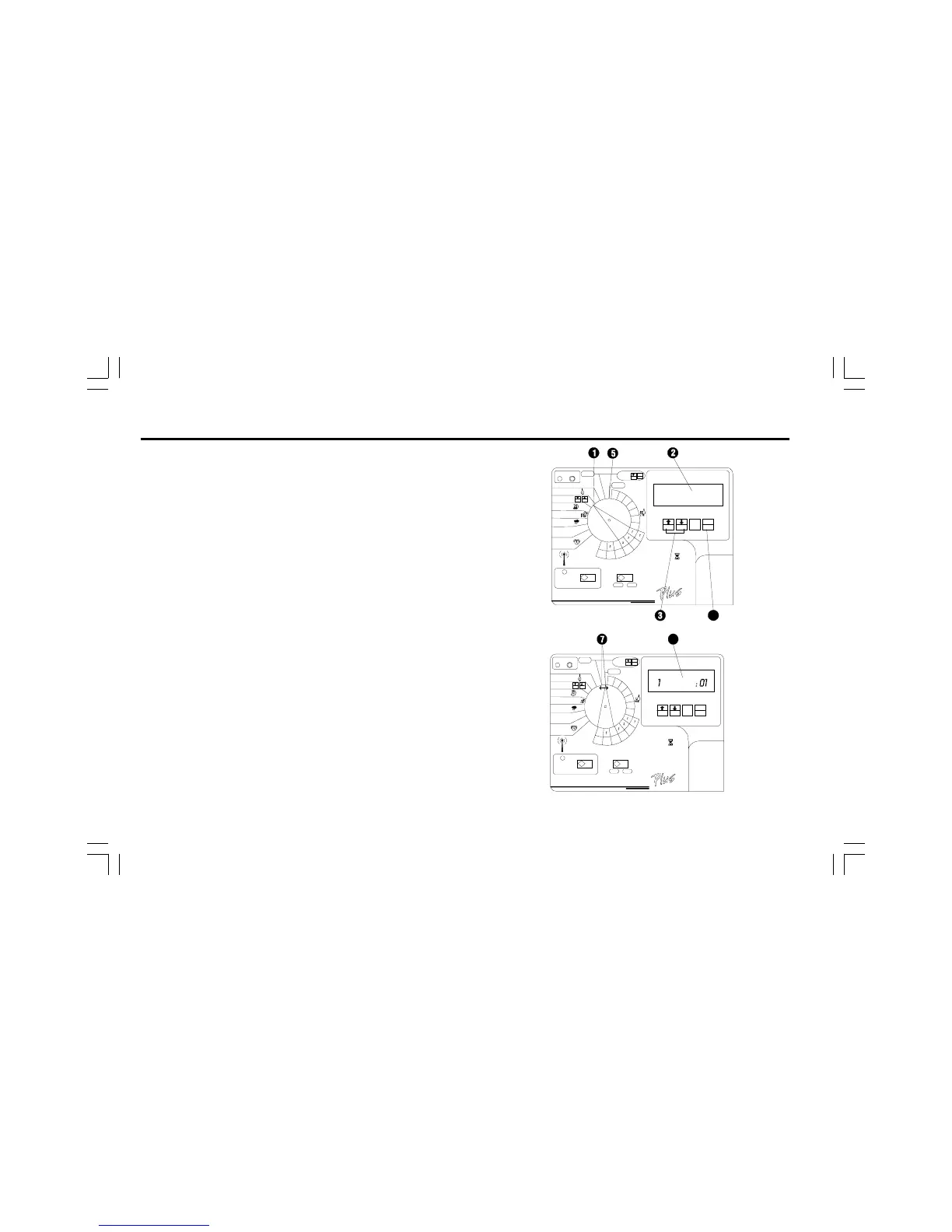
➊ Turn the dial to TEST/ Station Delay.
➋ The display shows TEST and the amount of time each
station will run. The default test run time is two minutes per
station.
➌ Press ñ or ò to increase or decrease the run times for
the TEST PROGRAM. The maximum test run time is 10
minutes.
➍ Press MAN. START/ADV. to start the test program.
➎ Turn the dial to AUTO.
➏ The display shows the number of the station that is
running, along with its remaining run time. The controller
runs each station in sequence, from lowest number to
highest. The test program skips any stations that have
zero watering times assigned to them. When the test
program is finished, the controller returns to automatic
operation.
➐ To cancel a test program after it has started, turn the dial
to OFF for three seconds. Then turn the dial back to
AUTO.


 To Next Page
 Loading...







